Gemini Omni 1.1 Flash Gives AI Video More Control
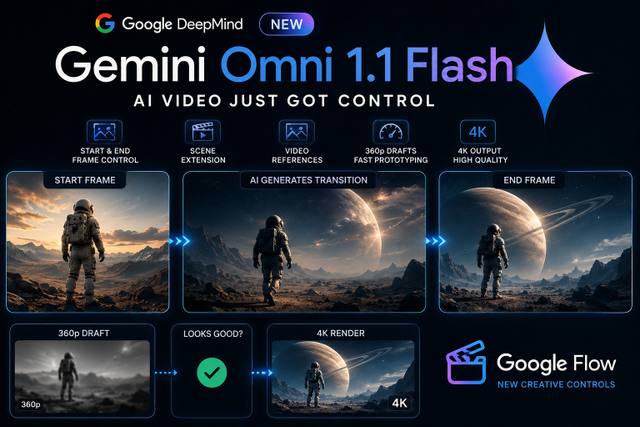
Google’s Gemini Omni 1.1 Flash adds start/end frame control, scene extension, video references, 360p drafts and upscaled 4K output.
By singamankitha
Google Just Gave AI Video Something Creators Actually Need: Control
AI video generation has gotten incredibly good at creating impressive clips.
But there has always been a frustrating problem.
You can describe what you want.
You can generate a beautiful shot.
But when you need the video to start exactly here, end exactly there, continue from an existing shot, preserve the same character, or quickly test an idea before spending time on a high-quality render…
Things get much harder.
Google is now attacking that problem with Gemini Omni 1.1 Flash.
Announced on August 27, 2026, Gemini Omni 1.1 Flash adds a new set of generative-video controls designed to make AI video more controllable, faster to iterate, and more useful for production workflows.
And that's the part worth paying attention to.
This isn't simply:
"Google released another AI video model."
The more interesting story is:
Google is trying to make AI video behave more like a filmmaking tool.
1. What Is Gemini Omni 1.1 Flash?
Gemini Omni 1.1 Flash is Google's latest version of its multimodal video-generation and editing system.
The model can work with text, images, and video and is designed for video creation and editing.
Google says developers can access Gemini Omni 1.1 Flash through the Gemini API, including Google AI Studio and the Gemini Enterprise Agent Platform.
The model supports video outputs from 3 to 10 seconds per generation, with resolutions including 360p, 720p, 1080p and 4K.
But the interesting part isn't the resolution.
It's the control layer.
2. Start and End Frame Control
This is probably the feature creators should pay the most attention to.
Previously, you could give an AI model an image and ask it to animate that image.
But what if you want to control where the shot ends?
Now you can provide a starting frame and an ending frame.
The AI generates the movement between them.
Conceptually:
START FRAME
↓
AI GENERATES MOTION
↓
END FRAME
Instead of saying:
"Make this person walk through the room."
you can establish:
Frame 1: Person standing at the door.
Frame 2: Person sitting at the table.
Then ask the model to create the transition between those two states.
This is especially useful for:
Camera movements
Character transitions
Product shots
Cinematic sequences
Transformations
Scene transitions
Looping shots
Image-to-video workflows
Google specifically highlights the ability to specify the starting and ending frames and generate continuous motion between them.
That's a major shift in how creators can think about prompting.
Instead of controlling only the description, you're beginning to control the visual endpoints.
3. Scene Extension
The second major feature is scene extension.
Imagine you've generated a 10-second shot.
The character walks toward the camera.
At the end of the clip, they're still moving.
Previously, extending the scene could be difficult because the model might suddenly change:
The character
Clothing
Lighting
Environment
Camera position
Visual style
Gemini Omni 1.1 Flash is designed to continue the scene from the existing footage.
Google says Omni 1.1 can analyze up to 10 seconds of prior footage when extending a scene.
The extensions can be generated in 10-second increments, reaching a cumulative scene length of up to 40 seconds.
So the workflow becomes:
Generate 10 seconds
↓
Extend
↓
Another 10 seconds
↓
Extend again
↓
Build the sequence
This is much more useful for storytelling than generating completely disconnected clips.
4. Why 10 Seconds of Context Matters
This sounds like a small technical improvement.
It isn't.
When continuing a video, the model needs to understand what was happening before the continuation.
If it only looks at the final moment, it has less context about:
Character movement
Camera motion
Lighting
Environment
Objects
Narrative direction
Gemini Omni 1.1 can analyze up to 10 seconds of prior footage for scene extension.
That gives the model more information about the scene it is continuing.
For creators, that can mean more consistent transitions.
And consistency is one of the biggest problems in AI video.
5. Video References
Gemini Omni 1.1 Flash can also use video references.
Google's documentation says you can provide video input, with up to three seconds of reference video for certain creative workflows.
Why does this matter?
Because sometimes text isn't enough to explain movement.
You might want:
This character
to perform
this movement
with
this visual style
Instead of describing every movement in words, a reference video can communicate the motion directly.
For example:
You provide a dance reference.
You provide your character.
The model can use the reference to help guide the movement while preserving the intended character and environment.
This moves AI video closer to:
Prompting + visual direction
rather than text-only prompting.
6. Faster 360p Prototyping
This feature may sound less exciting.
But for creators, it could save a lot of time and resources.
Instead of generating every idea at maximum quality, you can first create a 360p draft.
Think of it as a preview.
Your workflow becomes:
Idea
↓
360p draft
↓
Check composition
↓
Check movement
↓
Check character
↓
Looks good?
↓
Create high-resolution version
This is basically the AI-video equivalent of editing with proxies or creating rough previews before doing a final render.
Google says the 360p mode is designed for faster iteration and can be up to 60% faster based on system throughput compared with 720p generation.
That matters because one of the biggest problems with AI video isn't just quality.
It's iteration cost.
If you need ten generations to get one shot right, generating every attempt at high resolution can be inefficient.
A cheap, fast preview changes that workflow.
7. Then You Can Upscale to 4K
Once you've found the version you actually want, you can move toward higher-resolution output.
Gemini Omni 1.1 supports 1080p and 4K output through its video-generation pipeline. Google's documentation specifies that 4K is available as an output resolution, while the workflow includes upscaling.
This distinction matters.
Don't say:
"Gemini generates native 4K video."
That's too strong.
A more accurate description is:
"Gemini Omni 1.1 supports upscaled 4K output."
So the creator workflow becomes:
360p
↓
Test the idea
↓
Choose the best take
↓
1080p / 4K
↓
Final production
That is much more practical than generating every experiment at maximum quality.
8. Conversational Video Editing
Another important capability is conversational editing.
Gemini Omni Flash is designed to let users refine video through natural-language instructions.
Instead of rebuilding an entire shot, you can describe the change you want.
For example:
"Keep the character and background exactly the same, but make the camera slowly move closer."
Or:
"Keep the lighting and clothing unchanged, but change the camera angle."
Or:
"Extend this scene while maintaining the character's appearance and environment."
This is important because it changes the relationship between the creator and the AI.
Instead of:
Generate → Reject → Generate again
you can move toward:
Generate → Edit → Refine → Edit → Final
That's much closer to an actual creative workflow.
Google describes Omni Flash as supporting conversational video editing through the Interactions API.
9. The Real Change: Generate → Control → Extend → Finish
This is why I think the headline shouldn't simply be:
"Google launched a new AI video model."
The better way to understand this update is:
Generate
↓
Control
↓
Extend
↓
Refine
↓
Upscale
↓
Finish
That's a much more complete workflow.
Previously, AI video often felt like:
Prompt → Hope
You write a prompt.
The AI generates something.
You hope it looks right.
If it doesn't, you try again.
Now the tools are moving toward:
Prompt → Direct → Control → Iterate → Finish
That's a much more useful direction.
10. Why First/Last Frame Control Is So Important
Let's say you're creating a cinematic advertisement.
You already have:
Opening shot
A product sitting on a table.
And you already know the final shot:
Ending shot
The product is in the person's hand.
You don't necessarily want the AI to decide the entire journey between those two moments.
You want to direct it.
That's exactly where start/end frame control becomes useful.
You can define:
Where the shot begins
and
Where the shot ends
Then let the AI generate the motion connecting them.
This is closer to traditional filmmaking.
A director knows:
Shot A → Shot B
and the camera movement connects the two.
AI can now increasingly participate in that process.
11. What This Means for AI Creators
For creators, the biggest opportunity isn't simply making prettier AI videos.
It's making more controllable videos.
That distinction matters.
A beautiful random shot is impressive.
A beautiful shot that can be reliably directed is useful.
If you can control:
Opening frame
Ending frame
Character
Motion
Camera
Reference movement
Scene continuation
Resolution
then AI video becomes much easier to integrate into real production.
This could be useful for:
Social media
Create short cinematic clips with consistent transitions.
Advertising
Control the beginning and ending of product shots.
Short films
Extend scenes while maintaining visual continuity.
Music videos
Use reference footage to guide movement.
UGC
Create controlled transitions around a creator's supplied images or footage.
E-commerce
Generate product animations and controlled camera movements.
Education
Create visual explanations and demonstrations.
12. Google Flow Gets These Capabilities Too
The update isn't limited to developers.
Google is also bringing these capabilities into Google Flow, its AI filmmaking and creative environment.
Flow has been positioned as a broader filmmaking workspace, and the Gemini Omni 1.1 capabilities add more control over generation and editing.
The combination is interesting.
Instead of having:
One tool for images
One tool for video
One tool for editing
One tool for extending clips
the direction is toward a more unified creative workspace.
That makes the workflow easier for creators who don't want to build everything through APIs.
13. The New AI Video Workflow
A practical creator workflow could now look like this:
STEP 1 — Create your opening frame
Design the exact visual you want.
↓
STEP 2 — Create your ending frame
Define where the shot needs to finish.
↓
STEP 3 — Generate a 360p draft
Check the movement before spending resources on the final version.
↓
STEP 4 — Refine
Change camera movement, timing, character actions or other details.
↓
STEP 5 — Extend
If the shot needs more time, continue the scene.
↓
STEP 6 — Review
Check character consistency, lighting, movement and composition.
↓
STEP 7 — Upscale
Move the selected take toward 1080p or 4K output.
↓
STEP 8 — Edit
Combine the finished shots into the final production.
That's a much more production-oriented workflow.
14. A Practical Prompt
For creators experimenting with start and end frame control, a prompt can focus on the transition rather than trying to describe every frame.
Example:
"Use the supplied image as the exact opening frame and the supplied image as the exact ending frame. Preserve the character's identity, clothing, environment, lighting and overall visual style. Create natural continuous movement between the two frames. Maintain consistent anatomy and proportions. Use a cinematic camera movement that connects the opening and ending compositions naturally. Do not introduce additional characters, wardrobe changes, environment changes or unexplained objects."
The important concept is:
Don't only describe what should happen.
Define:
Where it starts
Where it ends
What must remain unchanged
How the movement should connect them
That's the mindset shift.
15. What Gemini Omni 1.1 Flash Does NOT Solve
We shouldn't overhype this.
AI video still has problems.
You can still encounter:
Inconsistent physics
Strange hands
Character drift
Unwanted objects
Motion artifacts
Incorrect interactions
Continuity errors
Prompt interpretation problems
Start/end frame control doesn't magically eliminate these issues.
And 4K output doesn't magically make a bad generation good.
A bad shot rendered in 4K is still a bad shot.
That's why the most important feature may actually be control, not resolution.
16. Why Control Matters More Than 4K
This is the biggest takeaway from the announcement.
People often focus on:
"4K AI video!"
But resolution isn't the fundamental problem.
The fundamental problem is:
Can I make the AI produce the shot I actually want?
A creator would often prefer:
A controllable 1080p shot
over
A beautiful but uncontrollable 4K shot.
Because production requires consistency.
You need the character to remain the same.
The camera needs to move correctly.
The shot needs to connect to the previous shot.
The ending needs to connect to the next shot.
That's why start/end frame control and scene extension are arguably more important than simply increasing resolution.
17. Why This Could Matter for AI Filmmaking
Traditional filmmaking gives creators control over:
Camera
Actors
Lighting
Blocking
Framing
Editing
AI video is gradually recreating some of these controls digitally.
Start/end frames give control over composition.
Reference videos give control over movement.
Scene extension gives control over duration.
Conversational editing gives control over revisions.
Higher resolution gives control over final delivery quality.
The more of these controls become available, the less AI video feels like a random generator.
And the more it starts behaving like a creative production system.
18. The Bigger Picture
The AI video race isn't only about which model produces the most photorealistic image.
The next competition is increasingly about:
Control
Consistency
Editing
Workflow
Speed
Cost
Integration
A model that produces an incredible five-second demo is impressive.
A model that lets creators repeatedly produce exactly the shots they need is much more valuable.
Gemini Omni 1.1 Flash is Google's move in that direction.
19. What Creators Should Watch Next
There are several things worth watching as AI video develops.
Better temporal consistency
Characters and objects should remain stable across longer sequences.
Better camera control
Creators should be able to specify camera movement more precisely.
Better character consistency
The same character should remain recognizable across multiple shots.
Longer coherent scenes
AI should eventually handle longer sequences without obvious resets.
Better editing
Creators should be able to change one element without destroying everything else.
Lower generation costs
Fast draft modes could become increasingly important.
More precise keyframe control
Start and end frames could eventually evolve into more sophisticated multi-keyframe workflows.
This is where AI video starts becoming less like prompting and more like directing.
20. Final Takeaway
Google's Gemini Omni 1.1 Flash isn't important simply because it can create AI-generated video.
The more important development is control.
You can start with an idea.
Generate a quick 360p draft.
Control the opening and ending frames.
Use reference video.
Extend the scene.
Refine the result conversationally.
Then move toward high-resolution output.
The workflow becomes:
Generate
↓
Control
↓
Extend
↓
Refine
↓
Upscale
↓
Publish
That's a very different future from:
Write prompt → Generate → Hope
And for creators, that's the real story.
AI video is slowly moving from:
"Look what AI made."
to:
"Here's exactly what I want AI to make."
That difference is huge.
Key Takeaways
1. Gemini Omni 1.1 Flash launched on August 27, 2026.
2. Start and end frame control lets creators define the visual endpoints of a shot.
3. Scene extension can use up to 10 seconds of prior context and extend footage in 10-second increments, up to 40 seconds cumulatively.
4. Video references can help guide movement and visual consistency.
5. 360p drafts make experimentation faster before committing to higher-resolution output.
6. 1080p and 4K output are supported, with 4K available as an upscale workflow rather than something you should describe as native 4K generation.
7. Conversational editing makes iterative video refinement easier.
8. Google Flow is also incorporating these capabilities into its creative workflow.
9. The biggest improvement isn't simply resolution.
It's control.