Sri Krishna Radha AI Video Prompt – Create a Divine Love Story
Create a beautiful 30-second cinematic Radha Krishna AI video using your own face reference, traditional Indian outfits, divine flute scenes with three detailed video prompts.
Source: https://youtube.com/shorts/lYYrR4n91tM?si=_KVoVJMWrLuInXyw
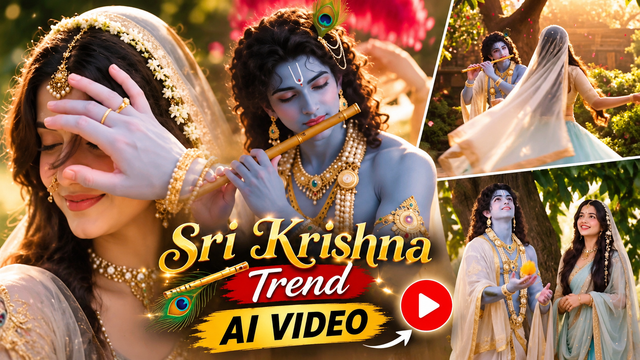
Sri Krishna Radha – Complete AI Video Prompts
IMAGE PROMPT – Create Radha's Character
Create a cinematic ultra-realistic portrait using the uploaded girl's face as the exact facial reference. Keep her identity, facial structure, eyes, nose, lips, skin tone and natural expression unchanged.
Transform the scene into a dreamy mythological Indian royal couple portrait.
A young woman wearing an elegant pastel blue traditional saree with delicate pink floral embroidery, a transparent soft blue veil (dupatta) covering her head, intricate gold bridal jewellery including a maang tikka, pearl-and-gold earrings, layered necklace, nose ring with chain, and subtle floral accessories woven into her hair.
Her long dark hair is naturally flowing, slightly wavy, with soft flowers decorating it. She has a gentle calm expression, looking directly toward the camera with natural glowing skin and minimal elegant makeup.
Standing closely behind her is a handsome young man in a traditional royal-inspired outfit, wearing layered pearl and gemstone jewellery, floral garlands, and a subtle forehead tilak. He has dark wavy hair and a soft romantic expression.
Scene: Magical golden forest background during sunset, warm sunlight filtering through trees, dreamy bokeh lights, floating flower petals, soft glowing atmosphere and romantic divine aesthetic.
Camera: Close-up portrait photography, shoulder-up framing, 85mm lens, shallow depth of field, cinematic lighting, realistic skin texture, natural facial details, ultra-high resolution and soft golden colour grading.
Style: Photorealistic, cinematic, Indian royal aesthetic, divine couple portrait, warm golden-hour lighting, detailed jewellery and natural beauty.
Negative prompt: Cartoon, anime, artificial face, altered identity, different facial features, extra fingers, distorted hands, blurry face, plastic skin, unrealistic makeup, bad anatomy, low quality, over-smoothing, duplicate people and unnatural expressions.
VIDEO PROMPT – PART 1: The Divine Touch & The Flute
Duration: 0–10 seconds
Create a cinematic photorealistic video in 8K style.
Show a close-up of a beautiful Indian woman wearing heavy traditional gold bridal jewellery, a gold maang tikka, a nose ring and white jasmine flowers in her hair with a sheer veil.
She closes her eyes and smiles softly. A blue-skinned hand gently touches her forehead. She opens her eyes and looks up lovingly.
Cut to a medium shot of a blue-skinned Indian man with curly hair, a peacock feather and heavy gold pearl jewellery, playing a wooden flute. Bright red flower petals rain down from the sky. The woman is visible in the background smiling.
Cut to a wide shot of the woman in a light blue lehenga and sheer veil spinning and dancing gracefully in a sunlit garden while the blue-skinned man plays the flute.
Golden-hour lighting, shallow depth of field, romantic and divine mythological atmosphere.
VIDEO PROMPT – PART 2: The Mango Tree & Playful Expressions
Duration: 10–20 seconds
Create a cinematic photorealistic video in 8K style.
Show a medium shot under a lush green mango tree. A blue-skinned man in traditional white and gold attire reaches up and plucks a ripe yellow mango from the tree.
Beside him, a beautiful Indian woman in a light blue saree, sheer veil and heavy gold jewellery watches him with a smile.
She looks up at the mango, pouts her lips playfully and gestures with her hand, asking for it.
The blue-skinned man smiles mischievously while holding the mango.
Show a close-up of the woman making a cute, surprised expression with wide eyes and puckered lips.
Soft sunlight filters through the leaves, vibrant colours, detailed facial expressions and a romantic playful mood.
VIDEO PROMPT – PART 3: Playful Refusal, The Bangle & The Field
Duration: 20–30 seconds
Create a cinematic photorealistic video in 8K style.
The blue-skinned man offers the yellow mango to the woman, but she playfully turns her head away, pouting and crossing her arms.
Show a close-up of her face, looking at him with wide eyes and a playful expression.
Cut to a close-up of the blue-skinned man smiling warmly and lovingly at her.
Cut to a close-up of a blue hand reaching down to pick up a gold bangle from a stone path.
Cut to a wide shot from behind: the woman in a flowing light blue lehenga and sheer veil walks through a tall green field, her hair and veil blowing in the wind.
The blue-skinned man follows her closely, holding the mango.
Beautiful natural lighting, photorealistic details, cinematic composition and divine romantic atmosphere.
Negative Instructions
Avoid changing the female face, changing the male character's identity, inconsistent outfits, distorted hands, extra fingers, unnatural movements, blurry faces, duplicate characters, cartoon effects and unrealistic jewellery.
How to Create a Sri Krishna Radha AI Video – Step-by-Step Guide
Follow these simple steps to create a beautiful mythological AI video using your own face reference.
Step 1: Prepare Your Face Reference
Open ChatGPT or another AI image generator. Upload a clear front-facing photo of the girl whose face you want to use as Radha.
Use the image prompt provided above to create a traditional Radha character wearing a pastel blue saree, gold jewellery and a beautiful veil.
Step 2: Create Krishna's Character
Generate a separate Krishna character image with blue skin, curly hair, a peacock feather, traditional white and gold clothing and beautiful jewellery.
Keep the Krishna character's appearance consistent in all scenes.
Step 3: Generate the First Video (0–10 Seconds)
Copy Part 1 video prompt. Upload the Radha and Krishna reference images into your chosen AI video generator.
Generate the divine forehead-touch scene, Krishna playing the flute and Radha dancing gracefully.
Step 4: Generate the Second Video (10–20 Seconds)
Copy Part 2 video prompt. Generate the mango tree scene.
Show Krishna picking a mango while Radha makes cute and playful expressions asking for it.
Step 5: Generate the Third Video (20–30 Seconds)
Copy Part 3 video prompt. Generate the playful refusal, golden bangle and green field walking scenes.
Step 6: Combine All Three Clips
Download the three generated clips. Open CapCut or another video editor.
Arrange the clips in the correct order:
Part 1: 0–10 seconds
Part 2: 10–20 seconds
Part 3: 20–30 seconds
Add smooth transitions, suitable background music and final colour adjustments.
Step 7: Export Your Video
Export the completed video in 1080p or the highest quality supported by your editor. Use a vertical 9:16 format for Instagram Reels and YouTube Shorts.
Common Mistakes and How to Fix Them
1. Face Changes Between Scenes
Problem: Radha's face looks different in each clip.
Solution: Use the same clear face reference image for every generation. Increase identity or face-reference strength if your tool provides that setting.
2. Krishna's Appearance Changes
Problem: Krishna's jewellery, hairstyle or peacock feather changes.
Solution: Reuse the same Krishna reference image and repeat the character description in every prompt.
3. Saree and Jewellery Change
Problem: Radha's outfit changes between scenes.
Solution: Describe the exact pastel blue saree, sheer veil, gold jewellery and floral accessories in every scene prompt.
4. Incorrect Hand Movements
Problem: Extra fingers or distorted hands appear.
Solution: Use simple hand movements, clear references and natural pose instructions. Regenerate incorrect shots.
5. Video Looks Artificial
Problem: The video looks animated instead of realistic.
Solution: Include photorealistic details, realistic skin texture, natural lighting and cinematic human movements.
6. Scenes Do Not Match
Problem: Each clip looks like a different story.
Solution: Maintain the same characters, costumes, environment and lighting across all three clips.
Pro Tips for Better Results
Generate short clips instead of creating the entire 30-second video at once.
Use clear face reference images.
Keep character descriptions consistent.
Generate each scene separately and combine them using a video editor.
Use face-swapping tools only with the person's permission if you are using someone else's face.
Final Result
Create a beautiful divine Radha Krishna love story with realistic characters, traditional Indian outfits, flute scenes, playful expressions and cinematic golden-hour lighting.
This workflow is suitable for Instagram Reels, YouTube Shorts and AI mythology video creators.