Lord Ayyappa AI Photo Prompt (Free): Devotional Portrait for Mandala Season
Copy our two most-used Lord Ayyappa AI photo prompts and make a cinematic devotional portrait with your own face in ChatGPT for the Mandala season.
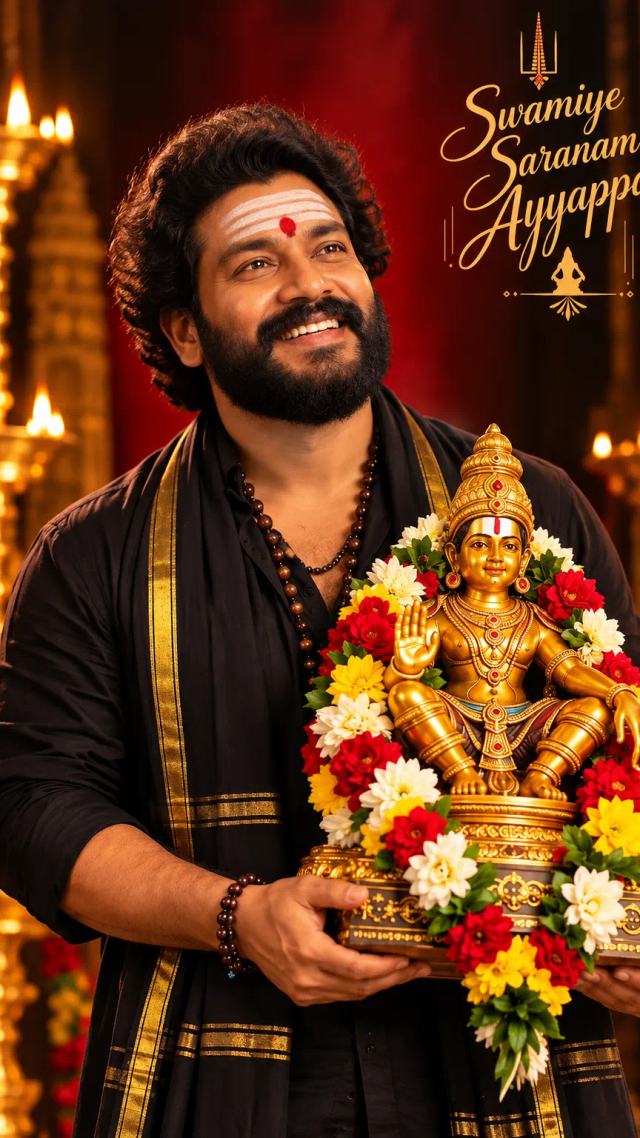
Every year from mid-November, lakhs of devotees begin the 41-day Mandala vratham before the Sabarimala pilgrimage. Black clothes, rudraksha malas, vibhuti on the forehead and the chant of Swamiye Saranam Ayyappa fill WhatsApp statuses and Instagram stories. This season, a new kind of devotional photo is everywhere: a cinematic, temple-lit AI portrait of a devotee holding a decorated Ayyappa idol or performing aarti.
This guide gives you the two Ayyappa photo prompts our readers copy most (together they have been copied more than 300 times on Prompt Mandi), shows you how to make the picture with your own face in ChatGPT, and explains how to change the details so the result feels personal and respectful.
What is the Ayyappa devotional AI photo trend?
It is a vertical portrait, usually 4:5 or 9:16, that looks like it was shot by a professional photographer inside a temple at night. The devotee wears the traditional black dhoti or shawl of the Mandala season, rudraksha beads and vibhuti marks. Warm brass lamps, flowers and soft golden light do most of the work.
People use these images as WhatsApp DP and status pictures during the vratham, to announce that they have taken the mala, and as greeting images for family groups. Because the picture can keep your own face, it feels far more personal than a downloaded god photo.
Ayyappa photo prompt 1: devotee holding the idol (free)
This is the most-copied prompt on Prompt Mandi. It places a smiling devotee in front of a deep red temple backdrop, holding a golden, flower-decorated Ayyappa idol, with Swamiye Saranam Ayyappa written in gold calligraphy. Copy it exactly as it is first; you will customise it in the next section.
Create an ultra-realistic 8K cinematic devotional portrait of a happy young Indian man holding a beautifully decorated golden Lord Ayyappa idol.

Give the man a completely unique and natural-looking face, thick curly black hair, a well-groomed beard, expressive eyes and a warm devotional smile. Apply three horizontal white vibhuti marks on his forehead with a small red kumkum tilak in the centre.

He is wearing a traditional black Ayyappa swamy devotional outfit with a black shawl featuring elegant golden borders, rudraksha prayer beads and traditional bracelets.

He is carefully holding a magnificent golden Lord Ayyappa idol decorated with intricate traditional ornaments, a beautiful golden crown, colourful red, yellow and white flower garlands.

Background: A beautiful traditional Indian temple atmosphere with glowing brass oil lamps, deep rich red backdrop, warm golden lights and soft cinematic bokeh.

Lighting: Dramatic warm golden illumination, realistic reflections on the golden idol, beautiful highlights on the man's face and detailed shadows.

Composition: Medium full portrait, subject positioned slightly to the left, idol clearly visible in the foreground, elegant devotional text space on the upper right.

Add beautiful golden calligraphy reading "Swamiye Saranam Ayyappa" with a small traditional sacred symbol above it.

Professional DSLR photography, ultra-detailed textures, realistic skin, intricate gold ornaments, photorealistic 8K quality, HDR, cinematic colour grading, vertical 4:5 composition.

Avoid cartoon effects, distorted hands, extra fingers, blurry idol, artificial skin and spelling errors.
Ayyappa photo prompt 2: night aarti with a brass lamp (free)
The second prompt is more dramatic. A devotee performs aarti with a large multi-tiered brass lamp, with other devotees softly blurred in the background. It works best for men's portraits and for a full-screen status image.
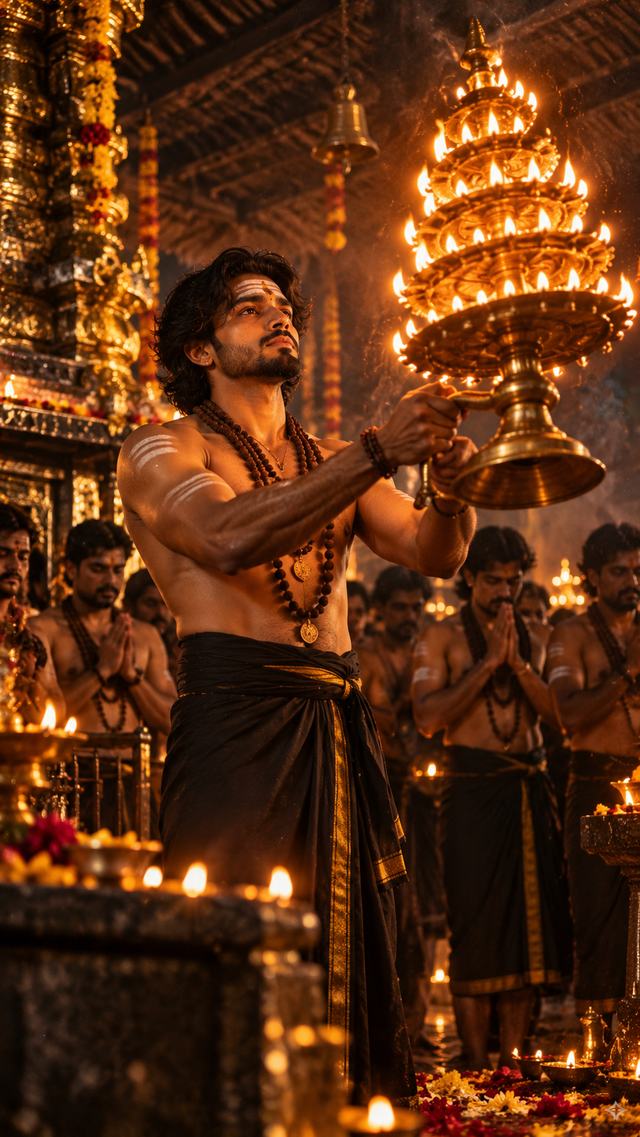
Create an ultra-realistic cinematic portrait of a devoted Ayyappa worshipper performing a sacred aarti at night. He is standing shirtless, wearing a traditional black dhoti, multiple rudraksha malas, and sacred vibhuti marks across his forehead and arms. He holds a large traditional multi-tiered brass oil lamp filled with hundreds of glowing flames.

Behind him, several devotees stand in prayer, also wearing traditional black attire and rudraksha malas. Set the scene inside a traditional South Indian temple atmosphere with a thatched roof, oil lamps, flower petals and glowing embers on the ground.

Use dramatic warm firelight, deep shadows, realistic skin texture, detailed brass reflections, natural facial expression, volumetric light, cinematic composition, devotional atmosphere, shallow depth of field, high contrast, photorealistic details, ultra-detailed, 8K quality, vertical portrait, masterpiece.
Before you paste the prompt, check these 4 things
- Use a clear, front-facing photo if you want your own face. Good light, no sunglasses, and only one person in the frame.
- Decide the text first. The prompt writes Swamiye Saranam Ayyappa. If you want your name or a date instead, change it before you generate, because AI tools often misspell text added later.
- Pick the size. Prompt 1 asks for 4:5, which suits Instagram posts. For WhatsApp status or Reels, change it to 9:16.
- Keep it respectful. These are devotional images. Avoid adding brand logos, jokes or unrelated props to the idol or the shrine.
How to make the Ayyappa photo step by step
Method 1: with your own face (recommended)
- Open ChatGPT and start a new chat. Image generation works on the free plan, with a daily limit.
- Upload one clear photo of yourself.
- Paste prompt 1 or prompt 2, and add this line at the end: Keep the face, hairline and skin tone exactly the same as the uploaded photo.
- Send it and wait for the image. If the face looks different, reply with: The face does not match. Keep my exact facial features and regenerate.
- Download the image and set it as your status or DP.
Method 2: without a photo
Paste the prompt as it is. ChatGPT will create a new, natural-looking face, which is useful when you want a greeting image for a group rather than a personal portrait. The same prompts also work in Google Gemini; the lighting is usually a little cooler there, so add warm golden temple light if it looks flat.
Make it yours: what you can change
- Outfit colour: black is traditional for the Mandala season, but blue and saffron dhotis are also worn. Replace black with your colour.
- Mala: swap rudraksha beads for a tulsi mala if that is what you wear.
- Setting: replace the red backdrop with the eighteen holy steps (pathinettam padi) lit with oil lamps or a forest path at dawn on the way to Sabarimala.
- Family version: change a happy young Indian man to an Indian father and his young son, both in black devotional attire.
- Text: replace the calligraphy with Swamiye Saranam Ayyappa – Mandala Pooja, or remove the line entirely for a clean portrait.
Why this trend works so well
Three things make these portraits stand out on a crowded status feed. First, warm firelight on gold and skin reads as premium even on a small phone screen. Second, the dark outfit and red or black background create strong contrast, so the face and the idol pop. Third, the image is personal: friends and family recognise you, which is why these get far more replies than generic god images.
The prompts are written like a photographer's brief: subject, outfit, props, background, lighting, composition and then a short list of things to avoid. That structure is the reason they work in both ChatGPT and Gemini, and you can reuse it for any festival portrait.
Common mistakes and how to fix them
- Extra fingers or a melted idol: keep the Avoid… line at the end of the prompt, and regenerate once. Hands holding objects are the hardest part for every AI tool.
- Spelling errors in the calligraphy: ask for the text in a separate message: Rewrite the text exactly as: Swamiye Saranam Ayyappa.
- The face looks like someone else: use a sharper photo and say do not beautify or change my face.
- Too dark: add brighter exposure, lift the shadows slightly.
Frequently asked questions
Is this Ayyappa prompt free?
Yes. Both prompts on this page are free to copy and use. ChatGPT and Gemini each have their own free daily limits for image generation.
Which AI tool gives the best result?
ChatGPT image generation is the most reliable at keeping your face and writing the calligraphy correctly. Gemini is faster and good for the no-photo version.
Can I make it for a woman or a child?
Yes. Replace the subject line, for example a young Indian girl in a black pattu pavadai with vibhuti on her forehead, and keep everything else the same.
Can I use the image commercially?
Use it for personal greetings and social media. For printing and selling, check the AI tool's terms, and avoid using images of real temples' idols for products.