Instagram Edits Comes to Mac With AI Agent Support
Instagram Edits is expanding to Mac with watermark-free 4K exports and AI-agent-assisted editing. Discover the new features, Meta Creator Assistant and what this means for content creators.
Source: https://tbreak.com/instagram-edits-mac-4k-export-ai-agents/
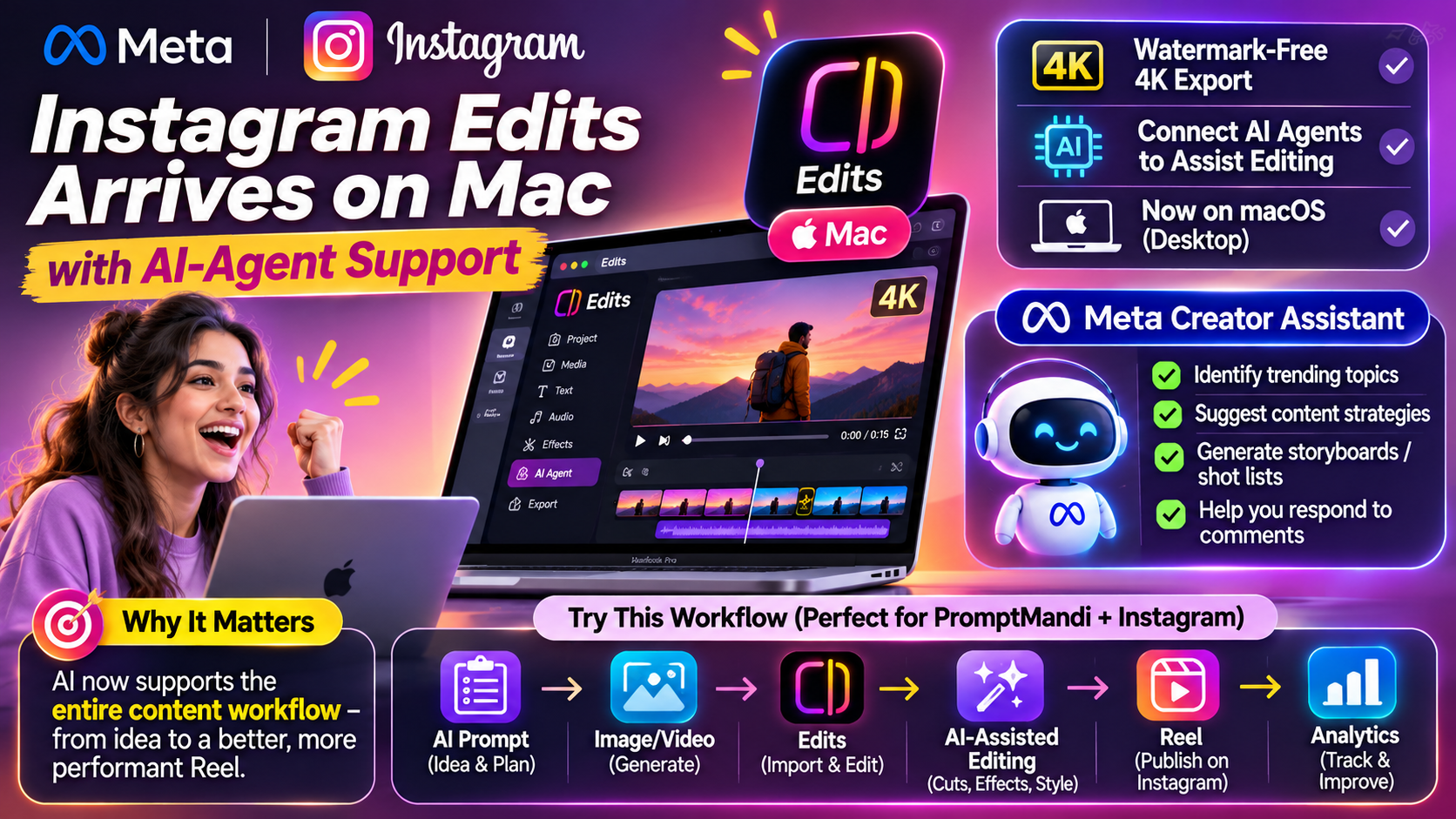
Instagram Edits Arrives on Mac With AI-Agent Support: A New Era for Content Creators
Introduction: Video Editing Is Getting Smarter
Social media content creation is changing rapidly. A few years ago, creating a professional video required expensive editing software, technical knowledge and hours of manual work.
Today, artificial intelligence is changing that process.
Instagram is expanding its Edits video-editing experience to desktop users through a Mac version. The development brings new opportunities for creators who want to produce high-quality videos using desktop editing tools and AI-assisted workflows.
One particularly interesting development is the ability to connect AI agents to assist with editing tasks.
This could represent an important step towards a future where creators spend less time performing repetitive editing work and more time developing creative ideas.
1. What Is Instagram Edits?
Instagram Edits is Meta's video-editing application designed for content creators.
It provides tools to create, edit and prepare videos for social media platforms, particularly Instagram Reels.
Instead of depending entirely on complicated professional editing applications, creators can use Edits to manage different parts of their video-production process.
The desktop expansion brings the editing experience to Mac users, making it more convenient for people who prefer working on larger screens.
According to the reports, the Mac version includes advanced editing capabilities and support for AI-assisted workflows.
2. Instagram Edits Comes to Mac
One of the biggest changes is desktop availability.
Mobile editing is convenient, but it can become difficult when creators work with multiple video clips, detailed timelines and complicated audio arrangements.
A desktop environment offers more space and flexibility.
The reported Mac features include:
Multi-track video editing
Creators can organise multiple video clips and arrange them along a timeline. This makes it easier to combine different scenes into one video.
Advanced audio waveforms
Audio waveforms help creators understand where sounds, dialogue and music appear in their videos.
Colour-grading tools
Creators can adjust the visual appearance of their videos to achieve a consistent professional look.
Keyboard shortcuts
Keyboard shortcuts can make repetitive editing operations faster and improve productivity.
Watermark-free 4K exports
The reported 4K export capability allows creators to produce high-resolution videos without an Edits watermark.
These features can be particularly useful for creators producing cinematic Reels, tutorials, product videos and promotional content.
3. AI Agents: The Most Interesting Development
The most exciting part of this update is the reported support for connecting AI agents through the Model Context Protocol (MCP).
MCP is an open standard that allows AI applications to connect with external tools and services through a structured interface.
In a video-editing workflow, compatible AI agents could potentially help with tasks such as:
Organising video clips.
Preparing rough cuts.
Assisting with repetitive editing operations.
Managing parts of a production workflow.
Reducing manual work during content preparation.
Imagine creating a video using several clips and asking a compatible AI agent to help organise them into a rough sequence.
Instead of performing every initial editing task manually, the creator could use AI assistance and then review the result.
It is important to remember that AI assistance does not mean completely automatic professional editing. Creators still need to check timing, transitions, audio quality and the final output.
4. Meta Creator Assistant Is Also Evolving
Meta has also expanded its Creator Assistant capabilities.
This development is important because successful content creation involves much more than editing videos.
Creators need to research trends, understand their audience, plan content and respond to comments.
The reported Creator Assistant capabilities include:
Trend identification: Helps creators discover topics and trends that may be relevant to their audience.
Content strategy suggestions: Provides ideas for improving content planning and publishing strategies.
Storyboards and shot lists: Helps creators organise video concepts before recording or generating content.
Comment assistance: Helps creators manage audience interactions and prepare responses.
These capabilities could make AI useful throughout the content-creation process rather than only during video editing.
5. How AI Could Transform the Entire Content Workflow
Consider a creator who wants to publish one Instagram Reel every day.
Traditionally, the workflow might involve researching an idea, writing a script, creating visuals, editing clips, adding music, preparing captions and publishing the video.
AI-assisted tools can help with several of these steps.
Here is a possible workflow:
Step 1: Generate an idea
Use an AI assistant to discover a topic and prepare a short video concept.
Step 2: Create the visuals
Generate images or video clips using suitable AI tools.
Step 3: Import content into Edits
Bring the generated clips into the desktop editing environment.
Step 4: Use AI-assisted editing
Connect compatible AI agents to help with supported editing tasks.
Step 5: Add finishing touches
Review transitions, audio, captions, colour and timing.
Step 6: Export and publish
Prepare the final video and publish it as an Instagram Reel.
Step 7: Study analytics
Review views, watch time, engagement and audience responses to improve future videos.
This creates a connected workflow from the first idea to the final published Reel.
6. Why This Matters for Indian Creators
India has a growing creator economy, with students, freelancers, small businesses and independent creators using Instagram to reach audiences.
However, not everyone has access to professional editing equipment or advanced video-production skills.
AI-assisted tools could help reduce some of these barriers.
For example:
Students can create educational Reels.
Small businesses can prepare product advertisements.
Freelancers can offer video-editing services.
Digital marketers can develop social media campaigns.
AI creators can combine generated visuals with professional editing.
Creators who understand both AI tools and video production may find new opportunities in content creation and digital marketing.
One limitation is that the reported desktop release currently focuses on macOS. Windows and Linux users should check official availability announcements before planning their workflows around the desktop version.
7. A Practical Experiment for PromptMandi Creators
Here is an interesting experiment you can try.
Create a series called:
One AI Prompt → One Professional Reel
For every Reel:
Select an interesting AI image or video prompt.
Generate the visual content.
Import the results into a video editor.
Use available AI assistance for editing.
Add captions, transitions and music.
Export the finished video.
Share the original prompt on PromptMandi.
This approach connects your social media content with your website.
Instead of simply showing the final AI-generated result, you can explain how it was created.
That gives your audience a reason to visit your website and explore more prompts.
8. Skills Students Should Learn
Students interested in AI content creation can focus on these practical skills:
AI prompt engineering.
Video editing fundamentals.
Python programming.
AI tools and APIs.
Content strategy.
Social media analytics.
Automation and AI agents.
Understanding how different tools work together is becoming just as important as knowing how to operate individual applications.
Conclusion: The Future of Content Creation Is AI-Assisted
Instagram Edits arriving on Mac, together with reported AI-agent integration, highlights an important direction for the creator economy.
Video editing is moving beyond traditional manual workflows towards more connected and intelligent production environments.
The combination of AI-generated visuals, desktop editing, AI assistants and content analytics could make it easier for creators to develop professional content.
For students and independent creators, this is an opportunity to experiment, develop practical skills and build a portfolio.
The future creator will not just know how to edit a video. They will know how to manage an entire AI-powered content workflow.