Meta Muse Gadgets: Build Your Own AI Devices
Discover Meta Muse Gadgets, open-source development tools for connecting AI agents to Raspberry Pi, ESP32, custom hardware, and compatible smart-home devices.
Source: https://www.theverge.com/tech/1004330/meta-muse-ai-gadgets-home-link
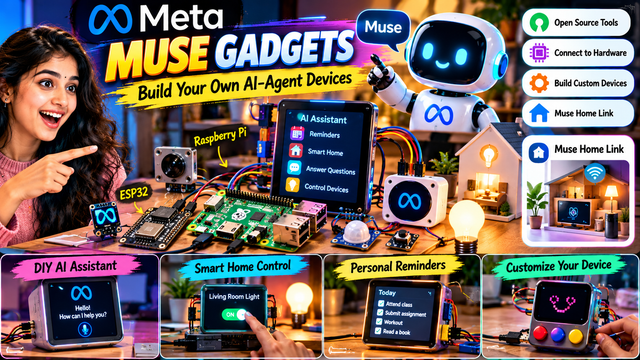
Meta Muse Gadgets: How Developers Could Build Their Own AI-Powered Devices
Introduction: AI Is Moving Beyond Chat Windows
Artificial intelligence has become part of everyday digital life. People use AI assistants to answer questions, write content, generate images, learn programming, and automate repetitive tasks. Most of these interactions happen through a mobile app, a website, or a chat window.
But what if an AI assistant could also interact with a physical device on your desk, display reminders on a small screen, or help you experiment with smart-home hardware?
That is the idea behind Meta Muse Gadgets, a project described in The Verge's October 2, 2026 report. The project focuses on development tools that let people connect Meta's Muse AI agent to custom hardware.
The idea is interesting because it brings together two areas that are often studied separately: artificial intelligence and electronics. Developers can explore not only what an AI system can say, but also how it might interact with a physical environment through connected devices.
For students, electronics enthusiasts, software developers, and technology creators, this offers an opportunity to understand how AI agents might become part of everyday gadgets.
An important distinction is necessary, however. The reported open-source release concerns gadget-development tools and code. It does not mean the entire Muse AI agent or its underlying model has become open source.
1. What Are Meta Muse Gadgets?
Meta Muse Gadgets are part of an approach to experimenting with AI agents through custom-built hardware.
A traditional AI assistant generally appears as software on a computer or smartphone. Users enter a question, receive an answer, and continue the conversation.
A hardware-based AI project adds another layer. Developers can build a physical interface around an AI-powered experience, using components such as screens, buttons, sensors, and development boards.
For example, a hobbyist could imagine a desk gadget that shows a daily schedule, a small display that presents useful information, or a connected device that provides an interface for supported smart-home actions.
These are examples of possible projects, not a claim that every function is available out of the box.
The important idea is that developers can experiment with the connection between an AI agent and physical hardware instead of restricting every interaction to a conventional application.
According to The Verge's report, Meta also introduced Muse Home Link, a gadget intended to connect Muse with compatible home devices.
The exact capabilities of a particular project depend on the supported hardware, software integrations, permissions, and available AI services.
2. What Does Open Source Mean in This Project?
The term open source is frequently used in technology news, but it is important to understand exactly what has been released.
Open-source software generally makes its source code available under a licence that defines how people may use, inspect, modify, and redistribute it.
For developers, this can make experimentation easier. They can examine how a tool works, adapt supported components, learn from examples, and potentially contribute improvements, subject to the project's licence and requirements.
In the Muse Gadgets story, the reported open-source element concerns the gadget-development tools and code.
That is different from making the entire underlying AI model open source.
An AI hardware project can depend on several separate components: an open-source development framework, a proprietary AI model, a hardware board, and external services. Releasing one component does not automatically make all the others open source.
This distinction matters for students and businesses evaluating whether they can modify a project, operate it independently, or use it commercially.
Before starting a build, developers should check the official repository, software licence, hardware compatibility, and any service or account requirements.
3. How Could an AI Gadget Work?
Consider a simple desk assistant with a small screen.
The developer begins with a supported hardware board and connects a display. The software provides an interface through which the device can communicate with the AI service. The screen then presents information returned by the supported system.
A simplified workflow looks like this:
Step 1: Choose the hardware.
A developer selects a compatible board, such as a Raspberry Pi or an ESP32-based device, depending on the project's requirements.
Step 2: Connect the components.
The project might include a small display, buttons, sensors, a speaker, or indicator lights. Not every board supports every component in the same way.
Step 3: Configure the software.
The developer installs the appropriate code, sets up connectivity, and configures the supported connection to the AI agent.
Step 4: Define the gadget's purpose.
The software determines what information the device displays and how the user interacts with it.
Step 5: Test the complete system.
The developer checks whether inputs are handled correctly, information appears as expected, and errors or network failures are managed safely.
The result could be a small interactive gadget rather than a general-purpose computer.
However, a physical device does not automatically become intelligent simply because it has an AI-related logo or screen. It needs working software, suitable hardware, a functioning AI connection, and a clearly defined task.
4. Raspberry Pi and ESP32: Why These Boards Matter
Two hardware platforms that frequently appear in DIY electronics projects are Raspberry Pi and ESP32.
They serve different purposes, and choosing the right one depends on what the developer wants to build.
Raspberry Pi
Raspberry Pi computers can run operating systems and support a wide range of programming tools. Depending on the model, they can be useful for projects involving displays, networking, cameras, local applications, and other connected components.
A Raspberry Pi may be suitable when a project needs a relatively capable computing environment or several software components running together.
For example, a student might build a desk dashboard that displays a timetable, weather information, or reminders obtained from supported services.
ESP32
ESP32 boards are commonly used in embedded systems and Internet of Things projects. They are useful for compact devices that interact with sensors, buttons, displays, and wireless networks.
An ESP32 may be a good fit for a smaller gadget that sends sensor information to another system or controls a simple interface.
However, an ESP32 is not equivalent to a full desktop computer. Memory, processing power, software support, and connectivity requirements must be considered when designing a project.
Some AI functions may need to run on an external server or supported service rather than directly on the board.
Which should beginners choose?
For a beginner who wants to learn general programming and build a screen-based assistant, a Raspberry Pi can provide a convenient starting point.
For a compact sensor or button-based project, an ESP32 may be more appropriate.
The correct choice depends on the hardware specifications, software requirements, budget, and intended application. Neither platform guarantees compatibility with Muse Gadgets; developers must verify the supported configurations.
5. Five AI Gadget Ideas Developers Could Explore
The most exciting part of AI hardware is the variety of projects people can imagine.
Idea 1: A personal reminder display
A small display could show a class timetable, assignment deadlines, meetings, or a daily checklist.
The AI component could help organise information or answer questions through a supported integration. The device itself would handle the display and user interaction.
For students, this could be an interesting way to combine programming, user-interface design, and hardware.
Idea 2: A smart-home interface
A gadget could provide a simple interface for controlling compatible smart-home equipment.
For example, it might let an authorised user check device status or request a supported action through an AI assistant.
Safety is important here. The system should verify permissions, restrict sensitive actions, and require confirmation when appropriate. A prototype should not expose home devices directly to untrusted commands.
Idea 3: An interactive learning gadget
Teachers and students could explore devices that display definitions, quiz questions, simple explanations, or educational prompts.
An AI service could generate or retrieve suitable content, while the hardware provides buttons or a display for interaction.
Such a project could become a useful demonstration of how software and electronics work together.
Idea 4: A voice-enabled desk assistant
A device with a microphone, speaker, and suitable processing or network connection could support voice interactions if the relevant software and hardware are compatible.
Possible functions include answering basic questions, presenting reminders, or providing a hands-free interface.
Developers must account for microphone permissions, background listening, privacy, latency, and network reliability.
Idea 5: A sensor-based information device
An embedded device could collect environmental readings from supported sensors and present the results through a display or connected AI service.
For example, a project could show temperature readings and explain what the values mean.
Measurements must come from actual sensors, and AI-generated explanations should not be treated as a substitute for accurate instrumentation.
These five ideas are potential applications of AI-connected hardware. They should not be interpreted as five ready-made official Meta products.
6. What Is Muse Home Link?
The Verge reported that Meta introduced Muse Home Link as a gadget designed to connect Muse with compatible home devices.
The broader idea is to connect an AI assistant to the systems that operate a home.
A conversational assistant can be useful for answering questions, but interaction with physical devices requires more than generating text. The software needs a supported integration, a clear understanding of the requested action, and appropriate permission to carry it out.
For example, a compatible system might allow an authorised user to request a supported lighting action. The integration would then need to translate that request into an action the relevant device understands.
Compatibility is crucial. Not every smart bulb, camera, sensor, or home appliance will necessarily work with a particular system.
Users should check supported devices and configuration requirements rather than assuming universal compatibility.
Security also matters. A home-connected AI system should protect credentials, limit access, and prevent unauthorised commands from changing important settings.
Muse Home Link illustrates the direction of AI assistants becoming more connected to physical environments, but its precise capabilities should be verified against official documentation.
7. Why This Matters for AI Developers
AI development increasingly involves more than selecting a model and writing a prompt.
A complete application may need an interface, external tools, structured data, network communication, permissions, and error handling. When hardware is added, developers must also consider power requirements, physical connections, device limitations, and software reliability.
A project like Muse Gadgets can help people think about these engineering challenges.
For example, an AI agent might produce a useful response, but a small device still needs to decide how that response should appear on its display. A connected system may need to handle a lost network connection. A button may need to interrupt an ongoing action. A device that controls a home appliance needs safeguards against unintended behaviour.
These are practical engineering problems rather than just AI-prompting questions.
Students who explore such projects can gain experience with APIs, programming, embedded systems, user interfaces, and system integration.
They can also learn to evaluate an AI application using real criteria: response accuracy, latency, cost, reliability, accessibility, and user safety.
8. Opportunities for Indian Students and Creators
India has a large community of engineering students, electronics hobbyists, software developers, and technology educators.
AI-connected hardware projects could provide new ways for them to demonstrate their skills.
A student could develop a college project around an interactive timetable display, a sensor dashboard, or a classroom information assistant. A creator could document the development process through short videos and longer tutorials.
A useful demonstration would explain the problem, show the hardware, describe the software architecture, and test the final result.
Creators should distinguish clearly between an official product feature and a project they built independently. That helps viewers understand which capabilities come from the original tool and which require additional code or hardware.
For entrepreneurs, these projects may reveal opportunities in education, retail, accessibility, home automation, and industrial monitoring.
However, a demonstration is not automatically a commercial product. Real deployments require support, security, maintenance, dependable hardware, and a sustainable business model.
9. Challenges and Limitations to Consider
Building an AI gadget can be rewarding, but developers should understand the practical difficulties.
Hardware compatibility: A board may not support every peripheral or software package required by a project.
Network dependence: If the AI service operates remotely, connectivity problems can interrupt the experience.
Cost: The final project may require a board, display, sensors, power supply, enclosure, and paid services.
Privacy: Microphones, cameras, and connected sensors can collect sensitive information. Data collection should be limited to what the application needs.
Security: Credentials should be protected, device permissions restricted, and software updates maintained.
Reliability: An AI-generated answer can be wrong. Critical controls should use predictable logic and appropriate safeguards.
Accessibility: A gadget should provide understandable feedback and an alternative interaction method when possible.
Licensing: Open-source code can have conditions that matter for redistribution and commercial use.
These challenges do not make the idea less interesting. They show why successful AI hardware requires thoughtful engineering as well as a capable AI service.
10. A Practical Learning Roadmap for Beginners
Students who want to explore AI hardware can approach the subject in stages.
Start by learning basic programming and understanding how inputs and outputs work. Next, experiment with a small development board and a simple display or button. Build a project that performs a predictable task before introducing an AI connection.
After that, study how APIs and network requests work. Learn how to pass information to a supported service and display the response safely.
Once the basic system works, add features gradually. A reminder display could become a conversational information device, for example, provided the required integration is available.
Throughout the process, keep credentials out of public code, test failure conditions, and document what the device can and cannot do.
Before using Muse-specific code, review the official project's documentation, repository, licence, supported hardware, and setup instructions. Those details determine whether a particular board can be used and what configuration is required.
This staged approach makes it easier to identify problems and helps beginners understand every component rather than copying code without understanding it.
Conclusion: AI Could Become Part of the Physical World
Meta Muse Gadgets represents an interesting direction for AI experimentation: connecting AI agents to custom-built devices rather than limiting every interaction to a conventional chat interface.
The reported release of open-source gadget-development tools could help developers explore new hardware projects, while Muse Home Link highlights the potential for AI assistants to interact with compatible home devices.
For Indian students, developers, and technology creators, the broader lesson is that AI innovation increasingly happens at the intersection of software, hardware, and useful real-world tasks.
The most valuable projects will not simply place a chatbot inside a box. They will solve a clear problem, use appropriate hardware, protect user data, and behave reliably.
The tools and hardware requirements still need to be checked carefully, and open-source gadget code should not be mistaken for the entire Muse AI model being open source.
Nevertheless, the idea is worth watching. As AI systems become more connected to devices and services, the next generation of useful assistants may appear not only on our screens but also in the objects we interact with every day.
Source: The Verge, October 2, 2026, report on Meta Muse Gadgets and Muse Home Link.