ChatGPT Images 2.5: Sketch, Templates & Shareable Prompts
ChatGPT Images 2.5 makes AI image creation faster and more flexible with Sketch, templates, precise editing and shareable prompts.
By singamankitha
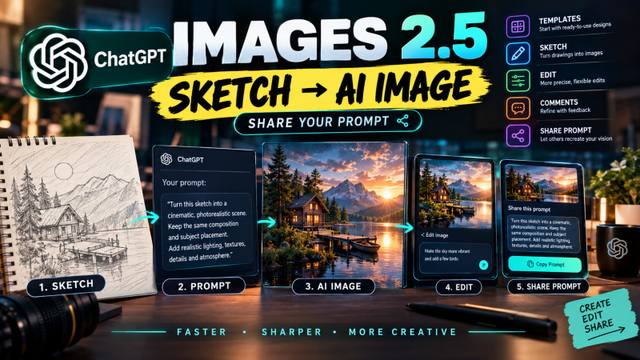
ChatGPT Images 2.5: Sketch, Templates & Shareable Prompts
Published: September 8, 2026
Category: Tools & Apps
Reading time: ~8 minutes
ChatGPT Images Just Got a Major Creative Upgrade
AI image generation is moving beyond simply typing a prompt and waiting for a picture.
On September 8, 2026, OpenAI introduced ChatGPT Images 2.5, a new image-generation experience designed to make creating, editing and sharing AI images easier and more precise.
According to OpenAI, Images 2.5 brings sharper details, faster generation, more precise editing and better consistency when making multiple edits to the same image. OpenAI also introduced several new creative features inside ChatGPT, including Templates, Sketch, image comments and shareable prompts.
For creators, designers, marketers and AI enthusiasts, the most interesting change may not simply be better image quality.
It is the ability to move from an idea to an image more naturally — and then let someone else recreate that idea using the same prompt.
That changes how AI image content can be created and shared.
What Is ChatGPT Images 2.5?
ChatGPT Images 2.5 is OpenAI's latest image-generation system for ChatGPT.
OpenAI says the new system improves natural lighting, textures, reference-image preservation and the ability to follow detailed editing instructions across multiple turns.
One particularly useful improvement is consistency.
Previously, making several changes to an AI-generated image could sometimes cause unrelated parts of the image to change. Images 2.5 is designed to better preserve earlier edits while applying new instructions.
This is especially useful when creating professional content.
For example, imagine you generate an image of a person wearing a black jacket.
You then ask:
“Change the background to a luxury studio.”
Then:
“Make the lighting warmer.”
Then:
“Add a professional product on the table.”
The goal is for each edit to build on the previous result instead of completely changing the original concept.
OpenAI says Images 2.5 is designed to handle these multi-turn edits more reliably.
The Biggest New Feature: Sketch to Image
One of the most creator-friendly additions is Sketch.
Sometimes you know exactly what you want an image to look like, but you cannot explain it properly with words.
Now you can draw a rough version of your idea and use it as a visual guide.
On mobile, users can type @ in the message box and select Sketch. They can then draw their idea and describe what they want ChatGPT to create from that drawing.
The sketch does not have to be professional.
You could draw a simple room layout.
You could sketch the position of a person.
You could draw where a product should appear.
You could even make a very rough drawing showing where the camera should be.
ChatGPT can then use that visual reference together with your written instructions.
For example, imagine drawing a basic sketch of a woman standing beside a car.
Your instruction could be:
“Turn this sketch into a cinematic luxury automotive advertisement. Keep the woman's position and the car placement exactly as shown. Use sunset lighting, realistic reflections and a premium city background.”
Instead of trying to describe every position using words, the sketch gives the AI another form of information.
That could make visual communication much easier for creators.
Templates Make Starting Easier
Another new feature is Templates.
Starting from a completely blank prompt can sometimes be difficult.
You may know that you want a poster, product image or promotional design, but you may not know how to structure the prompt.
Templates provide a starting point.
OpenAI says users can choose templates for popular creative formats, including examples such as posters and merchandise, and then customize the details, design elements and style.
Think of it like starting with a creative framework instead of a completely empty page.
For example:
Template → Poster
Then you can specify:
Product
Headline
Colors
Brand style
Background
Lighting
Typography
Target audience
The AI handles the image-generation process while you focus on the creative direction.
This could be particularly useful for small businesses and social-media creators who regularly need promotional graphics.
More Precise Editing
Images 2.5 also focuses heavily on editing.
OpenAI says the model is better at following complex visual instructions and preserving important details across multiple edits.
That means creators can spend more time refining an image rather than starting over.
For example, you might generate a fashion photograph and then request:
“Change only the jacket color.”
Then:
“Keep the face, hairstyle and pose unchanged.”
Then:
“Make the background slightly darker.”
Then:
“Add soft studio lighting.”
The goal is targeted editing rather than rebuilding the entire image each time.
On mobile, users can also open a generated image and add comments describing what they want changed.
This creates a more conversational editing workflow.
Instead of learning complicated editing software, a creator can simply explain the change.
The Feature Creators Will Love: Shareable Prompts
There is another feature that could be particularly interesting for the AI creator community.
Users can now share the prompt used to generate an image.
OpenAI says that when an image is shared, the prompt can also be included so another person can use the same creative idea with their own images and details.
This creates a new type of content loop:
Create → Share → Recreate → Remix
Imagine a creator generates a cinematic portrait.
Instead of posting only the final image, the creator can share the prompt.
Another person can then use that prompt with their own reference photo.
The result may look completely different because the person, environment or details are different, while the underlying creative concept remains similar.
This is potentially useful for:
AI prompt creators
Instagram creators
YouTube creators
Digital artists
Designers
Marketing teams
AI education pages
Prompt marketplaces
Photography communities
For prompt-focused platforms, this makes the prompt itself part of the content.
Why Shareable Prompts Matter
Traditionally, AI image creators often keep their prompts private.
A viewer sees the final image and asks:
“How did you make this?”
The creator may then manually copy and paste a long prompt.
Shareable prompts make that process easier.
The image becomes the demonstration.
The prompt becomes the reusable creative recipe.
And the audience becomes part of the experiment.
One creator can create an idea.
Ten people can recreate it.
Those ten people can modify it.
Then their versions can inspire another generation of creators.
This could create a much more interactive AI-content ecosystem.
From Rough Idea to Finished Image
The bigger story behind Images 2.5 is that OpenAI is reducing the distance between an idea and the final visual.
Consider a simple workflow.
Step 1: Start With an Idea
You have an idea for a cinematic poster.
Step 2: Draw a Rough Sketch
You quickly sketch the subject, background and composition.
Step 3: Add Instructions
You describe the visual style, lighting, colors and details.
Step 4: Generate
ChatGPT turns the rough concept into a polished image.
Step 5: Edit
You request specific changes.
Step 6: Share
You share the final image along with the prompt.
This workflow requires less technical knowledge than traditional digital design.
The creator can focus more on the idea and less on the mechanics.
A Simple Example
Imagine you draw a very basic sketch of a person standing under a large tree.
Your prompt could be:
“Transform this rough sketch into a cinematic photorealistic photograph. Preserve the exact subject placement and camera angle from the sketch. Create a dramatic sunset environment, realistic tree textures, natural skin tones, soft atmospheric fog and cinematic depth of field.”
The sketch provides the composition.
The prompt provides the creative direction.
The image model provides the visual execution.
That combination is powerful because text and visual references can work together.
Faster Generation Also Matters
OpenAI says Images 2.5 can generate images faster than its previous Images 2.0 system, with latency reduced by up to 50% in its comparison.
Speed may sound like a small improvement, but it matters when creators are experimenting.
If you are producing a social-media thumbnail, you may try ten different ideas.
If each generation takes less time, you can test more concepts.
The workflow becomes:
Generate → review → edit → generate → compare.
For professional creative teams, faster iteration can reduce the time required to develop a final visual.
Better Reference Image Preservation
Another important improvement is the ability to preserve subjects from reference images more reliably.
This matters for creators who want to maintain a consistent person, product or visual identity.
For example, a brand might want to create several promotional images using the same product.
Or a creator might want several images featuring a similar character.
Better preservation can help maintain important visual details while changing the environment, lighting or composition.
OpenAI says Images 2.5 is better at preserving subjects in reference photos and following editing instructions across multiple turns.
What Does This Mean for Social Media Creators?
For social-media creators, the biggest opportunity may be the combination of visual creation and prompt sharing.
Instead of creating a Reel that simply says:
“Look what AI generated.”
Creators can build a complete content format:
Before → Prompt → Generation → Edit → Final Result
For example:
Scene 1: Show a terrible rough sketch.
Scene 2: Show the prompt.
Scene 3: Show the AI generation process.
Scene 4: Reveal the final cinematic image.
Scene 5: Show the editing process.
Scene 6: Tell viewers that the prompt can be shared.
This creates a transformation story.
And transformation stories are naturally easy for audiences to understand.
A New Opportunity for Prompt Creators
Prompt creators could also use this feature to build reusable prompt libraries.
A creator could publish:
Portrait Prompt
Product Photography Prompt
Cinematic Poster Prompt
Fashion Prompt
Wedding Photography Prompt
YouTube Thumbnail Prompt
Business Advertisement Prompt
Each prompt could be accompanied by an example image.
The audience could then take the same prompt and customize it.
This turns a static image into a reusable creative resource.
Images 2.5 Is Not Only About Making Pretty Pictures
It is easy to look at an AI image update and focus only on image quality.
But the bigger change is the workflow.
Images 2.5 combines:
Better generation
Sketch-based creation
Templates
Editing
Comments
Prompt sharing
These features connect different stages of the creative process.
You can start with an idea.
You can draw it.
You can generate it.
You can refine it.
And you can share the instructions that produced it.
That is a much more complete creative workflow than simply entering a text prompt.
What About Developers?
OpenAI also introduced two API models alongside the ChatGPT experience: GPT-Image-2.5 Flare and GPT-Image-2.5 Sunburst.
OpenAI describes Flare as providing the Images 2.5 improvements in the API, while Sunburst is aimed at more detailed creative work with additional precision and longer generation times.
This means the technology is not limited to people manually creating images inside ChatGPT.
Developers can also build image-generation workflows into applications.
Potential use cases include creative tools, marketing platforms, retail experiences, visual search and rapid image prototyping.
One Important Detail
Not every feature works identically across every platform.
OpenAI's Help Center says Sketch is available through the mobile ChatGPT experience, while Templates are currently not available in ChatGPT Work. Availability can also depend on the product experience and rollout.
So creators should check the features available in their own ChatGPT interface rather than assuming every option will appear everywhere.
The Bigger AI Image Trend
AI image generation is gradually moving from:
“Write a prompt and generate.”
toward:
“Show the AI what you mean, generate it, refine it and share the creative process.”
That is an important shift.
People do not always think in paragraphs.
Sometimes they think visually.
A rough drawing can communicate composition.
A reference image can communicate style.
A comment can explain an edit.
And a prompt can communicate the creative instructions.
Combining all of these gives creators more ways to communicate with an image model.
Final Takeaway
ChatGPT Images 2.5 is more than a simple image-quality update.
OpenAI has added several tools designed to make AI image creation more accessible and collaborative.
Templates can help creators start faster.
Sketch lets users turn rough drawings into polished images.
More precise editing makes iterative workflows easier.
Comments make image refinement more conversational.
And shareable prompts make it easier for other people to recreate and remix an idea.
For AI creators, one workflow is especially interesting:
Rough idea → Sketch → Prompt → AI image → Edit → Share prompt → Community remix.
That could make the prompt itself as valuable as the final image.
The next time you see an impressive AI-generated image, the interesting question may no longer be only:
“How was this image created?”
It may also be:
“Can I use the same idea to create my own version?”
And with shareable prompts, the answer is increasingly yes.