Microsoft Turns Windows PCs Into AI-Agent Machines
Microsoft is turning Windows into a platform for AI agents that can run locally,use apps and files, and operate inside security-controlled execution containers.
Source: https://news.microsoft.com/source/emea/2026/10/building-windows-for-hybrid-intelligence/
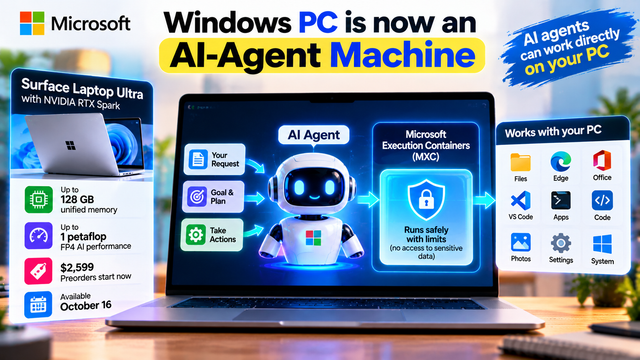
Microsoft Turns Windows PCs Into AI-Agent Machines
Microsoft is changing the role of the Windows PC.
Instead of treating artificial intelligence as something that lives mainly inside a browser or cloud service, Microsoft is building Windows into a platform where AI agents can run locally, use applications and files, and perform computer-based tasks inside controlled security boundaries.
Microsoft announced this new direction on October 7 as part of its Windows vision for hybrid intelligence.
The central idea is simple:
AI should be able to run locally when that makes sense and use the cloud when more computing power is required.
But there is another important part of the announcement.
AI agents are not just supposed to answer questions.
They are increasingly expected to take actions.
Microsoft says Windows is being built with containment, identity and manageability capabilities so organizations can control what agents access, understand which agent performed an action and govern agent activity at scale. Its Microsoft Execution Containers (MXC) are now generally available on Windows.
That could make the Windows PC a much more important part of the agentic AI ecosystem.
From chatbot to computer agent
The traditional AI workflow looks like this:
User → asks question → AI → gives answer
For example:
“Write Python code that analyzes this CSV.”
The AI generates the code.
But an AI agent works differently.
The workflow could become:
User → gives goal → AI agent → reads files → uses tools → runs code → checks results → completes task
That is a significant change.
The AI is no longer just producing text.
It is interacting with the computer.
Microsoft's Windows agent platform specifically describes agents that can inspect code, call tools, update files and help complete development tasks.
This is why operating-system support becomes important.
If an AI can actually operate a computer, the operating system needs to know what that AI is doing.
What are Microsoft Execution Containers?
This is where Microsoft Execution Containers, or MXC, come in.
MXC provides an operating-system-level containment layer for AI agents.
Microsoft says developers and IT teams can define what an agent is allowed to access and do, while Windows applies those policies during execution.
For example, an organization could potentially restrict an agent's access to:
specific files
network resources
applications
system capabilities
code execution
other operating-system resources
This is important because autonomous software creates a different security problem from traditional applications.
A normal application follows a predetermined set of functions.
An AI agent can dynamically decide what action to take next.
That flexibility is powerful, but it also creates risk.
Why agent security matters
Imagine giving a coding agent access to your entire PC.
You tell it:
“Find the bug in my project and fix it.”
The agent might need to:
Read the project files
Inspect the source code
Search for related files
Run commands
Modify code
Run tests
Inspect test results
Make another change
Repeat until the problem is solved
This could be extremely useful.
But what if the same agent accidentally accesses a private folder?
What if generated code runs a dangerous command?
What if a tool call sends sensitive information to a network service?
These are exactly the types of problems that make agent containment important.
Microsoft says Windows can provide controls for local file access, network access and managed-service access, while human confirmation can remain part of workflows for sensitive actions.
So the goal isn't simply:
“Let AI control the computer.”
It is:
“Let AI control the computer inside boundaries.”
Windows is becoming an agent platform
This is probably the biggest part of Microsoft's announcement.
Microsoft isn't treating agents as another application that runs on top of Windows.
It is increasingly building Windows itself around the requirements of agentic computing.
Microsoft describes Windows as a platform that combines:
Local execution + cloud integration + identity + containment + manageability
That combination is what the company calls hybrid intelligence.
An AI task could therefore be handled in different ways depending on what is most appropriate.
A lightweight task could run locally.
A sensitive task could remain on the device.
A large reasoning workload could use a cloud model.
An agent could potentially combine local and cloud capabilities.
The user doesn't necessarily have to think about where every computation happens.
The new Surface Laptop Ultra
Microsoft is also releasing hardware designed around this new AI direction.
The Surface Laptop Ultra is built around NVIDIA's RTX Spark platform and can be configured with up to 128GB of unified memory and up to 1 petaflop of AI compute. Microsoft opened preorders starting at $2,599, with availability beginning October 16.
The hardware is designed for creators, developers and AI builders who need more local computing power.
The important part is the combination.
It's not just:
Powerful laptop
It is:
Powerful local hardware + local AI models + Windows agent infrastructure
That combination is much more interesting.
Why 128GB of unified memory matters
Large AI models need a lot of memory.
On conventional computers, CPU memory and GPU memory can create separate constraints.
RTX Spark uses a unified-memory architecture where CPU and GPU can share the memory pool.
Microsoft says the Surface Laptop Ultra can have up to 128GB of unified memory, allowing it to handle larger local AI models and demanding workloads.
This makes local AI more practical for developers who want to experiment with larger models without sending every request to a cloud service.
Microsoft's current RTX Spark Windows lineup is explicitly positioned for local AI, intelligent orchestration and secure AI workflows.
Local AI without giving up the cloud
Microsoft isn't saying that every AI task should run locally.
Instead, it is promoting a hybrid model.
Think of it like this:
Small task → local AI
Private document → local AI
Local coding task → local agent
Large reasoning workload → cloud AI
Heavy computation → cloud
The system can potentially choose the most suitable environment.
Microsoft says its hybrid-intelligence approach combines intelligent routing, local models and performance runtimes so tasks can run in the appropriate environment.
This could provide a balance between privacy, cost, latency and model capability.
GitHub Copilot is part of the shift
Developers are one of the biggest target audiences for this technology.
Microsoft says GitHub Copilot on Windows is being designed to intelligently balance local and cloud AI resources for supported coding workflows.
That means a future coding workflow could look very different.
Instead of:
Developer → prompt → cloud model → code
it could become:
Developer → goal → coding agent → local model/cloud model → tools → code → tests
The agent can work inside a controlled execution environment.
Microsoft's documentation describes coding agents that can inspect code, call tools, update files and complete development tasks while operating within Windows security boundaries.
For developers, this could reduce repetitive work such as searching through repositories, running commands, testing changes and fixing straightforward errors.
What does this mean for creators?
The same concept goes beyond coding.
Imagine a creator has thousands of photos, videos and project files stored on a PC.
A local agent could potentially help organize those files, search for specific assets, prepare project folders or automate repetitive workflows.
A designer could use an agent alongside creative applications.
A video editor could eventually have an agent prepare assets and organize a project.
A freelancer could use an agent to manage files, prepare documents and automate routine tasks.
The important point is that the AI is operating closer to the user's actual workspace.
Instead of constantly uploading files to a chatbot, the agent can potentially work with the local environment — subject to permissions and the capabilities of the specific agent.
Privacy becomes a bigger advantage
Local AI can also provide an important privacy benefit.
If a model runs directly on the PC, some workloads can be processed without sending the underlying data to a cloud service.
That can be valuable for:
private documents
source code
business files
creative projects
internal company information
However, local AI does not automatically mean every action is private.
An agent may still use cloud services, network connections or external APIs depending on its configuration.
That's why Microsoft's containment and governance approach is important.
The goal is to give users and organizations visibility and control over what agents can access.
The bigger opportunity for India
This shift could eventually be important for Indian developers, startups and businesses.
India has a large developer ecosystem and a rapidly growing AI adoption market.
Many businesses want AI automation but also have concerns around sensitive information, operational control and cloud costs.
Local AI agents could provide another option.
A startup could run certain development or document workflows locally.
A creator could process sensitive project files on-device.
A developer could use local models for repetitive coding tasks.
An enterprise could define policies controlling what agents are allowed to access.
The hardware cost is currently a major limitation, especially for students and small businesses.
The Surface Laptop Ultra starts at $2,599 in the U.S., while Microsoft's RTX Spark Dev Box starts much higher at $5,999.
So this isn't yet a mainstream replacement for affordable cloud AI.
But the architecture is important.
As local hardware becomes more powerful and AI models become more efficient, these capabilities could eventually reach less expensive PCs.
The real story isn't the laptop
The Surface Laptop Ultra is the most visible product in Microsoft's announcement.
But the bigger story is the software architecture behind it.
Microsoft is effectively saying:
The PC can become a place where AI agents actually work.
The agent can have a goal.
It can use tools.
It can access approved files.
It can execute code.
It can interact with applications.
And Windows can provide a security boundary around those actions.
That is a much bigger change than simply putting a chatbot inside Windows.
Cloud AI → Local AI → Agentic AI
The evolution can be summarized in three stages.
Stage 1: Cloud AI
You send a prompt to a remote model.
Prompt → Cloud → Answer
Stage 2: Local AI
The model runs directly on your computer.
Prompt → Local Model → Answer
Stage 3: Local Agentic AI
The AI can actually work on the computer.
Goal → Agent → Windows → Tools → Files → Apps → Result
Microsoft is now building infrastructure for that third stage.
And that's why the October 7 announcement matters.
The future Windows PC may not simply be a device where humans run applications.
It could become a controlled environment where humans and AI agents work together.
The important question is therefore changing.
It is no longer:
“Does my PC have AI?”
It is:
“What can my AI agent safely do on my PC?”
Microsoft's new Windows direction suggests that the answer could soon be: much more than simply answering questions.