Google Is Turning Its Apps Into cinematical AI Workspaces
Google is bringing AI deeper into Gmail, Docs, Sheets and creative tools, turning everyday apps into smarter workspaces.
By @admin
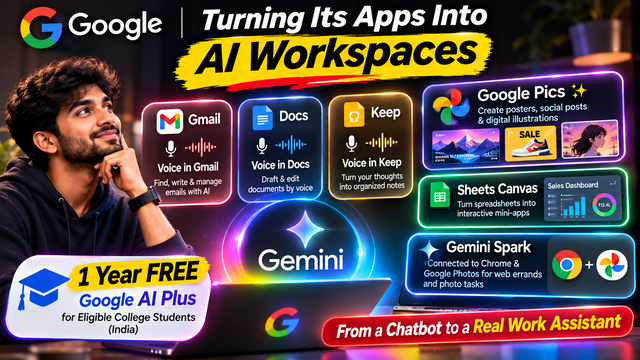
Google Is Turning Its Apps Into AI Workspaces
For years, using artificial intelligence at work usually meant opening a separate chatbot, typing a question, copying the answer and then pasting it into another application.
You might ask an AI tool to write an email, then open Gmail to send it. You might ask it to analyse a spreadsheet, then move the results into Google Sheets. You might generate an image in one platform, download it and upload it somewhere else.
That workflow is changing.
Google's September 9, 2026 update to its AI subscription plans highlights a bigger direction for the technology industry: AI is moving closer to the applications where people already spend their time.
Gmail, Google Docs, Keep, Sheets, Chrome and Google Photos are becoming more connected to AI-powered assistance. Some tools can help users create content, others can organise information, and some are designed to carry out tasks with less manual work.
The important development is not just that Google has added more AI features. It is that the company is trying to make AI a working layer across everyday software.
1. Gmail, Docs and Keep are getting voice-powered assistance
One of Google's most practical additions is the expansion of voice capabilities across Gmail, Google Docs and Google Keep.
Think about how much time people spend writing emails, searching through old messages, preparing documents and capturing quick ideas.
Instead of doing everything manually, users can increasingly speak naturally to these applications.
In Gmail, voice interaction can help users find information in their inbox. Imagine asking for details from an earlier conversation instead of scrolling through dozens of messages.
In Google Docs, voice features can help users draft and develop documents. This could be useful when someone has an idea but does not want to type the entire first draft.
Google Keep can also turn spoken thoughts into more organised notes and lists. A quick voice note could become a structured record of tasks, reminders or ideas.
For students, this could make it easier to capture lecture points. For creators, it could help collect content ideas while working on something else. For business owners, it could make everyday communication less time-consuming.
However, these capabilities are not included in every plan. Google's announcement lists voice features in Gmail and Keep for AI Plus, Pro and Ultra subscribers, while the Docs voice feature is listed for AI Pro and Ultra.
The larger idea is simple: people should be able to interact with their productivity tools in a more natural way.
2. Google Pics brings visual creation into the workflow
The second major addition is Google Pics, an image creation and editing tool available through Google Workspace for eligible AI subscribers.
Visual content has become essential for businesses, social media creators, marketers and educators.
A small business might need a promotional poster. A creator might need a social media graphic. A teacher might need an illustration to explain a concept.
Traditionally, these tasks could involve opening a separate design application, searching for templates, generating images elsewhere and moving files between platforms.
Google Pics aims to make parts of that process easier by bringing visual creation and editing into the Google ecosystem.
The tool is designed for tasks such as creating posters, producing social media posts and editing digital illustrations.
For content creators, the potential benefit is reduced switching between applications. A person working on a document or project may be able to create or refine supporting visuals without leaving the broader workflow.
But there is an important limitation: Google's September announcement lists Google Pics for AI Pro and AI Ultra subscribers. It is not a feature that every free Google account automatically receives.
The bigger trend is that AI image creation is becoming part of productivity software rather than remaining a separate creative experiment.
3. Google Sheets Canvas can turn spreadsheets into mini-apps
This may be one of the most interesting features for students, small businesses and people who work with data.
Spreadsheets are powerful, but they can also become complicated. A person may have hundreds of rows of information and still struggle to turn that information into something easy to use.
Google's Sheets Canvas is designed to help users transform spreadsheet data into custom, interactive mini-apps using prompts.
For example, imagine a student maintaining a spreadsheet of subjects, assignments, deadlines and completed tasks.
Instead of looking at rows and columns every day, the student could use a prompt to create an interactive study tracker.
A small business could start with a sales spreadsheet and create a more convenient interface for monitoring performance.
A team could use spreadsheet data to build a dashboard or a tool for organising schedules.
The key difference is that users are not limited to asking AI to explain the spreadsheet. The feature aims to help turn the information into a more usable interactive experience.
This could make spreadsheet-based workflows more accessible to people who do not know how to build a full application.
However, a generated mini-app should not automatically be treated as production-ready software. Users still need to check calculations, test interactions and verify that the underlying spreadsheet data is correct.
Sheets Canvas is listed for Google AI Pro and Ultra subscribers.
4. Gemini Spark is moving towards task execution
Perhaps the most ambitious part of Google's announcement is Gemini Spark.
The idea behind an AI assistant is evolving. Instead of only answering questions, an assistant should be able to help complete tasks.
Google says Gemini Spark is connected with Chrome and Google Photos, allowing it to help with web errands, photo editing and album curation.
Consider a simple example.
You need to find information across websites. A traditional chatbot might explain how to search, but an agent-style assistant aims to help with the actual browsing task.
Or imagine having hundreds of photographs. Instead of manually going through every image, an AI assistant could help organise or curate albums.
This represents a move from conversational AI towards action-oriented AI.
But there is a major availability detail. Google's September 9 announcement lists these Gemini Spark integrations for AI Pro and Ultra subscribers in the United States.
That means users in India should not assume that every Chrome and Photos capability described in the announcement is already available to them.
Availability can vary by country, plan and rollout.
Even with that limitation, the direction is significant. AI companies are competing to build assistants that can understand a user's goal, interact with software and help carry out multiple steps.
5. Eligible college students in India can get a free year of Google AI Plus
The announcement also matters to students.
Google says eligible college students around the world can receive one year of a Google AI plan at no charge.
For India, Google's student offer specifies one year of Google AI Plus free of charge for eligible students.
The India announcement describes benefits including access to Gemini Omni, higher Gemini usage limits and 400 GB of storage.
Students should check the official eligibility requirements and offer terms before signing up. A free first year does not necessarily mean the subscription remains free forever. Google's India offer states that the plan can automatically become a paid subscription after the free period unless it is cancelled.
This matters because AI tools can be useful for more than writing assignments.
Students can use AI to understand difficult concepts, organise study material, brainstorm project ideas, summarise information and prepare structured notes. The value comes from using the tools to learn and work more effectively, not simply asking AI to complete every task.
For students who are eligible, the offer provides an opportunity to explore Google's AI ecosystem without paying the subscription price during the initial year.
6. What this means for Indian creators and businesses
The most useful way to understand these updates is to look at everyday work.
A digital marketer may need to write campaign emails, create posters, analyse performance data and prepare reports.
A student may need to organise notes, track assignments and understand complex subjects.
A creator may need to develop content ideas, prepare social media graphics and organise large collections of images.
A small business owner may need to manage customer communication, sales records and marketing material without hiring a large team.
AI-powered features inside existing applications could reduce the time spent switching between tools and performing repetitive tasks.
For example, a creator could use voice assistance to capture ideas, a visual tool to develop campaign graphics and spreadsheet features to organise content schedules.
A student could use a spreadsheet-based tracker to manage deadlines and a voice tool to capture lecture notes.
A business could use AI assistance to organise information and create an initial version of a report.
These are practical possibilities, but they are not all guaranteed to be available to every user under every subscription. The features need to be checked against the user's plan, country and account eligibility.
There is also a skill gap to consider. People who know how to describe a task clearly, verify AI output and build repeatable workflows will get more value than people who simply open a tool and experiment randomly.
7. The bigger competition: AI that works inside your software
Google is not the only company moving in this direction.
Across the technology industry, AI products are becoming more integrated with browsers, office software, communication tools and creative applications.
The competition is shifting from a simple question—whose chatbot gives the best answer?—towards a more practical one:
Which AI assistant can help users complete real work reliably?
That is a much harder challenge.
An assistant that drafts an email is useful. An assistant that understands the context, prepares the right draft, checks the relevant information and lets the user review it before sending could be even more useful.
An AI tool that explains spreadsheet data is helpful. A tool that can turn that data into a working interactive interface could save more time.
But these capabilities also introduce new responsibilities.
Users need to consider privacy, permissions, accuracy and control. An AI assistant working with emails, documents, photographs or business information may be handling sensitive data.
People should understand what information an application can access, check the output before relying on it and keep human approval for important decisions.
More automation is not automatically better if the system makes mistakes or takes actions without adequate oversight.
8. What should users do next?
You do not need to subscribe to every AI plan or use every new feature.
Start with one repetitive task in your daily routine.
If you spend too much time searching emails, explore the available Gmail assistance features.
If you regularly create posters or social media graphics, examine whether Google Pics is included in your plan.
If you work with spreadsheets, test whether Sheets Canvas can turn one of your existing workflows into a more convenient interactive tool.
If you are a student in India, check whether you qualify for Google's one-year AI Plus offer.
And if you are interested in Gemini Spark, verify its availability in your country before planning a workflow around it.
The most useful AI tool is not necessarily the one with the most impressive demonstration. It is the one that reliably saves time on a task you actually perform.
Final thought
Google's September 9 update is another sign that AI is moving beyond standalone chatbots.
The next generation of productivity software may not simply wait for users to click buttons, open menus and move information between applications. Instead, users will increasingly describe what they want to accomplish, while AI helps prepare the work, organise information and carry out selected actions.
That does not mean traditional applications are disappearing. It means the way people interact with them is changing.
For students, creators, marketers and businesses, the opportunity is to learn how to use these capabilities responsibly and turn them into practical workflows.
The future of AI may not be another chatbot you open every morning.
It may be an assistant already working inside the apps you use every day.