GitHub Copilot Retires 6 AI Models on October 19
GitHub Copilot will retire six AI models on October 19, 2026. See the replacement models and steps developers should take before the deadline.
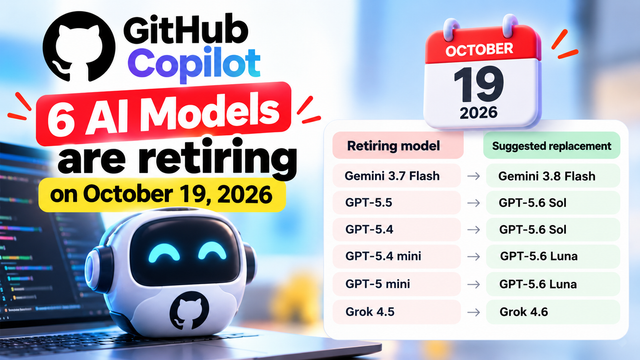
GitHub Copilot Is Retiring Six AI Models: What Developers Need to Know
GitHub Copilot users have an important date to remember: October 19, 2026. According to GitHub's announcement published on September 18, six AI models are scheduled for retirement across Copilot experiences, including chat, inline edits, agent mode and code completions.
This matters because developers often build their daily coding routines around a particular AI model. They may use one model to explain complicated code, another to generate functions, and another to help an AI coding agent complete a multi-step task. When a model is retired, users may need to switch to a supported alternative to keep their workflow running smoothly.
GitHub has listed suggested replacement models for all six retiring models. Developers should review those recommendations, check their own settings and test the alternatives before the announced deadline.
What exactly is changing?
GitHub Copilot is an AI coding assistant that helps developers write, understand, edit and troubleshoot code. Depending on the product experience and account setup, developers can use it for conversational assistance, inline code suggestions and more complex agent-driven tasks.
AI coding assistants can offer access to different models. Each model may behave differently: one might be useful for quick coding suggestions, while another might be better suited to longer reasoning tasks or complex programming problems.
GitHub's announcement identifies six models that are scheduled to be retired on October 19, 2026. The announced replacement mapping is:
Retiring model | Suggested replacement |
|---|---|
Gemini 3.7 Flash | Gemini 3.8 Flash |
GPT-5.5 | GPT-5.6 Sol |
GPT-5.4 | GPT-5.6 Sol |
GPT-5.4 mini | GPT-5.6 Luna |
GPT-5 mini | GPT-5.6 Luna |
Grok 4.5 | Grok 4.6 |
These are the replacement suggestions listed in the announcement. Developers should refer to GitHub's official notice for the applicable availability and product details rather than assuming that every model is available in every Copilot plan or environment.
When does the retirement happen?
The announced date is October 19, 2026.
Until that date, users should review their model selections and identify any projects, workflows or personal instructions that depend on the retiring models. Waiting until the final day can create unnecessary pressure, particularly for people working on assignments, team projects, client deliverables or production software.
The practical goal is simple: identify the affected models early, switch to the recommended alternatives where appropriate, and test the results before relying on them for important work.
Which Copilot experiences are affected?
GitHub's announcement covers several Copilot experiences. Understanding them helps developers check the right parts of their workflow.
1. Copilot Chat
Copilot Chat lets developers ask questions about programming, request explanations, investigate errors and discuss possible solutions.
For example, a student learning Python might ask why a loop produces the wrong output. A professional developer might ask for an explanation of an unfamiliar function or help understanding a test failure.
If a retiring model is selected for a chat workflow, the developer should review the model setting and choose an appropriate supported alternative before the deadline.
2. Inline edits
Inline editing helps developers modify code directly in their working context. They might ask Copilot to simplify a function, add input validation, rename variables or improve readability.
Changing models can affect the style and details of generated edits. After selecting a replacement, developers should inspect the proposed changes and run the relevant tests instead of automatically accepting every suggestion.
3. Agent mode
Agent mode can help with more involved coding tasks that require several steps. Depending on the environment and available capabilities, these tasks may involve exploring a codebase, editing files and helping developers work through a problem.
If your workflow uses one of the retiring models, test the recommended replacement on a small task first. Check whether it follows instructions, understands the project structure and makes changes that are easy to review.
4. Code completions
Code completions suggest code as developers type. These suggestions can speed up repetitive programming work and help developers explore unfamiliar APIs or syntax.
A model change may alter the suggestions a developer receives. After switching, pay attention to accuracy, relevance and how much manual correction is needed. The most useful model is not necessarily the one that produces the longest answer; it is the one that helps you write correct, maintainable code.
Why has GitHub listed replacement models?
A model retirement does not automatically mean that Copilot itself is shutting down. The announcement concerns selected AI models within Copilot experiences.
The suggested replacements give users a starting point for moving away from the retiring options. However, model names alone do not guarantee identical behaviour. Different models can interpret prompts differently, generate different implementations or vary in response speed.
For example, suppose you regularly ask Copilot to write unit tests for a Java application. After switching models, the replacement might structure the tests differently or make different assumptions about edge cases. That does not necessarily mean the new model is worse, but it does mean the output should be checked.
Treat the suggested replacement as a starting point, not as a promise that every response will remain identical.
What should developers do before October 19?
Here is a practical checklist for Copilot users.
Step 1: Identify your current model.
Open the Copilot experience you normally use and review the available model-selection controls. Check the settings relevant to chat, inline edits or agent workflows that you use. The exact interface can vary by product and account.
Step 2: Compare your selection with GitHub's retirement list.
Look for Gemini 3.7 Flash, GPT-5.5, GPT-5.4, GPT-5.4 mini, GPT-5 mini and Grok 4.5. If your workflow uses one of these models, review GitHub's official replacement recommendation.
Step 3: Select the suggested replacement where available.
Use the mapping in the official announcement to guide your choice. If a suggested model is not available in your environment, consult GitHub's current documentation or administrator guidance rather than assuming access.
Step 4: Test with familiar tasks.
Try a few representative prompts that you already know how to evaluate. Ask the model to explain a function, generate a small code change, suggest a unit test or help diagnose a known error.
Step 5: Review code before accepting it.
Check the output for correctness, security issues, missing edge cases and consistency with your project's coding standards. Run tests and inspect the final changes. AI-generated code still requires human review.
Step 6: Update team documentation.
If you work in a group, let teammates know which model is being retired and which replacement is recommended. Update internal instructions, onboarding notes and any documented model preferences.
Step 7: Recheck the official announcement.
Before the deadline, review GitHub's source for any updates about availability, eligibility or the retirement process. This is especially important for teams that depend on Copilot in their daily development workflow.
What does this mean for students in India?
For Indian computer science students, engineering students and beginners learning programming, Copilot can be a useful learning assistant. It can explain code, suggest examples, help investigate errors and provide ideas for practising a new language.
The retirement announcement is an opportunity to build a better habit: understand which AI tools you use and know how to change your workflow when those tools evolve.
Students working on C, C++, Java, Python, web development or machine-learning projects can prepare a small set of practice questions and compare how the replacement model responds. For example, ask it to explain a recursion problem, suggest test cases for a sorting function or identify why a simple API request fails.
Do not use AI-generated answers as a substitute for understanding the underlying concepts. Read the code, test it and make sure you can explain your solution yourself. This is particularly important for academic assignments, where institutional rules may restrict how AI tools can be used.
What should startups and software teams consider?
For startups and software companies, a model change can affect consistency even when the coding assistant remains available. Teams may have shared prompts, coding conventions and review processes built around their existing model choices.
Before the deadline, engineering leads can identify affected workflows and run a small evaluation of the suggested alternatives. They can compare correctness on representative tasks, the amount of editing required, response speed and compatibility with their normal development process.
Teams should also keep security and privacy requirements in mind. Review AI-generated changes, avoid sharing secrets in prompts and follow company policies for source code and customer data. A replacement model should be evaluated against the team's real requirements rather than selected only because its name sounds newer.
If a team uses Copilot through centrally managed settings, developers should coordinate with the relevant administrator. Individual users may not control every setting in an organisation's environment.
Will developers lose their entire Copilot service?
The announcement describes the retirement of six selected models, not the shutdown of GitHub Copilot as a whole.
The important question for an individual user is whether their particular model selection or workflow is affected. Users who do not rely on these retiring models may not need to make the same changes, but they should still check the official announcement for the scope that applies to their setup.
Also, do not assume that every feature, plan or account has exactly the same model availability. Availability can depend on the product experience and account configuration. GitHub's official announcement and current documentation should be treated as the source of truth.
Final takeaway
GitHub Copilot's announced retirement of six AI models on October 19, 2026, is a reminder that AI development tools continue to change. The company has provided suggested replacements, but developers should take time to review their settings and verify that their normal tasks still work well after switching.
If you use Copilot for college projects, freelance development, startup work or professional software engineering, check your current model, compare it with the retirement list and test the recommended alternative before the deadline. A little preparation now can help you avoid last-minute surprises.
Official source: GitHub Changelog — Upcoming deprecation of selected GitHub Copilot models in mid-October.
Always consult the original announcement for the latest details about affected models and their replacements.