GitHub Copilot Can Now Use Local Ollama Models
GitHub Copilot CLI can discover Ollama models running locally, giving developers a new local AI coding workflow.
Source: https://www.how2shout.com/news/github-copilot-local-sandboxing-ollama-models.html
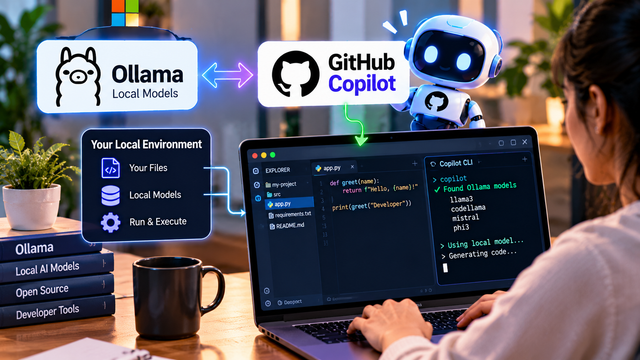
GitHub Copilot Can Now Use Local Ollama Models
GitHub Copilot is becoming more flexible for developers who want to work with AI models running on their own computers.
GitHub has made local sandboxing for Copilot generally available, while Copilot CLI can now discover and use models running through Ollama. This creates an interesting new workflow where a developer can combine Copilot with locally running AI models instead of relying exclusively on cloud-based models for every coding task.
The basic idea is:
Copilot → Ollama → Local AI model → Developer environment
This is important because local AI has been gaining attention among developers who want more control over their tools, models and data.
What is changing?
GitHub Copilot is an AI coding assistant designed to help developers write, understand and modify code.
Ollama, meanwhile, makes it possible to run supported AI models locally on a computer.
With the latest Copilot CLI capabilities, developers can discover models available through Ollama and use them as part of their coding workflow.
That means a developer could have a local model running on their own machine and interact with it through a developer-focused AI workflow.
Instead of the simple model of:
Developer → Cloud AI → Code
the workflow can also become:
Developer → Copilot CLI → Local Ollama model → Local development environment
This gives developers another option when deciding how they want to run AI-assisted coding tasks.
Why local AI matters
Running AI models locally has several potential advantages.
The first is control.
Developers can decide which models they install and use. They can experiment with different open models without depending entirely on a single cloud provider.
The second is flexibility.
Local models can be useful for experimentation, development and tasks where a developer wants to keep parts of their workflow closer to their own machine.
The third is cost management.
Depending on the model and hardware, running a model locally can reduce the need for repeated cloud API calls. However, local AI still has costs because capable models can require significant RAM, GPU power, storage and electricity.
Local does not automatically mean free.
Copilot and Ollama create an interesting combination
GitHub Copilot and Ollama serve different roles.
Copilot is designed around developer assistance and coding workflows.
Ollama provides a way to run AI models locally.
Combining them creates a bridge between AI coding tools and local models.
For developers, this can make local AI more practical.
A developer could install an Ollama-compatible model, run it locally and then use Copilot CLI to discover available models.
The workflow could look something like:
Install Ollama → run a local model → open Copilot CLI → discover the model → select it → work on a coding task
This is especially interesting for developers who regularly experiment with different AI models.
Local does not mean completely offline
There is one important detail that should not be missed.
It would be incorrect to describe this announcement by saying:
“GitHub Copilot is now completely offline.”
That is too broad.
The ability to use a local Ollama model does not mean every part of the Copilot experience automatically runs without network connections or external services.
There can still be network, authentication and service-related requirements depending on the specific Copilot feature and workflow being used.
So the more accurate description is:
“GitHub Copilot can now work with AI models running locally through Ollama.”
That is a much safer and more precise claim.
What is local sandboxing?
Another important part of the announcement is Copilot's local sandboxing capability.
A sandbox is an isolated environment designed to limit what software or an AI agent can access while it performs tasks.
This matters because modern coding agents can do more than generate code.
They may read project files, execute commands, modify files and interact with development tools.
Giving an AI system these capabilities without boundaries could create security risks.
A local sandbox can provide a controlled environment in which agentic coding tasks can be executed.
The general idea is:
AI agent → sandbox → limited tools and files → coding task
rather than:
AI agent → unrestricted access to computer
This distinction becomes increasingly important as AI coding tools become more capable.
Why developers are interested
Traditional AI coding assistants mostly focused on generating code from prompts.
Modern coding agents are moving toward more autonomous workflows.
A developer can give an agent a task such as fixing a bug, modifying several files or implementing a feature.
The agent can then inspect the project, reason about the task, edit files and potentially execute commands.
When local models and local sandboxing become part of that environment, developers get more flexibility over where parts of the workflow run.
This is one reason local AI is becoming increasingly interesting for programmers.
A new developer workflow
Imagine a student building a Python project.
Instead of manually writing every function, the student could use an AI coding workflow to understand the existing project, generate code and suggest changes.
With a local Ollama model available, the developer can experiment with local inference as part of the workflow.
The simplified process becomes:
Project → Copilot CLI → Ollama → Local model → Code changes → Testing
The developer remains in control of the project while AI assists with different stages.
This can be particularly useful for learning because students can experiment with models and coding agents rather than treating AI as a black box.
What this means for privacy
Privacy is another reason developers may be interested in local models.
If a model itself runs locally, its inference does not need to be sent to a remote model provider simply for that inference.
However, developers should not assume that this means the entire surrounding application is private.
Other parts of a development tool may still communicate with external services.
The correct approach is to understand exactly what data each component sends and receives.
Developers working with sensitive source code should check the documentation, configuration and data-handling policies of the tools they use.
Local inference can improve control, but it is not a universal privacy guarantee.
Hardware still matters
There is also a practical limitation.
Running AI models locally requires suitable hardware.
Small models can run on relatively ordinary computers, while larger and more capable models can require substantial memory and GPU resources.
Performance can vary significantly depending on the model, quantization, processor, GPU and available RAM.
For developers with powerful machines, local AI can be very practical.
For users with older laptops, cloud models may still provide a better experience.
This means local AI is not automatically the best option for everyone.
Why this matters for Indian students
This development is particularly interesting for students learning programming and AI.
Many students want to experiment with AI coding tools but may have limited access to expensive cloud services.
Local models provide another way to learn about LLMs, coding agents and AI-assisted development.
A student with a capable laptop can experiment with different models and understand how AI systems work closer to the development environment.
It can also help students learn an important concept:
AI is not only a website you chat with.
It can be a model running on a computer, connected to software tools and integrated into a development workflow.
What this means for developers
For professional developers, the biggest benefit may be flexibility.
Instead of treating cloud AI and local AI as competing choices, developers can potentially use both.
A cloud model may be useful for a complex task.
A local model may be useful for experimentation or certain development tasks.
Different models can be selected depending on performance, cost, privacy requirements and hardware availability.
This creates a more flexible AI development environment.
The bigger trend
The GitHub Copilot and Ollama development is part of a larger shift toward local and hybrid AI.
The future of developer AI may not be:
Cloud AI only
or
Local AI only
Instead, developers may use a combination of:
Local models + cloud models + AI agents + development tools + sandboxing
The important question will be which model should handle which task.
That could eventually make AI coding environments much more adaptable.
What creators should say about this news
The strongest content angle is not:
“GitHub Copilot is now completely offline.”
That statement is too broad.
A better headline is:
“GitHub Copilot can now work with AI models running on your own PC.”
That immediately communicates the interesting part without overstating the privacy or offline capabilities.
A simple Reel can demonstrate the concept visually:
Ollama model → Copilot CLI → coding task → local development environment
Then explain that local model support gives developers another option, but does not automatically make the entire Copilot experience offline.
Final takeaway
GitHub Copilot's integration with local Ollama models is another sign that AI coding is becoming more flexible.
Developers are no longer limited to thinking about AI as a remote chatbot.
AI models can increasingly run locally, connect to developer tools and participate in coding workflows.
At the same time, local execution should not be confused with complete offline operation or guaranteed privacy.
For developers, the real opportunity is choice.
Cloud AI when you need it.
Local AI when it makes sense.
AI agents when automation helps.
Sandboxing when safety matters.
That combination could become an important part of the next generation of AI-powered development environments.