Claude Can Now Edit Google Docs, Sheets and Slides
Claude can edit Google Docs, Sheets, and Slides directly. Discover its AI writing, spreadsheet, and presentation features, beta access, and limitations.
Source: https://claude.com/es/resources/articles/claude-now-works-in-google-docs-sheets-and-slides
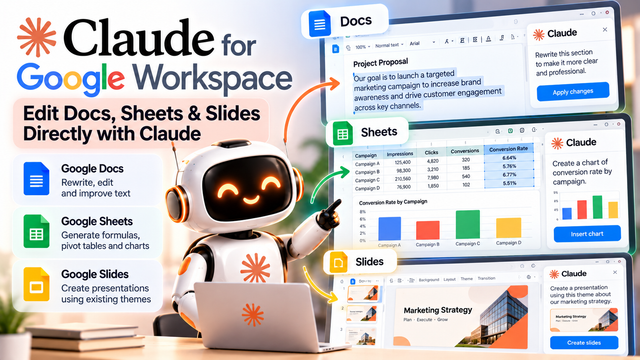
Claude Can Now Edit Google Docs, Sheets and Slides Directly: What You Need to Know
Introduction
Artificial intelligence is becoming a useful assistant for writing, data analysis, and presentation design. However, many people still need to move between different applications to complete their work. They may ask an AI chatbot to rewrite a paragraph, copy the result into a document, switch to a spreadsheet to analyse data, and then create a presentation using the findings.
This repeated process can take time, especially for students, creators, freelancers, and professionals who regularly work with multiple files.
On October 6, 2026, Anthropic introduced Claude for Google Workspace, bringing Claude's capabilities into Google Docs, Sheets, and Slides through an integrated sidebar. According to the announcement supplied by Claude, the feature entered public beta for eligible paid Claude plans.
The integration is designed to help users work directly within their existing documents, spreadsheets, and presentations instead of constantly copying content between an AI assistant and separate applications.
This development is part of a broader trend toward AI assistants that work inside everyday productivity software. Rather than simply generating suggestions in a separate chat window, these assistants can help users modify and organise their work where it already exists.
What Is Claude for Google Workspace?
Claude is Anthropic's AI assistant. It can help with tasks such as writing, summarisation, reasoning, coding, and information analysis.
Google Workspace includes productivity applications such as Docs, Sheets, Slides, Drive, and Gmail. These tools are widely used for writing reports, maintaining records, analysing information, and preparing presentations.
The Claude integration described in the announcement focuses on Google Docs, Sheets, and Slides. It allows users to interact with Claude through a sidebar while working in the file currently open.
For example, a user working on a report could ask Claude to rewrite a paragraph in a more professional tone. Someone using a spreadsheet could request help with formulas or charts. A person preparing a presentation could ask for slides that follow an existing theme.
The key idea is that Claude can assist with the content inside the relevant application rather than requiring the user to repeatedly copy information into a separate chat.
The integration is in beta, so its capabilities, limitations, and behaviour should be checked against the current Claude Help Center documentation before relying on it for important work.
1. Google Docs: Edit and Improve Documents
Google Docs is used for assignments, reports, proposals, meeting notes, research summaries, and many other types of writing.
Writing a document involves more than producing the first draft. Users often need to improve sentence structure, correct grammar, reorganise sections, shorten explanations, and maintain a consistent tone.
With Claude available through the Docs sidebar, users can request help with editing the document they are working on.
How students could use it
Imagine a college student preparing an assignment about artificial intelligence. The initial draft contains long sentences, repeated ideas, and unclear explanations.
The student could ask Claude to improve readability, organise the paragraphs, and explain complicated concepts in simpler language. They could then review the proposed changes and ensure that the final document accurately reflects their understanding.
How professionals could use it
A business employee preparing a project proposal might ask Claude to make the introduction clearer, improve the executive summary, or reorganise a section into concise bullet points.
These tasks can make document preparation more efficient, particularly when the user already has an existing draft.
However, AI editing does not remove the need for proofreading. Names, dates, figures, quotations, and important commitments should be checked before the document is submitted or shared.
2. Google Sheets: Work With Formulas, Pivot Tables, and Charts
Google Sheets helps users organise data, calculate results, identify trends, and create visual reports.
Spreadsheet work can become challenging when the data contains many rows or requires formulas that the user does not know how to write.
According to the supplied announcement, Claude's Workspace integration can assist with formulas, pivot tables, and charts.
Example: Analysing an Instagram campaign
Imagine a creator tracks four campaigns in a spreadsheet. Each campaign has impressions, clicks, and conversions.
The creator wants to calculate the conversion rate, compare campaign performance, and create a chart.
A suitable prompt might be:
"Calculate the conversion rate for each campaign using conversions divided by clicks. Identify the highest-performing campaign, explain the results, and create a chart comparing conversion rates."
Claude can help construct the analysis within the supported workflow. The user should still check that the correct columns and formulas are being used.
What are pivot tables?
A pivot table summarises larger datasets by grouping information into categories. For example, a student could use a pivot table to compare monthly expenses, or a business could summarise sales by product category.
AI assistance can make it easier to request a summary without memorising every spreadsheet operation.
Why verification matters
Spreadsheet mistakes can produce misleading results. A formula may use the wrong denominator, exclude certain rows, or misinterpret blank cells.
Users should verify calculations, confirm that the intended data range was selected, and check that charts accurately represent the underlying information.
For financial, academic, or business-critical work, independent validation remains essential.
3. Google Slides: Create Presentations Using Existing Themes
Google Slides is commonly used for college presentations, business proposals, project reviews, training materials, and marketing reports.
Preparing a presentation requires several decisions: which points to include, how to organise the story, what information belongs on each slide, and how to maintain consistent formatting.
The Claude integration described in the announcement can help create slides using an existing presentation's layouts and themes.
This is useful because a presentation often needs to match an established visual style rather than introduce an entirely new design.
Example: Turning a report into a presentation
A student has completed a report on machine learning. They need a presentation with an introduction, key concepts, examples, advantages, limitations, and a conclusion.
The student could ask Claude to organise the material into a slide-by-slide outline and help create the slides using the existing presentation's theme.
A creator could similarly turn a campaign report into slides showing reach, engagement, audience growth, and recommendations.
The resulting presentation still needs human review. Users should check whether the slides contain accurate information, readable text, appropriate images, and a logical flow.
4. Direct Editing Through a Sidebar
One of the main advantages of this integration is the ability to interact with Claude while staying inside the file being edited.
Without an integrated workflow, a user might copy text from Docs into a chatbot, request a rewrite, copy the result back, and repeat the process for every section.
A sidebar can reduce this repeated switching by keeping the assistant close to the document, spreadsheet, or presentation.
The difference may seem small for a single sentence. However, it can become more useful when a user performs several related editing tasks during a long work session.
The exact actions Claude can perform depend on the open application, current integration capabilities, permissions, and beta limitations.
5. User Approval and Automatic Edits
Another important detail in the supplied announcement is the choice between requesting approval before ordinary edits and allowing those edits to be applied automatically.
The default is to ask for approval first.
This matters because editing a document or spreadsheet can affect existing work. Users may want to inspect proposed changes before accepting them, especially when working with important assignments, business records, or collaborative files.
Automatic editing can reduce interaction for routine tasks, but it also increases the importance of checking the outcome.
A sensible approach is to begin with approval enabled, test the feature on a copy of a non-sensitive file, and consider automatic edits only after understanding how the integration behaves.
Users should also review the relevant permissions and data-handling policies before connecting AI tools to confidential documents.
6. Important Limitations of the Beta
Although direct editing is useful, the feature should not be treated as a completely autonomous office worker.
The supplied Claude Help Center information identifies several limitations.
First, the sidebar works with the file currently open. This means users should not assume that the integration can independently manage every document across an entire workspace.
Second, closing the sidebar stops the active task. Users should therefore keep the relevant interface open while an operation is running and check whether the requested work has finished.
Third, the integration cannot create scheduled automations through this connection. It should not be confused with a system that automatically performs recurring tasks on a schedule.
The public beta status is another consideration. Features and behaviour may change as Anthropic develops the integration, so users should consult the current official documentation.
7. What Does This Mean for Indian Students and Creators?
For Indian college students, the integration could be useful when preparing assignments, organising research notes, analysing survey results, or developing presentations.
For example, a student could organise collected survey data in Sheets, create charts, and use the results to prepare a presentation. AI assistance may reduce repetitive formatting and drafting work, leaving more time for understanding the subject.
Content creators can explore spreadsheet analysis for tracking impressions, engagement, conversions, and content performance. They can then use the findings to prepare reports or campaign presentations.
Freelancers and small businesses may benefit from faster proposal preparation, clearer documentation, and more accessible data analysis.
However, access is not automatically free for every user. The announcement describes public beta access for eligible paid Claude plans, and availability may depend on the account, region, and setup.
Users should check the current eligibility requirements before planning a workflow around the integration.
8. Skills Developers and Students Should Learn
The arrival of AI assistants inside productivity software does not make foundational skills unnecessary.
Students and professionals will still benefit from learning spreadsheet formulas, data interpretation, document structure, presentation design, and critical thinking.
They should also learn how to write precise instructions, validate AI-generated outputs, protect confidential information, and recognise when human judgement is required.
For developers, this trend provides an example of how AI capabilities can be integrated into existing software workflows. It also raises practical questions about permissions, user approval, data access, error handling, and the reliability of automated edits.
These skills are valuable because the goal is not simply to use AI more frequently. It is to use AI effectively without sacrificing accuracy or control.
Conclusion
Claude's integration with Google Docs, Sheets, and Slides illustrates how AI assistance is moving directly into the applications people use for everyday work.
The announced capabilities include document editing, spreadsheet formulas and charts, and presentation creation using existing themes. A sidebar-based workflow can reduce the need to repeatedly copy content between separate applications.
For students, creators, freelancers, and businesses, this could make common productivity tasks more convenient. At the same time, beta limitations, account eligibility, data permissions, and the need to verify AI-generated work remain important.
The best way to evaluate the feature is to test it on a real but non-sensitive file, compare the results with the original, and measure whether it genuinely saves time.
Sources: Anthropic's Claude for Google Workspace announcement and the Claude Help Center guide to using Claude in Google Docs, Sheets, and Slides.