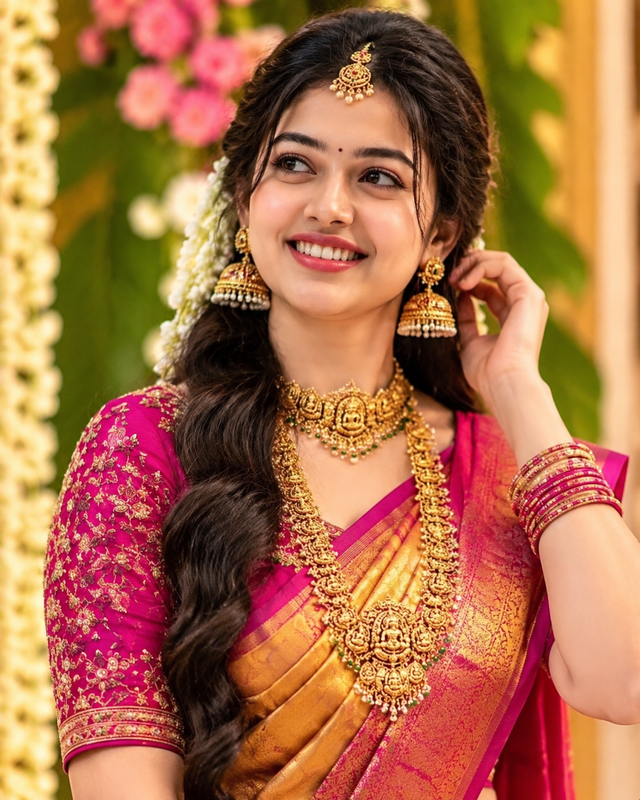
Ultra-Realistic South Indian Bridal Portrait AI Prompt – Golden Saree
Create a stunning, photorealistic South Indian bridal portrait featuring a golden silk saree, rich magenta blouse,
ABy @admin
- Views
- 2
- Copies
- 0
- Made for
- ChatGPT
- Difficulty
- beginner
- – likes
- – saves
- – shares
Create an ultra-realistic, high-resolution 4K-style portrait of a beautiful young adult South Indian woman dressed as a traditional bride during a festive wedding celebration. Give her a completely different, original face with unique facial features, natural skin texture, expressive dark eyes, a gentle smile, and realistic proportions.
She wears a luxurious golden silk saree with an intricate magenta-pink and gold brocade border, paired with a richly embroidered magenta blouse. Her long, thick, dark hair is styled in an elegant braid decorated with fresh white jasmine flowers. Add an ornate gold maang tikka, traditional temple-style jhumka earrings, an elaborate gold choker with green gemstone accents, a long antique gold necklace, and matching gold-and-magenta bangles.
Pose her naturally with one hand gently touching her earring while she looks slightly to the side with a warm, joyful smile. Use a beautiful wedding backdrop featuring yellow and white flower garlands, pink floral accents, lush green foliage, and soft natural bokeh.
Photography style: professional DSLR portrait photography, 85mm portrait lens, shallow depth of field, tack-sharp facial details, realistic silk texture, intricate jewellery craftsmanship, natural skin pores, soft golden-hour lighting, balanced highlights, cinematic colour grading, lifelike shadows, and premium editorial quality.
Composition: vertical 3:4 portrait, framed from the waist upward, with the face and jewellery as the main focus. Maintain realistic anatomy, natural hands, accurate jewellery placement, and detailed fabric embroidery. The final image should look like a professionally photographed South Indian bridal portrait, not a painting or cartoon.
Output: highest available image resolution, 4K-style detail, photorealistic finish, rich but natural colours, no text, no watermark, no logo, no distorted fingers, no duplicate jewellery, and no artificial plastic skin.
Creator's tips
For the best results, use ChatGPT Image generation or Google Gemini image generation. Specify a completely original face to create a different-looking model while keeping the bridal styling consistent. Upload a reference image only when you want to guide the outfit, pose, or background. Avoid excessive sharpening and oversaturated gold, which can make skin and jewellery look artificial.
Recreate this in 4 steps
- 1Copy the promptTap “Copy prompt”, or open it straight in ChatGPT.
- 2Make it yoursFill any blanks and add one-tap tweaks — your photo, aspect ratio, more cinematic light.
- 3Paste it into ChatGPTFor a personal likeness, upload your photo first, then paste the prompt.
- 4Refine and shareRegenerate a couple of times, keep your favourite, and share the result.
Questions people ask
It was written for ChatGPT, and also works in Gemini and Midjourney. Use the one-tap tweaks to adjust aspect ratio for each tool.
Yes. Upload your photo in the AI tool first, then add the “Keep my face” tweak before copying so the prompt asks it to keep your facial features.
Yes — every prompt on Prompt Mandi is free to copy. Check your AI tool's own terms before using generated images commercially.