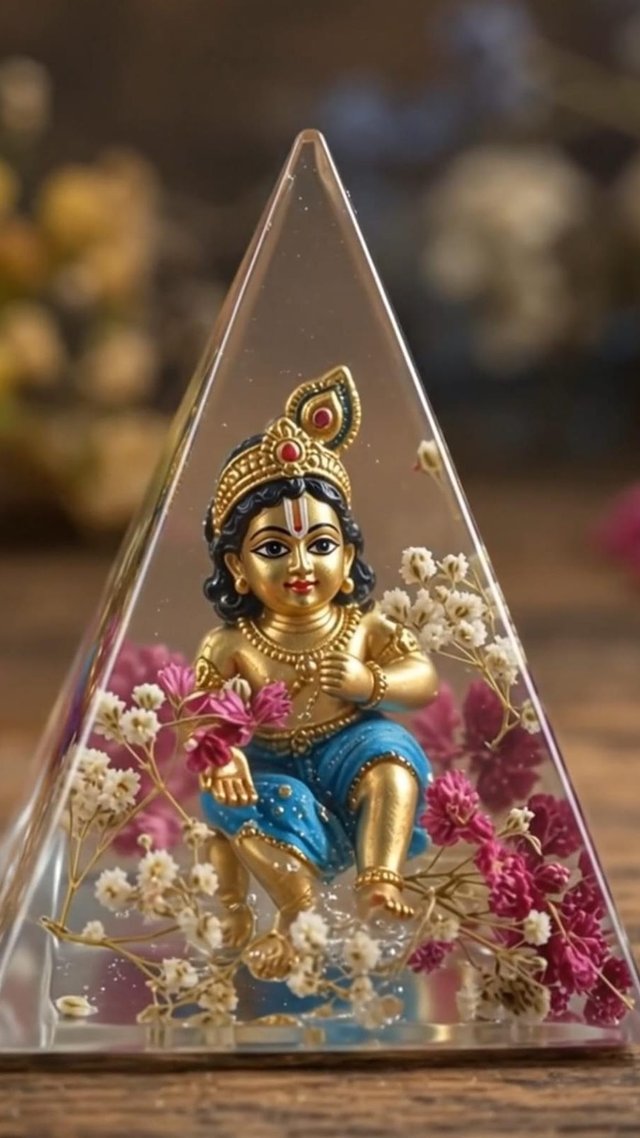
Turn your resin image into a seamless cinematic video! ✨🎨
Turn your resin-art image into one seamless cinematic video! ✨ Watch pouring, decorating, demoulding & the final reveal in stunning 9:16. 🎨
GBy @growwithsneha__
- Views
- 23
- Copies
- 0
- Made for
- ChatGPT
- Difficulty
- beginner
- – likes
- – saves
- – shares
step 1:image prompt below":
copy below give to chatgpt:
****************************************************************************


# 4-Panel Resin Art Process — Ready-to-Use Prompt

Create a **photorealistic cinematic 2×2 four-panel resin craft process image on a single page**.

**Object:** krishna
**Decorations:** flowers

Show the complete process naturally from **left to right, top to bottom**:

**Panel 1:** A realistic hand pours crystal-clear liquid resin into a **transparent inverted triangular pyramid silicone mould** containing the selected object, positioned upside down.

**Panel 2:** The **same object** remains in the same mould and resin while realistic hands use fine tweezers to carefully place the selected decorations around it.

**Panel 3:** After curing, realistic hands carefully remove the **same transparent silicone mould** from the resin artwork. The same object and decorations remain preserved inside the crystal-clear resin.

**Panel 4:** The completed **inverted triangular pyramid resin artwork** is displayed upright on the same rustic wooden table. The selected object is now upright inside the crystal-clear resin, surrounded by the same decorations.

### Strict Consistency

Use the **exact same object, mould, decorations, hands, table, camera angle, perspective, lighting, colors and background** throughout all four panels.

The mould must remain identical in **shape, proportions, size, orientation and position** in Panels 1–3. Do not change, rotate, resize, reshape or replace it.

The selected object and decorations must remain visually consistent throughout the entire process.

### Style

**Ultra-photorealistic professional macro photography, warm cinematic lighting, realistic human hands, rustic wooden worktable, glossy crystal-clear epoxy resin, realistic reflections and refractions, tiny natural air bubbles, realistic material textures, shallow depth of field, soft background bokeh, premium handcrafted resin-art photography.**

Use **thin white separators** between the four panels.

**No numbers, labels, text, logos or watermark. No different objects, different moulds, mould changes, rotation, resizing, distorted hands, extra fingers, cartoon style, CGI appearance or inconsistent lighting.**

******************************************************************************

step 2:open google flow
video prompt :

*****************************************************************************

Use the **uploaded 4-panel resin-art image as the primary visual reference**.

Create **ONE continuous cinematic video in vertical 9:16 format** that naturally animates all four panels as a single resin-art process. The four panels are **four stages of the same process, not four separate videos or unrelated shots**.

Use the uploaded reference image to determine the **exact object, decorations, mould, table, hands, background, colors, lighting and overall appearance**. If the user-selected object or decorations are different, follow the uploaded image exactly. **Do not assume or replace the object.**

### CONTINUOUS VIDEO SEQUENCE

**Scene 1 — Pour Resin**
Begin with the first stage from the reference image. A realistic hand slowly pours crystal-clear liquid epoxy resin into the **same transparent inverted triangular pyramid silicone mould**, containing the exact object shown in the reference. Keep the object positioned exactly as shown.

**Seamless transition → Scene 2 — Add Decorations**
Without cutting to a different setup, continue from the same mould and resin. Realistic hands use fine tweezers to carefully place the **exact decorations shown in the reference image** around the object.

**Seamless transition → Scene 3 — Demould**
Continue naturally after the resin has cured. Realistic hands gently peel away the **same transparent silicone mould**. The hardened crystal-clear resin artwork remains intact with the same object and decorations preserved inside.

**Seamless transition → Scene 4 — Final Reveal**
Continue into the finished result. The completed inverted triangular pyramid resin artwork is standing upright on the same rustic wooden table. The object is now upright inside the crystal-clear resin, surrounded by the same decorations. Finish with a slow cinematic macro reveal of the completed artwork.

### ONE-VIDEO CONTINUITY

The entire sequence must feel like **one continuous real-life crafting session**.

Maintain exact continuity of:

* Object identity and appearance
* Decorations
* Transparent inverted triangular pyramid mould
* Mould proportions and geometry
* Resin artwork
* Hands
* Rustic wooden table
* Background
* Camera perspective
* Lighting
* Colors
* Material appearance

Do not restart the scene between stages. Do not introduce a new setup. Do not change the object or decorations.

### VIDEO STYLE

**Vertical 9:16 composition**, optimized for mobile video and Instagram Reels.

Ultra-photorealistic cinematic macro photography, premium resin-art aesthetic, warm cinematic lighting, realistic human hands, glossy crystal-clear epoxy resin, natural reflections and refractions, tiny realistic air bubbles, detailed material textures, shallow depth of field, soft background bokeh, realistic motion and physically accurate materials.

Use **smooth cinematic transitions and continuous camera movement** between all four stages.

### STRICT NEGATIVE INSTRUCTIONS

No four separate videos, no disconnected scenes, no scene reset, no object substitution, no object morphing, no decoration changes, no different mould, no mould reshaping, no inconsistent proportions, no extra fingers, distorted hands, duplicated objects, flickering, sudden camera jumps, changing background, changing lighting, cartoon style, CGI appearance, text, labels, numbers, logos or watermark.

**Output: ONE continuous vertical 9:16 video.**
Recreate this in 4 steps
- 1Copy the promptTap “Copy prompt”, or open it straight in ChatGPT.
- 2Make it yoursFill any blanks and add one-tap tweaks — your photo, aspect ratio, more cinematic light.
- 3Paste it into ChatGPTFor a personal likeness, upload your photo first, then paste the prompt.
- 4Refine and shareRegenerate a couple of times, keep your favourite, and share the result.
Questions people ask
It was written for ChatGPT, and also works in Gemini and Midjourney. Use the one-tap tweaks to adjust aspect ratio for each tool.
Yes. Upload your photo in the AI tool first, then add the “Keep my face” tweak before copying so the prompt asks it to keep your facial features.
Yes — every prompt on Prompt Mandi is free to copy. Check your AI tool's own terms before using generated images commercially.
📌 How to Use These Prompts
STEP 1 — Create the Resin-Art Image 🖼️
Copy the Image Prompt from the Prompt Section and paste it into ChatGPT.
Simply replace the Object Name and Decoration Name in the prompt with your preferred choices. You can choose any object and decorations you want.
Then generate your 4-panel resin-art process image. ✨
STEP 2 — Turn the Image into a Video 🎬
Take the generated 4-panel image from Step 1 and upload it to Google Flow as the reference image. Then copy the Video Prompt from the prompt section and paste it into Google Flow to create one continuous 9:16 cinematic video.
Important: Both prompts are provided separately in the Prompt Section. You only need to copy the relevant prompt for each step—do not copy the entire section.