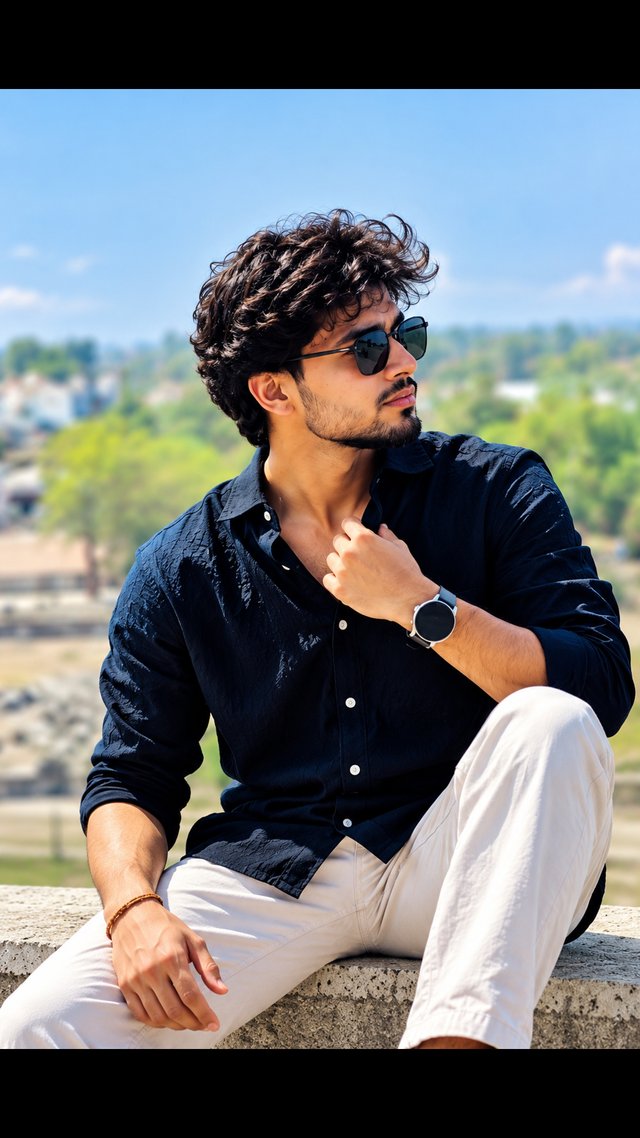
Stylish Men's Portrait – ChatGPT 4K AI Prompt
Create an attractive, photorealistic men's portrait featuring a navy blue shirt, stylish sunglasses, textured hair, and a bright outdoor background.
NBy @nomulagangothri
- Views
- 1
- Copies
- 0
- Made for
- ChatGPT
- Difficulty
- beginner
- – likes
- – saves
- – shares
Create an ultra-realistic, high-resolution 4K portrait of a stylish young South Asian man with a completely original face, natural facial features, realistic skin texture, and thick, voluminous curly black hair. Give him a neatly trimmed beard, a confident expression, and stylish black sunglasses. Dress him in a dark navy-blue textured button-up shirt with the sleeves casually rolled up, paired with clean white trousers and a minimalist wristwatch. Pose him sitting confidently on a concrete ledge outdoors, with one knee raised and one hand naturally adjusting his shirt collar while he gazes toward the side. Use a beautiful sunlit outdoor setting with green trees, distant buildings, a clear pale-blue sky, and a softly blurred background. Add natural daylight, realistic shadows, crisp fabric details, natural hands and fingers, sharp facial focus, professional DSLR photography, shallow depth of field, balanced colors, and premium men's fashion editorial styling. Vertical 9:16 composition, full upper-body and seated pose, photorealistic details, and high-resolution 4K quality. Avoid distorted anatomy, extra fingers, unnatural skin smoothing, blurry facial features, text, watermarks, and logos.
Creator's tips
Best results: Use ChatGPT image generation and describe the navy shirt, white trousers, sunglasses, wristwatch, and outdoor pose clearly. Natural daylight and a softly blurred background make the portrait more attractive. Common mistake: Overexposing the sky can reduce image detail, so keep the lighting balanced. Use a 9:16 ratio for Instagram Reels or a square crop for profile photos.
Recreate this in 4 steps
- 1Copy the promptTap “Copy prompt”, or open it straight in ChatGPT.
- 2Make it yoursFill any blanks and add one-tap tweaks — your photo, aspect ratio, more cinematic light.
- 3Paste it into ChatGPTFor a personal likeness, upload your photo first, then paste the prompt.
- 4Refine and shareRegenerate a couple of times, keep your favourite, and share the result.
Questions people ask
It was written for ChatGPT, and also works in Gemini and Midjourney. Use the one-tap tweaks to adjust aspect ratio for each tool.
Yes. Upload your photo in the AI tool first, then add the “Keep my face” tweak before copying so the prompt asks it to keep your facial features.
Yes — every prompt on Prompt Mandi is free to copy. Check your AI tool's own terms before using generated images commercially.