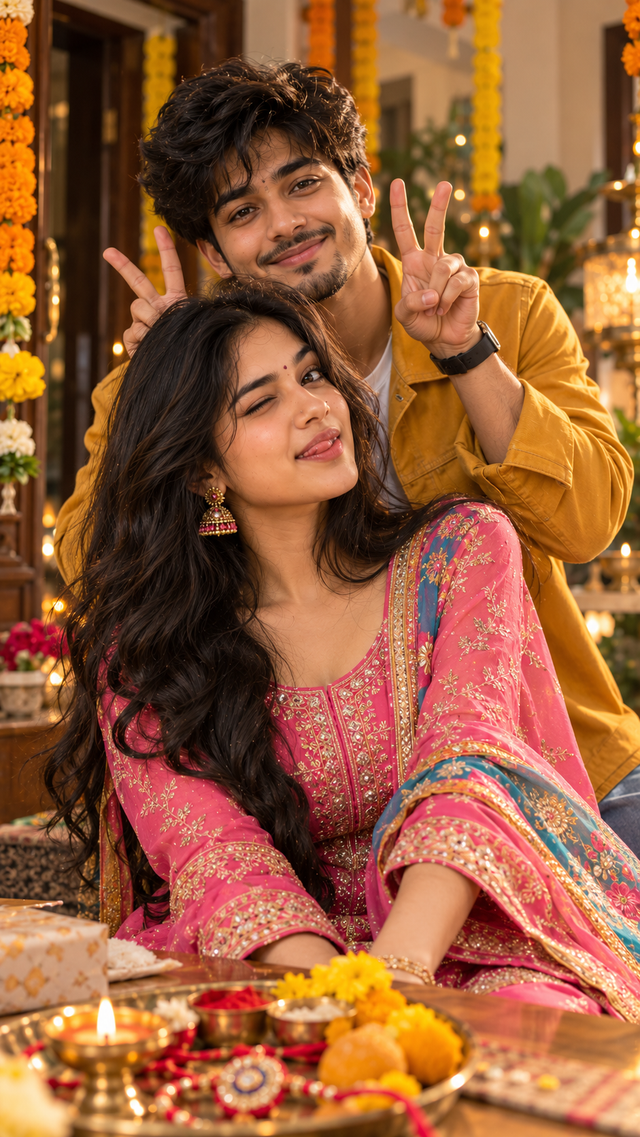
Raksha Bandhan Portrait – Cinematic 8K AI
Create a joyful, photorealistic Indian portrait with vibrant festive styling and cinematic 8K detail.
NBy @nomulagangothri
- Views
- 4
- Copies
- 0
- Made for
- ChatGPT
- Difficulty
- beginner
- – likes
- – saves
- – shares
Create an ultra-realistic 8K HD portrait of a young Indian couple celebrating Raksha Bandhan. Use completely original, different faces and identities, not resembling any real celebrities or existing people. The woman wears a beautiful pink traditional Indian outfit with a colorful dupatta, elegant embroidered details, and traditional jhumka earrings. She has long flowing dark hair and a playful expression, winking and slightly sticking out her tongue. The man stands behind her wearing a stylish mustard-yellow casual jacket, smiling warmly. He playfully raises both hands behind her head to create bunny-ear gestures. Capture them in a cheerful, candid moment.

Use natural Indian skin tones, realistic facial features, detailed hair strands, authentic fabric textures, sharp eyes, realistic hands and fingers, soft natural lighting, shallow depth of field, cinematic photography, warm festive atmosphere, professional DSLR photography, high dynamic range, crisp details, photorealistic quality, realistic background blur, 8K ultra HD, vertical portrait composition.
Creator's tips
Turn this playful Raksha Bandhan photo into a relatable Instagram Reel that people want to share with their siblings. Hook: “Tag that one sibling who never behaves normally 😂❤️” Animation: Add a slow camera zoom, a tiny head movement, and natural blinking. Sound: Use a trending sibling-comedy audio with a festive beat drop. Editing: Keep the pink outfit vibrant, the mustard jacket warm, and skin tones natural. Pro move: End with “Love you, idiot! 😂🫶” to make the Reel feel personal and shareable.
Recreate this in 4 steps
- 1Copy the promptTap “Copy prompt”, or open it straight in ChatGPT.
- 2Make it yoursFill any blanks and add one-tap tweaks — your photo, aspect ratio, more cinematic light.
- 3Paste it into ChatGPTFor a personal likeness, upload your photo first, then paste the prompt.
- 4Refine and shareRegenerate a couple of times, keep your favourite, and share the result.
Questions people ask
It was written for ChatGPT, and also works in Gemini and Midjourney. Use the one-tap tweaks to adjust aspect ratio for each tool.
Yes. Upload your photo in the AI tool first, then add the “Keep my face” tweak before copying so the prompt asks it to keep your facial features.
Yes — every prompt on Prompt Mandi is free to copy. Check your AI tool's own terms before using generated images commercially.