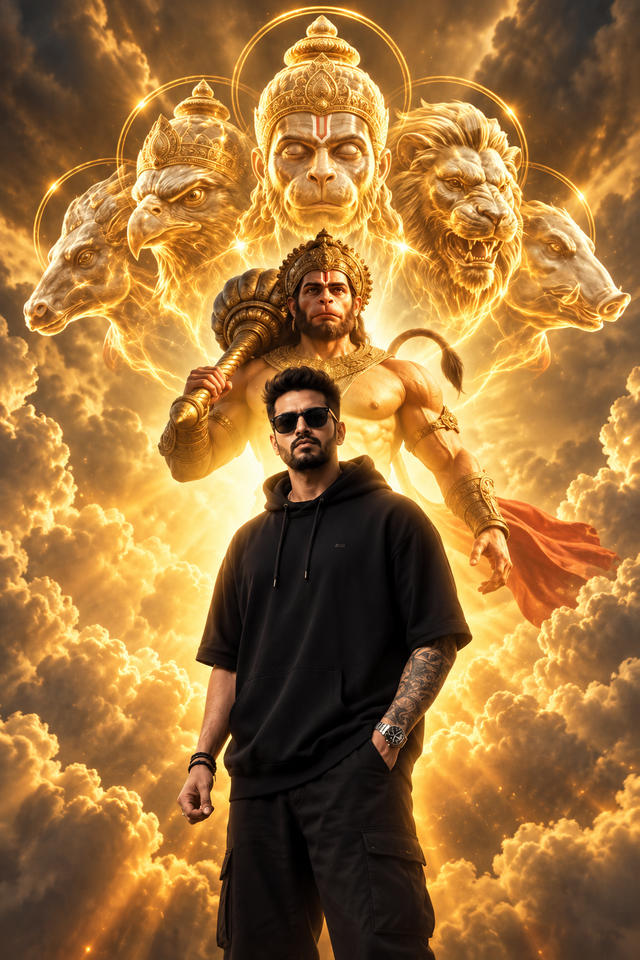
Panchamukhi Hanuman Divine Golden AI Portrait
Create a powerful devotional AI portrait featuring Panchamukhi Hanuman, a golden divine aura, glowing clouds, and a stylish man in black streetwear.
NBy @nomulagangothri
- Views
- 1
- Copies
- 0
- Made for
- ChatGPT
- Difficulty
- beginner
- – likes
- – saves
- – shares
Create an ultra-detailed, cinematic fantasy portrait in vertical 9:16 format. Show a fictional young Indian man standing confidently in the foreground, wearing an oversized black hoodie, black trousers, dark sunglasses, and a stylish wristwatch. Behind him, depict Lord Panchamukhi Hanuman in a majestic divine form, wearing an ornate golden crown, traditional gold jewelry, and golden armor, holding a powerful golden gada. Above and around Hanuman, show five distinct divine faces representing the Panchamukhi form, arranged symmetrically with beautiful glowing golden halos. Surround the figures with magnificent golden clouds, radiant heavenly light, sparkling particles, and dramatic rays of sunlight. Create a powerful composition with the man sharply visible in front and the divine Hanuman towering protectively behind him. Use realistic facial details, intricate ornaments, rich golden textures, dramatic cinematic lighting, volumetric clouds, professional fantasy CGI, photorealistic rendering, ultra-sharp details, and an epic devotional atmosphere. Keep the composition balanced, anatomically accurate, respectful, and free from text, logos, and watermarks.
Creator's tips
Works well with ChatGPT image generation. Clearly describe all five faces of Panchamukhi Hanuman and their symmetrical arrangement. Use golden backlighting to create a divine atmosphere. Avoid excessive glow that hides the details of Hanuman's crown and the foreground subject.
Recreate this in 4 steps
- 1Copy the promptTap “Copy prompt”, or open it straight in ChatGPT.
- 2Make it yoursFill any blanks and add one-tap tweaks — your photo, aspect ratio, more cinematic light.
- 3Paste it into ChatGPTFor a personal likeness, upload your photo first, then paste the prompt.
- 4Refine and shareRegenerate a couple of times, keep your favourite, and share the result.
Questions people ask
It was written for ChatGPT, and also works in Gemini and Midjourney. Use the one-tap tweaks to adjust aspect ratio for each tool.
Yes. Upload your photo in the AI tool first, then add the “Keep my face” tweak before copying so the prompt asks it to keep your facial features.
Yes — every prompt on Prompt Mandi is free to copy. Check your AI tool's own terms before using generated images commercially.