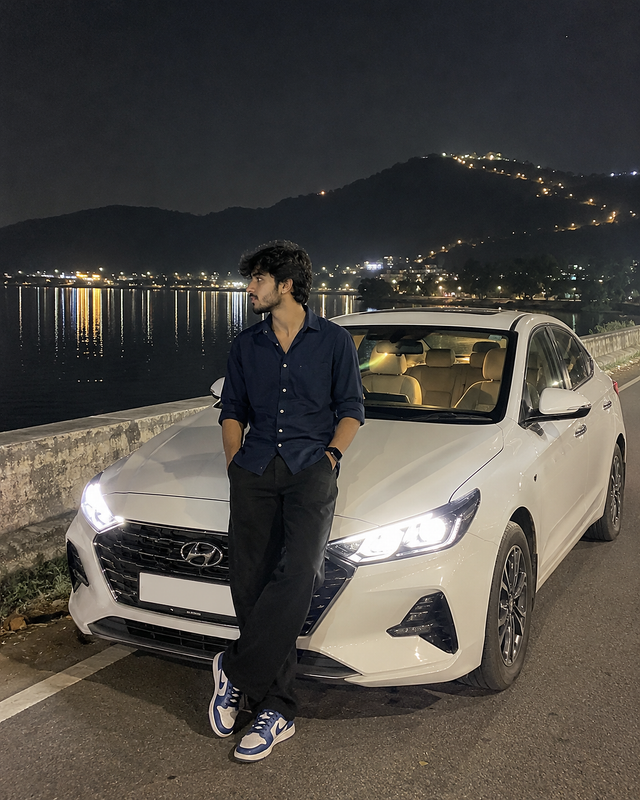
Realistic iPhone Night Portrait with White Hyundai Car
Finding peace at the edge of the world. Just me, the mountains, and the long road home. 🏔️
- Views
- 11
- Copies
- 0
- Made for
- Gemini
- Difficulty
- beginner
- – likes
- – saves
- – shares
image Ultra-realistic casual smartphone photograph captured on an iPhone 15 Pro using the standard 1× rear camera (26mm wide-angle lens). Vertical 4:5 full-body composition with an eye-level handheld perspective. A young South Asian man with medium-fair skin, thick slightly messy black hair, and a naturally lean physique is standing casually in front of a white Hyundai sedan parked beside a calm lakeside road at night. He is wearing a dark navy-blue full-sleeve button-up shirt with the sleeves casually rolled up, loose black

straight-fit trousers, blue-and-white sneakers, and a black smartwatch. Both hands are in his pockets while he looks naturally toward his left with a relaxed, thoughtful expression.

The white Hyundai sedan is positioned slightly behind him at a three-quarter front angle. The LED headlights are switched on, casting realistic pools of light across the road without overexposure. The car interior glows softly with warm ambient lighting visible through the windows. The license plate appears authentic but not emphasized.

In the background is a peaceful lake reflecting distant city lights. A dark mountain range rises behind the lake with a winding line of warm lights tracing the hillside. The night sky is deep black with subtle atmospheric haze and minimal visible stars. Reflections on the water remain soft and natural. Lighting is completely natural, created only by the car headlights and existing ambient night lighting. Realistic smartphone exposure with slight shadow falloff, accurate white balance, authentic contrast, natural skin texture, and true-to-life colors. No cinematic lighting, no HDR, no artificial glow, no beauty filter, no AI enhancement, no skin smoothing, no color grading, no oversharpening, no fake bokeh, and no portrait mode.

Preserve realistic smartphone noise, slight handheld imperfections, natural depth of field, and genuine iPhone image quality, making the photograph appear like an unedited photo captured spontaneously during a nighttime road trip.
Creator's tips
**Pro Tip:** For a natural iPhone-style night photograph, keep the lighting realistic and avoid excessive HDR or artificial glow. Describe the navy-blue shirt, white Hyundai sedan, illuminated headlights, calm lake, and distant mountain lights clearly. Use an eye-level 1× camera perspective and preserve natural skin texture with slight low-light grain. Keep the full body and car visible for the best composition. For a different variation, try a rainy lakeside road or a soft foggy night.
Recreate this in 4 steps
- 1Copy the promptTap “Copy prompt”, or open it straight in ChatGPT.
- 2Make it yoursFill any blanks and add one-tap tweaks — your photo, aspect ratio, more cinematic light.
- 3Paste it into GeminiFor a personal likeness, upload your photo first, then paste the prompt.
- 4Refine and shareRegenerate a couple of times, keep your favourite, and share the result.
Questions people ask
It was written for Gemini, and also works in ChatGPT and Midjourney. Use the one-tap tweaks to adjust aspect ratio for each tool.
Yes. Upload your photo in the AI tool first, then add the “Keep my face” tweak before copying so the prompt asks it to keep your facial features.
Yes — every prompt on Prompt Mandi is free to copy. Check your AI tool's own terms before using generated images commercially.