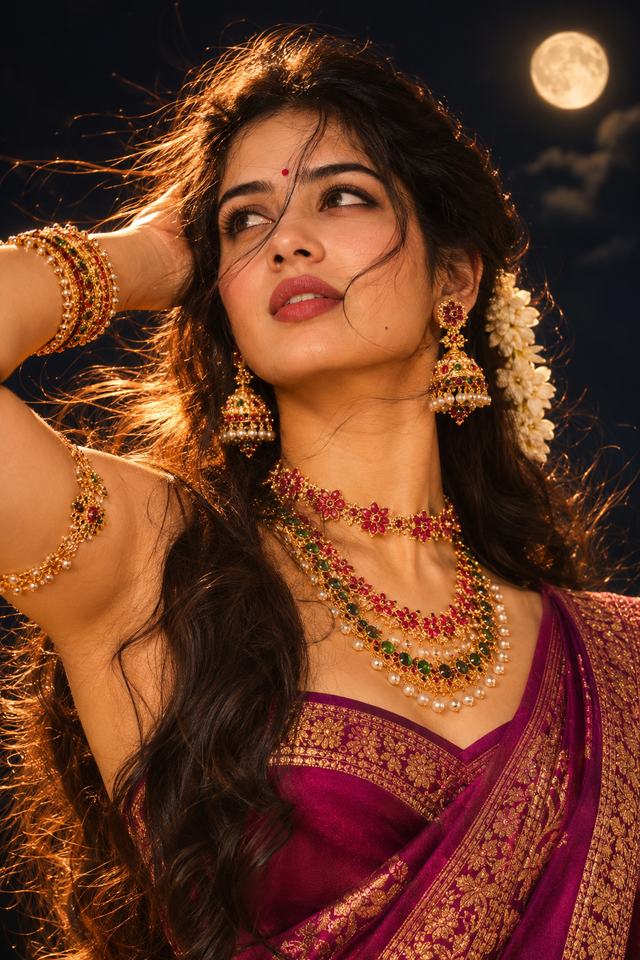
Moonlight Queen – Cinematic Magenta Saree Portrait
Create a stunning moonlit Indian beauty portrait featuring a woman in a royal magenta saree, traditional gold jewellery, jasmine flowers, and dreamy golden lighting.
NBy Gangothri
- Views
- 1
- Copies
- 0
- Made for
- ChatGPT
- Difficulty
- beginner
- – likes
- – saves
- – shares
Create an ultra-realistic, cinematic 8K-style close-up portrait of a beautiful young adult South Asian woman with a unique, natural AI-generated face. She is wearing a luxurious deep magenta silk saree with intricate golden zari embroidery and a matching traditional blouse.

Her long, thick, wavy black hair flows naturally in the night breeze, decorated with beautiful white jasmine flowers. She wears an elegant red bindi, traditional gold-and-red jhumka earrings, layered gold necklaces with ruby and emerald stones, matching bangles, and a delicate gold armlet.

Pose her gracefully with one hand resting behind her head, gently touching her hair. Her face is turned slightly upward as she gazes thoughtfully toward the glowing full moon. Give her a soft, dreamy expression with natural makeup, expressive eyes, and subtle rose-colored lipstick.

Background: A beautiful dark night sky with a large glowing full moon in the upper corner, soft clouds, and a mysterious cinematic atmosphere.

Lighting: Warm golden moonlight, dramatic golden rim lighting around her flowing hair, soft highlights on her face and jewellery, realistic shadows, and a beautiful amber glow.

Photography style: Professional DSLR portrait photography, 85mm lens, shallow depth of field, sharp facial details, realistic skin texture, intricate jewellery details, rich magenta colors, cinematic color grading, and premium Indian traditional fashion editorial style.

Composition: Vertical 2:3 portrait, close-up to medium framing, face and jewellery in sharp focus, elegant natural proportions, photorealistic quality.

Create a completely different original face. Avoid cartoon effects, plastic skin, distorted jewellery, extra fingers, blurry eyes, artificial facial features, text, and watermarks.
Creator's tips
For the best results, use ChatGPT Image Generation or a photorealistic image model. Emphasize golden rim lighting, detailed traditional jewellery, and natural hair movement. Keep the full moon visible in the background. Avoid excessive beauty filters to maintain realistic skin texture and facial details.
Recreate this in 4 steps
- 1Copy the promptTap “Copy prompt”, or open it straight in ChatGPT.
- 2Make it yoursFill any blanks and add one-tap tweaks — your photo, aspect ratio, more cinematic light.
- 3Paste it into ChatGPTFor a personal likeness, upload your photo first, then paste the prompt.
- 4Refine and shareRegenerate a couple of times, keep your favourite, and share the result.
Questions people ask
It was written for ChatGPT, and also works in Gemini and Midjourney. Use the one-tap tweaks to adjust aspect ratio for each tool.
Yes. Upload your photo in the AI tool first, then add the “Keep my face” tweak before copying so the prompt asks it to keep your facial features.
Yes — every prompt on Prompt Mandi is free to copy. Check your AI tool's own terms before using generated images commercially.