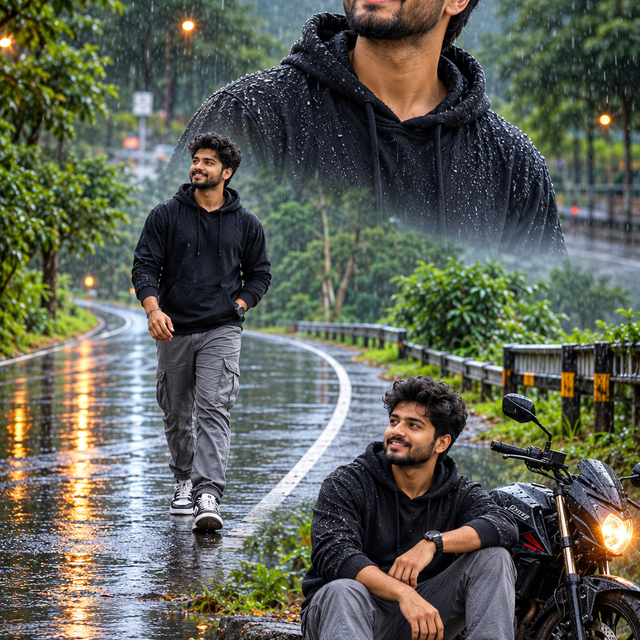
Monsoon Male Portrait – Cinematic ChatGPT AI Prompt
Create a realistic cinematic men's portrait in a black hoodie and grey cargo pants on a rain-soaked forest road, and a stylish black motorcycle.
NBy @nomulagangothri
- Views
- 0
- Copies
- 0
- Made for
- ChatGPT
- Difficulty
- beginner
- – likes
- – saves
- – shares
Create an ultra-realistic 8K-style cinematic monsoon portrait collage featuring a fictional young South Asian man with an original face, thick curly black hair, a neatly trimmed beard, and a cheerful natural smile. He wears a black hoodie speckled with rain droplets, grey cargo trousers, black-and-white sneakers, and a simple wristwatch. Compose the image in three coordinated scenes: a large upper-body close-up in the upper right, a full-body walking pose on the left, and a relaxed seated pose beside a stylish black motorcycle in the lower right. Set the scene on a winding wet road surrounded by lush green trees, bushes, and misty hills. Add gentle rainfall, puddles reflecting warm streetlights, wet asphalt, subtle road mist, and a glowing motorcycle headlight. Use natural overcast lighting with cinematic highlights, realistic water droplets on clothing, detailed fabric textures, accurate anatomy, lifelike skin, and believable reflections. Keep the same fictional man's appearance consistent across all three poses. Use professional fashion photography, a vertical 9:16 composition, sharp facial details, realistic depth of field, balanced framing, and rich but natural green and charcoal tones. The overall mood should feel fresh, stylish, peaceful, and cinematic. No text, no logos, no watermark. Do not imitate any real person's face.
Creator's tips
Best used with ChatGPT image generation. Describe the rainy road, black hoodie, grey cargo pants, motorcycle, and three-pose collage clearly. Tip: ask for the same fictional face and outfit in every pose. Common mistake: too much rain or fog can hide facial details, so keep the face sharp and the background slightly blurred.
Recreate this in 4 steps
- 1Copy the promptTap “Copy prompt”, or open it straight in ChatGPT.
- 2Make it yoursFill any blanks and add one-tap tweaks — your photo, aspect ratio, more cinematic light.
- 3Paste it into ChatGPTFor a personal likeness, upload your photo first, then paste the prompt.
- 4Refine and shareRegenerate a couple of times, keep your favourite, and share the result.
Questions people ask
It was written for ChatGPT, and also works in Gemini and Midjourney. Use the one-tap tweaks to adjust aspect ratio for each tool.
Yes. Upload your photo in the AI tool first, then add the “Keep my face” tweak before copying so the prompt asks it to keep your facial features.
Yes — every prompt on Prompt Mandi is free to copy. Check your AI tool's own terms before using generated images commercially.