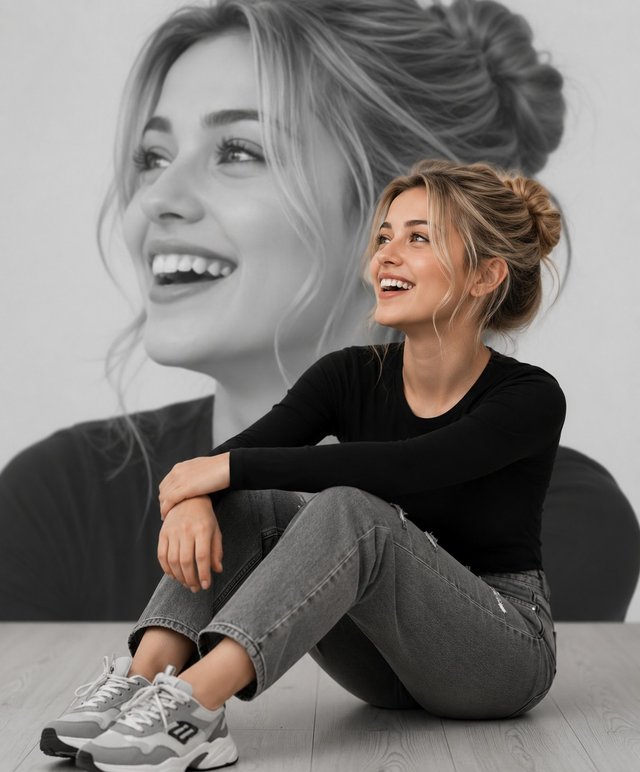
Modern Girl Double Exposure Portrait
Create a stylish double-exposure portrait featuring a seated modern woman with a giant black-and-white background portrait, using the face from a reference image.
ABy @admin
- Views
- 11
- Copies
- 0
- Made for
- ChatGPT
- Difficulty
- beginner
- – likes
- – saves
- – shares
Create a high-end editorial double-exposure portrait using two reference images. Keep the seated body pose, black full-sleeve top, grey jeans, white sneakers, camera angle, lighting, and minimalist studio background from Reference Image 1. Replace the face completely with the face from Reference Image 2 while preserving its exact facial structure, eyes, eyebrows, nose, lips, hairstyle, skin tone, and natural expression. Create a huge monochrome black-and-white close-up portrait of the same face in the background with a joyful smile, while the foreground remains in full colour. Maintain perfect identity consistency between both faces. Soft studio lighting, realistic shadows, premium fashion photography, ultra-realistic skin texture, cinematic composition, shallow depth of field, HDR, 8K Ultra HD, magazine cover quality, masterpiece, hyper-realistic, sharp focus, clean modern aesthetic, natural colours.
Creator's tips
🔥 Creator Tip: Make your double-exposure portrait look like a professional fashion magazine cover. Identity lock: Use a clear, front-facing reference photo and preserve the exact facial features in both layers. Composition: Keep the seated, full-colour subject in the foreground and the oversized monochrome portrait behind, slightly offset for depth. Blending: Use a smooth gradient or soft mask around the background portrait instead of a hard cutout.
Recreate this in 4 steps
- 1Copy the promptTap “Copy prompt”, or open it straight in ChatGPT.
- 2Make it yoursFill any blanks and add one-tap tweaks — your photo, aspect ratio, more cinematic light.
- 3Paste it into ChatGPTFor a personal likeness, upload your photo first, then paste the prompt.
- 4Refine and shareRegenerate a couple of times, keep your favourite, and share the result.
Questions people ask
It was written for ChatGPT, and also works in Gemini and Midjourney. Use the one-tap tweaks to adjust aspect ratio for each tool.
Yes. Upload your photo in the AI tool first, then add the “Keep my face” tweak before copying so the prompt asks it to keep your facial features.
Yes — every prompt on Prompt Mandi is free to copy. Check your AI tool's own terms before using generated images commercially.
This prompt is optimized for ChatGPT image generation using two reference images. The first image provides the body pose, clothing, composition, and background, while the second image supplies the facial identity. The result is a seamless, ultra-realistic portrait with consistent facial features, professional studio lighting, and a premium editorial look. Best results are achieved using portrait (9:16) orientation with maximum image quality.