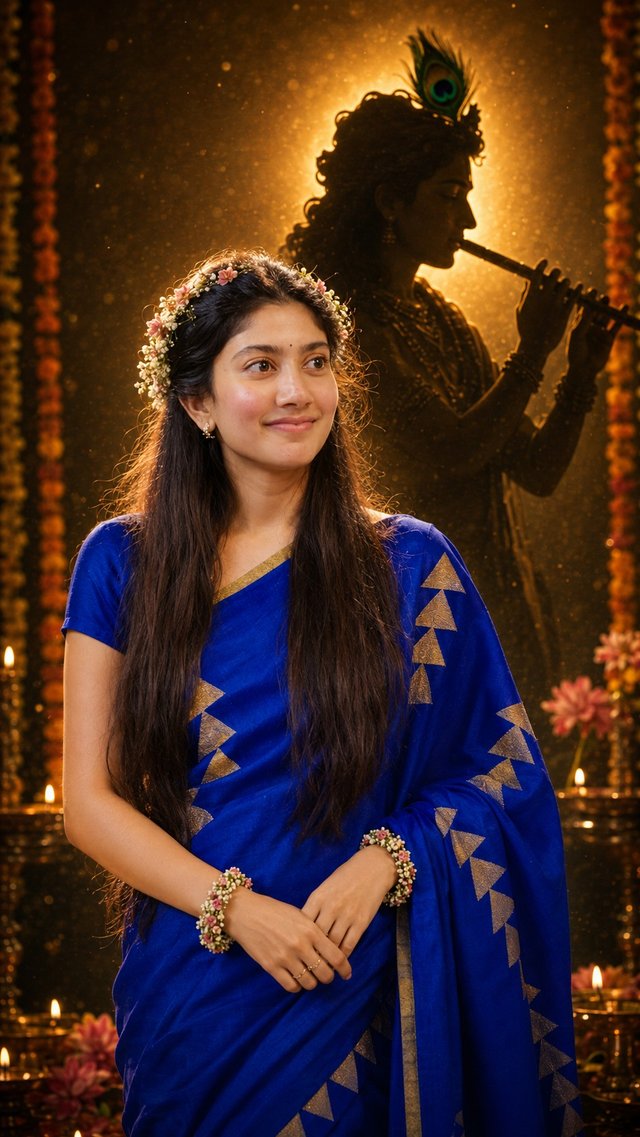
Janmashtami Divine Krishna Silhouette AI Portrait Prompt
Create a divine Janmashtami portrait with your own photo, featuring a glowing Krishna silhouette, golden cinematic lighting, floral details, and a peaceful devotional atmosphere. 🦚✨ Perfect for AI photos and Instagram Reels.
GBy @growwithsneha__
- Views
- 20
- Copies
- 1
- Made for
- ChatGPT
- Difficulty
- beginner
- – likes
- – saves
- – shares
Create a highly realistic cinematic Janmashtami devotional portrait in vertical 9:16 format using the uploaded person's photo as the PRIMARY IDENTITY REFERENCE and this reference image only as the SCENE AND COMPOSITION REFERENCE.

IMPORTANT: Preserve the uploaded person's exact identity and recognizable likeness. Keep their original face, facial features, skin tone, natural expression, hairstyle, hair length, hair texture, body proportions, clothing, outfit colors, patterns, jewelry, and existing accessories unchanged. Do not transfer the reference person's face, clothing, or identity to the uploaded person.

Recreate the same overall composition and atmosphere as the reference image. Place the person naturally in the foreground, centered in the lower portion of the frame, with an elegant peaceful devotional presence. Keep the person's natural pose as much as possible, but position both hands gracefully together near the waist similar to the reference. Hands must be realistic and anatomically correct.

Do not change the person's hairstyle. Only add delicate fresh floral accessories naturally around their existing hair using small white jasmine flowers and subtle pink flowers. Add matching small floral bracelets around both wrists using tiny white and pink flowers. Do not add any other unnecessary jewelry or accessories.

Keep the background scenery fixed and consistent with the reference: a deep dark cinematic devotional environment with warm golden lighting, glowing particles, soft bokeh, blurred flowers, oil lamps/diyas near the bottom, and subtle vertical flower garlands along the sides.

Behind the person, maintain one large majestic and clearly recognizable dark silhouette of Lord Krishna in the same position and composition as the reference. Krishna should be in graceful side profile, playing the flute near his lips, with flowing hair, a clearly visible peacock feather, natural hands holding the flute, and an elegant divine posture. Keep Krishna dramatic, anatomically correct, sharp, and clearly recognizable, not abstract or distorted.

Create a powerful warm golden halo behind Krishna, outlining his head, hair, peacock feather, face profile, hands, arms, and flute. The foreground person should be naturally illuminated with soft warm light while Krishna remains a dramatic dark silhouette surrounded by golden backlighting.

Use ultra-realistic photography, natural skin texture, realistic hair strands, detailed fabric texture, realistic flowers, physically accurate hands, cinematic lighting, warm brown and golden tones, shallow depth of field, atmospheric particles, soft bokeh, volumetric golden light, premium devotional photography, photorealistic, highly detailed, 8K quality.

STRICT NEGATIVE INSTRUCTIONS: Do not change identity, face, skin tone, facial features, natural expression, hairstyle, hair length, body proportions, original clothing, clothing colors, patterns, jewelry, or accessories. No face morphing, no beautification filter, no artificial smile, no outfit replacement, no religious costume replacement, no extra jewelry, no crown on the person, no duplicate person, no distorted hands, no extra fingers, no missing fingers, no extra arms, no duplicate flowers, no cartoon, painting, illustration, CGI, plastic skin, text, logo, or watermark. Do not distort Krishna, do not create abstract Krishna, duplicate Krishna, incorrect flute, extra hands, or incorrect anatomy.

FINAL PRIORITY: The uploaded person's identity and original appearance must remain unchanged. Only use the reference image for the fixed background, Krishna silhouette, scenery, lighting, composition, hand positioning, floral hair accessories, floral wrist accessories, and overall Janmashtami atmosphere.
Recreate this in 4 steps
- 1Copy the promptTap “Copy prompt”, or open it straight in ChatGPT.
- 2Make it yoursFill any blanks and add one-tap tweaks — your photo, aspect ratio, more cinematic light.
- 3Paste it into ChatGPTFor a personal likeness, upload your photo first, then paste the prompt.
- 4Refine and shareRegenerate a couple of times, keep your favourite, and share the result.
Questions people ask
It was written for ChatGPT, and also works in Gemini and Midjourney. Use the one-tap tweaks to adjust aspect ratio for each tool.
Yes. Upload your photo in the AI tool first, then add the “Keep my face” tweak before copying so the prompt asks it to keep your facial features.
Yes — every prompt on Prompt Mandi is free to copy. Check your AI tool's own terms before using generated images commercially.
Create your own divine Krishna-inspired portrait! 🦚✨
Upload your photo to ChatGPT, copy and paste the prompt, and create this cinematic Janmashtami look with your own face. 🙏💛