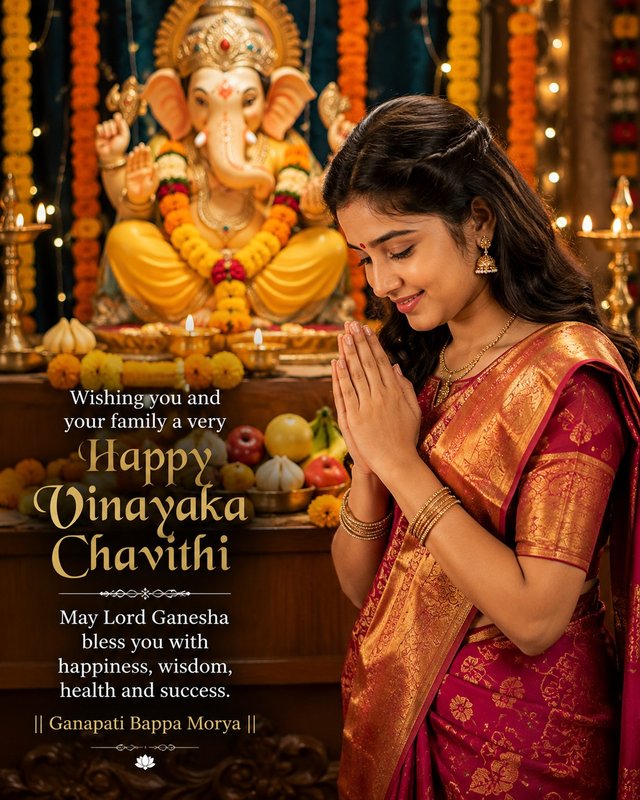
Happy Vinayaka Chavithi Wishes — AI Portrait
Create a beautiful festive human portrait with Lord Ganesha and heartfelt Vinayaka Chavithi wishes.
NBy @nomulagangothri
- Views
- 52
- Copies
- 0
- Made for
- ChatGPT
- Difficulty
- beginner
- – likes
- – saves
- – shares
Create a photorealistic 8K vertical portrait of a beautiful young Indian woman celebrating Vinayaka Chavithi. She is wearing an elegant traditional magenta and gold silk saree with beautiful Indian jewelry, bangles, earrings and a small red bindi. She is standing beside a beautifully decorated Lord Ganesha idol with her hands joined in a respectful namaste pose, with a peaceful and devotional expression.

The background is richly decorated with marigold garlands, fresh flowers, glowing brass diyas, puja offerings, fruits and warm festive lights. Use cinematic golden lighting, realistic skin texture, natural facial details, soft depth of field, beautiful background bokeh, vibrant traditional colors, premium Indian festive atmosphere, highly detailed, photorealistic, 8K quality.

Add elegant readable festive text:
"Wishing You and Your Family a Very Happy Vinayaka Chavithi"
"May Lord Ganesha Bless You With Happiness, Wisdom, Health and Success."
"|| Ganapati Bappa Morya ||"

Vertical 9:16 composition, centered subject, professional festival photography.
Creator's tips
**Pro Tip:** For a premium Vinayaka Chavithi festival portrait, use rich magenta silk with intricate gold zari work and realistic jewelry highlights. Illuminate the woman and Lord Ganesha idol with warm golden light from brass diyas to create a divine, festive atmosphere. Keep the namaste pose natural, facial features sharp, and skin texture realistic, with marigold garlands and soft bokeh adding depth. Place the greeting text in clear, elegant gold or cream typography with strong contrast and proper spacing. Double-check spelling, avoid text overlapping the subject or idol, and maintain a balanced 9:16 composition for Instagram Reels and festival posts.
Recreate this in 4 steps
- 1Copy the promptTap “Copy prompt”, or open it straight in ChatGPT.
- 2Make it yoursFill any blanks and add one-tap tweaks — your photo, aspect ratio, more cinematic light.
- 3Paste it into ChatGPTFor a personal likeness, upload your photo first, then paste the prompt.
- 4Refine and shareRegenerate a couple of times, keep your favourite, and share the result.
Questions people ask
It was written for ChatGPT, and also works in Gemini and Midjourney. Use the one-tap tweaks to adjust aspect ratio for each tool.
Yes. Upload your photo in the AI tool first, then add the “Keep my face” tweak before copying so the prompt asks it to keep your facial features.
Yes — every prompt on Prompt Mandi is free to copy. Check your AI tool's own terms before using generated images commercially.
Happy Vinayaka Chavithi 🪔🙏
May Lord Ganesha fill your life with happiness, wisdom, prosperity and success. 🌺✨