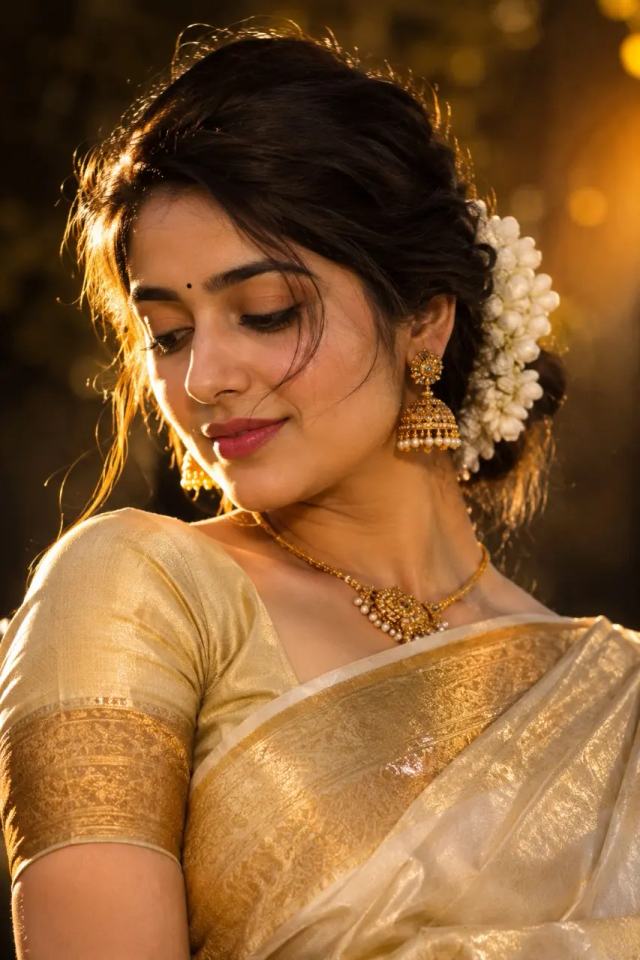
Golden Saree Cinematic Portrait – 8K AI Photo
Create a stunning cinematic Indian woman portrait with a golden saree, jasmine flowers, traditional jewelry and warm golden lighting.
NBy Gangothri
- Views
- 55
- Copies
- 2
- Made for
- ChatGPT
- Difficulty
- beginner
- – likes
- – saves
- – shares
Create an ultra-realistic 8K HD cinematic portrait of a beautiful young Indian woman wearing an elegant ivory-gold silk saree with a rich metallic gold border and matching blouse.

She has long, naturally wavy dark hair styled into a low bun decorated with fresh white jasmine flowers. Add traditional ornate gold jhumka earrings, a delicate gold necklace, bracelet, ring and a small black bindi.

Capture her in a graceful close-up pose, gently looking downward and slightly away from the camera with a soft, natural expression. A few loose strands of hair fall naturally across her face.

Use warm golden-hour lighting with beautiful rim light illuminating her hair and shoulders. Create a dark, softly blurred background with warm golden bokeh and subtle motion-blur light streaks.

Highly realistic Indian facial features, natural skin texture, realistic eyes, detailed hair strands, authentic jewelry details, realistic silk fabric texture, natural makeup, soft shadows, cinematic depth of field, professional fashion photography, 85mm portrait lens, luxury editorial aesthetic, warm color grading, photorealistic, ultra-detailed, 8K HD.

Keep the composition elegant, feminine and natural. No text, no watermark, no distorted face, no extra fingers, no unnatural anatomy, no cartoon effect.
Creator's tips
**Pro Tip:** For a premium traditional portrait, use warm golden-hour backlighting to create a soft glow around the hair and jasmine flowers. Describe the ivory silk saree, metallic gold border, intricate jhumka earrings, and natural skin texture in detail. Keep the eyes and jewelry in sharp focus while using a softly blurred, dark background for depth. Avoid excessive skin smoothing and overexposed gold highlights to preserve a realistic, elegant editorial look.
Recreate this in 4 steps
- 1Copy the promptTap “Copy prompt”, or open it straight in ChatGPT.
- 2Make it yoursFill any blanks and add one-tap tweaks — your photo, aspect ratio, more cinematic light.
- 3Paste it into ChatGPTFor a personal likeness, upload your photo first, then paste the prompt.
- 4Refine and shareRegenerate a couple of times, keep your favourite, and share the result.
Questions people ask
It was written for ChatGPT, and also works in Gemini and Midjourney. Use the one-tap tweaks to adjust aspect ratio for each tool.
Yes. Upload your photo in the AI tool first, then add the “Keep my face” tweak before copying so the prompt asks it to keep your facial features.
Yes — every prompt on Prompt Mandi is free to copy. Check your AI tool's own terms before using generated images commercially.