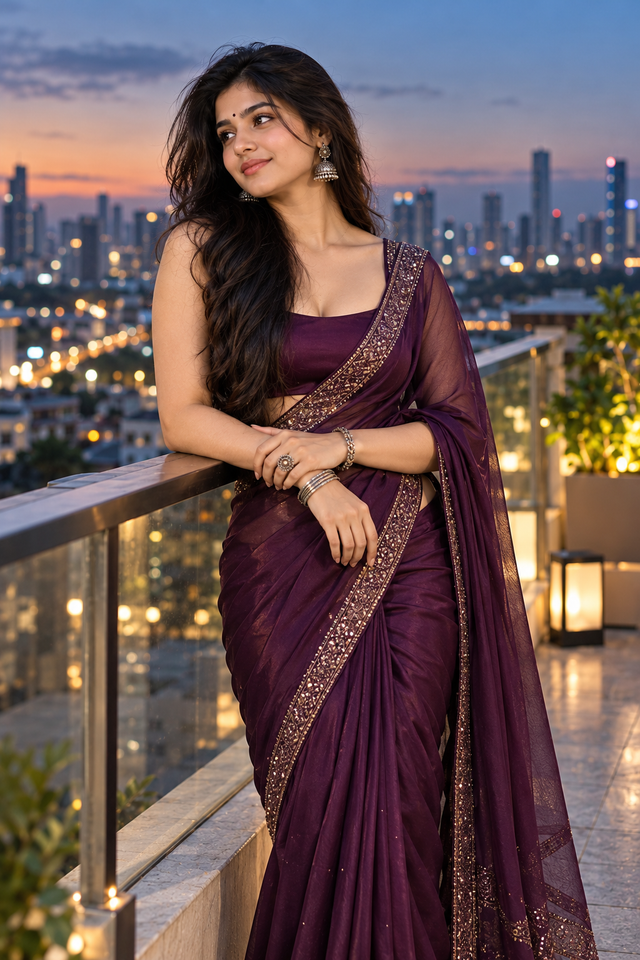
Elegant Deep Purple Saree Portrait | Luxury Indian Evening Fashion Photography
Create a sophisticated portrait of a graceful Indian woman in a rich deep-purple saree with elegant jewelry and a stylish evening city backdrop.
NBy @nomulagangothri
- Views
- 11
- Copies
- 1
- Made for
- ChatGPT
- Difficulty
- beginner
- – likes
- – saves
- – shares
Create an ultra-realistic portrait of a beautiful Indian woman with a completely unique face, expressive eyes, flawless glowing skin, and long silky black hair flowing naturally over one shoulder. She wears a luxurious deep plum-purple silk saree with a subtle shimmering border and a matching sleeveless designer blouse. She accessorizes with oxidized silver jhumka earrings, a matching statement ring, bracelet, and elegant bangles. Her makeup is soft and glamorous with defined eyes, nude lips, and a tiny black bindi. She stands gracefully on a modern rooftop terrace, lightly resting her hands on a railing while looking away from the camera with a calm, confident expression. The background features a softly blurred city skyline at dusk, cool blue evening tones, cinematic lighting, shallow depth of field, realistic skin textures, highly detailed silk fabric, premium fashion photography, masterpiece, ultra-realistic, 8K, luxury ethnic fashion, vertical portrait.
Creator's tips
Use cool blue-hour lighting balanced with warm city lights, an 85mm lens at f/1.8, and realistic silk reflections to create a premium Indian fashion editorial. Emphasize the rich plum-purple saree, intricate silver border, natural skin texture, detailed jhumka earrings, and creamy city bokeh for a cinematic, ultra-HD 4K finish.
Recreate this in 4 steps
- 1Copy the promptTap “Copy prompt”, or open it straight in ChatGPT.
- 2Make it yoursFill any blanks and add one-tap tweaks — your photo, aspect ratio, more cinematic light.
- 3Paste it into ChatGPTFor a personal likeness, upload your photo first, then paste the prompt.
- 4Refine and shareRegenerate a couple of times, keep your favourite, and share the result.
Questions people ask
It was written for ChatGPT, and also works in Gemini and Midjourney. Use the one-tap tweaks to adjust aspect ratio for each tool.
Yes. Upload your photo in the AI tool first, then add the “Keep my face” tweak before copying so the prompt asks it to keep your facial features.
Yes — every prompt on Prompt Mandi is free to copy. Check your AI tool's own terms before using generated images commercially.