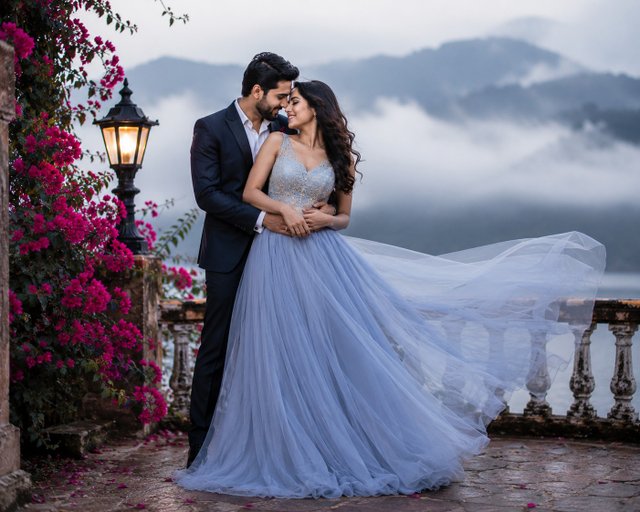
Dreamy Mountain Pre-Wedding Photoshoot | Ultra-Realistic AI Image Prompt
Create a breathtaking pre-wedding portrait with misty mountains, a flowing gown, cinematic lighting, and a luxury outdoor setting.
ABy @admin
- Views
- 16
- Copies
- 0
- Made for
- ChatGPT
- Difficulty
- beginner
- – likes
- – saves
- – shares
Create an ultra-realistic pre-wedding photoshoot of a romantic couple at a luxury mountain-view location. The groom wears a tailored navy suit with a white shirt and formal shoes. The bride wears a flowing pastel blue designer gown with intricate embroidery and a dramatic long train moving gracefully in the breeze. The couple embraces lovingly on a vintage stone terrace surrounded by blooming pink flowers, elegant railings, and a glowing lantern. Mist-covered mountains and a peaceful lake create a magical backdrop under soft natural light. Cinematic composition, shallow depth of field, realistic skin textures, soft bokeh, HDR lighting, luxury fashion photography, photorealistic, masterpiece, ultra-detailed, 8K quality.
Recreate this in 4 steps
- 1Copy the promptTap “Copy prompt”, or open it straight in ChatGPT.
- 2Make it yoursFill any blanks and add one-tap tweaks — your photo, aspect ratio, more cinematic light.
- 3Paste it into ChatGPTFor a personal likeness, upload your photo first, then paste the prompt.
- 4Refine and shareRegenerate a couple of times, keep your favourite, and share the result.
Questions people ask
It was written for ChatGPT, and also works in Gemini and Midjourney. Use the one-tap tweaks to adjust aspect ratio for each tool.
Yes. Upload your photo in the AI tool first, then add the “Keep my face” tweak before copying so the prompt asks it to keep your facial features.
Yes — every prompt on Prompt Mandi is free to copy. Check your AI tool's own terms before using generated images commercially.
Compatible with ChatGPT Images, GPT Image, Midjourney, FLUX, Gemini, Sora, and other AI image generators. Use a 16:9 aspect ratio for banners, 9:16 for reels, or 1:1 for Instagram posts. Enable high-quality rendering, realistic lighting, HDR, and maximum detail for premium cinematic results.