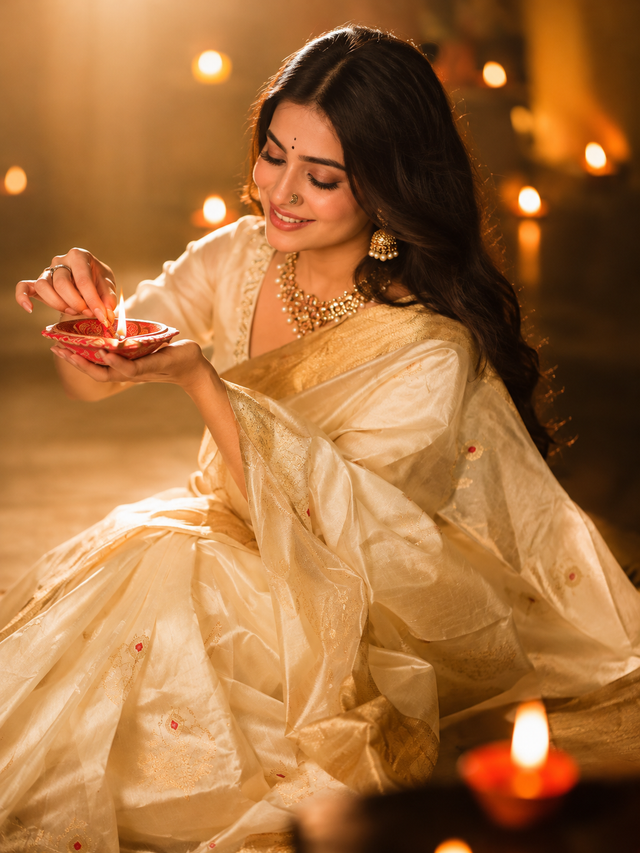
Diwali Diya Lighting Portrait – Golden Saree Look
Create a beautiful, photorealistic Indian woman celebrating Diwali in an elegant ivory silk saree while lighting a traditional diya. Perfect for festive portraits and social media posts.
NBy @nomulagangothri
- Views
- 0
- Copies
- 0
- Made for
- Veo
- Difficulty
- beginner
- – likes
- – saves
- – shares
A warm, cinematic portrait of a graceful Indian woman celebrating Diwali, seated elegantly in a flowing ivory-and-gold silk saree with delicate red floral motifs. She is wearing traditional gold jewelry, ornate earrings, a necklace, a small nose ring, and a tiny black bindi. Her long, wavy dark hair falls over one shoulder. She gently lights a traditional red clay diya held in her hands, looking down with a soft, peaceful smile. Glowing diyas and warm fairy lights create beautiful golden bokeh in the background. Soft candlelight illuminates her face and hands, rich amber and honey tones, luxurious silk texture, intimate festive atmosphere, shallow depth of field, elegant Indian cultural styling, realistic skin texture, natural expression, cinematic portrait photography, soft highlights, subtle shadows, highly detailed, photorealistic.

Negative Prompt
Blurry face, distorted hands, extra fingers, malformed diya, unrealistic flame, duplicated jewelry, harsh shadows, overexposure, flat lighting, plastic skin, messy hair, distorted saree, cartoon style, illustration, low resolution, watermark, text, oversaturated colors, unnatural pose.
Creator's tips
Use the reference image with medium-to-high reference strength to preserve the woman’s pose, saree drape, diya placement, and facial expression. Keep the lighting warm and soft—too much brightness can reduce the intimate candlelit mood.
Recreate this in 4 steps
- 1Copy the promptTap “Copy prompt”, or open it straight in ChatGPT.
- 2Make it yoursFill any blanks and add one-tap tweaks — your photo, aspect ratio, more cinematic light.
- 3Paste it into VeoFor a personal likeness, upload your photo first, then paste the prompt.
- 4Refine and shareRegenerate a couple of times, keep your favourite, and share the result.
Questions people ask
It was written for Veo, and also works in ChatGPT and Gemini. Use the one-tap tweaks to adjust aspect ratio for each tool.
Yes. Upload your photo in the AI tool first, then add the “Keep my face” tweak before copying so the prompt asks it to keep your facial features.
Yes — every prompt on Prompt Mandi is free to copy. Check your AI tool's own terms before using generated images commercially.