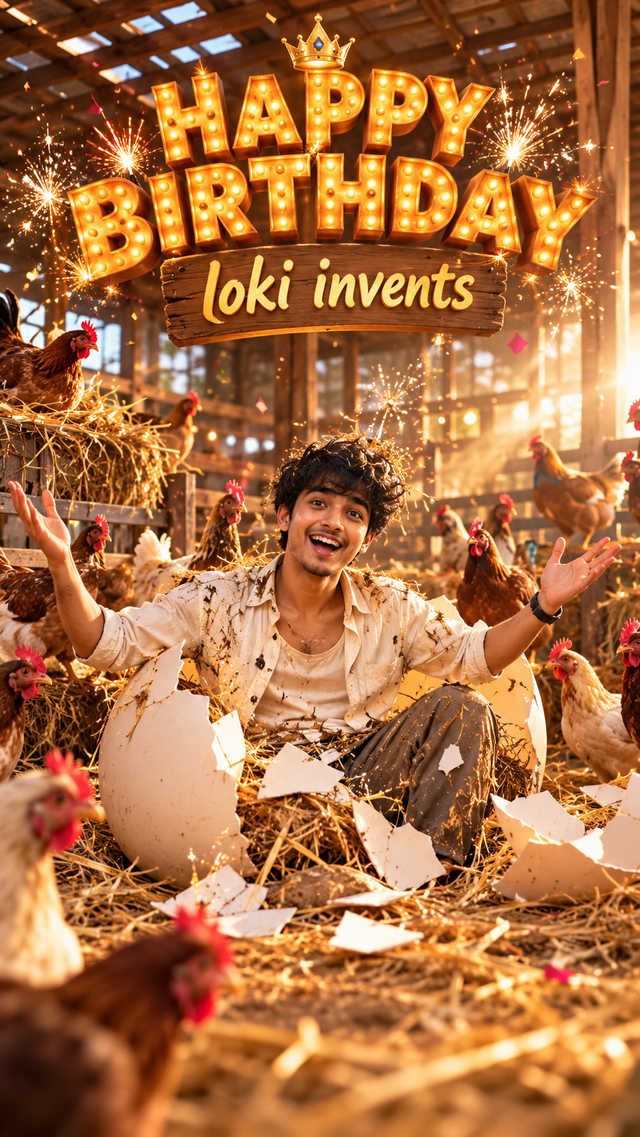
Create a Viral AI Birthday Video from One Photo 🎂 | Free Gemini Prompt
Learn how to create a cinematic AI birthday video from just one photo using Google Gemini. Follow the step-by-step process and use the ready-to-copy prompt to create a unique birthday transformation video.
- Views
- 1,253
- Copies
- 105
- Made for
- Gemini
- Difficulty
- beginner
- – likes
- – saves
- – shares
Create a funny, cinematic, photorealistic video inside a realistic chicken farm. A hen is sitting in a nest and lays a single egg. The egg slowly rolls out of the nest onto the hay-covered ground. After a few seconds, small cracks gradually appear on the egg. The cracks become larger and the egg gently breaks open.Suddenly, my friend's face comes out from inside the egg, looking surprised and confused. He slowly pushes his head and shoulders out, then his arms and upper body emerge. Finally, his entire body comes completely out of the egg and he stands up with smile next to the broken eggshells, then "Happy Birthday loki invents " title will appear at his background with cinematic font style and cracker lights.Keep the transformation smooth, with the same person's face and appearance throughout the entire video. Chickens react naturally and look surprised. Use cinematic camera movement, realistic lighting, detailed feathers and eggshells, unexpected ending.Video must be 9:16 ratio.
Creator's tips
Turn this funny birthday concept into a viral AI video! Hook (0–2 sec): Show a hen sitting on a nest while a mysterious egg starts shaking. Suspense (2–5 sec): Add realistic cracking sounds, tiny shell movements, and surprised chicken reactions. Reveal (5–8 sec): Your friend bursts out of the egg with a confused expression, then smiles. Grand finale (8–10 sec): Reveal “HAPPY BIRTHDAY LOKI INVENTS 🎂🔥” with golden 3D typography and festive sparks. Pro move: Use your friend's reference photo for facial consistency, and generate the video in short scenes to avoid face distortion during the transformation.
Recreate this in 4 steps
- 1Copy the promptTap “Copy prompt”, or open it straight in ChatGPT.
- 2Make it yoursFill any blanks and add one-tap tweaks — your photo, aspect ratio, more cinematic light.
- 3Paste it into GeminiFor a personal likeness, upload your photo first, then paste the prompt.
- 4Refine and shareRegenerate a couple of times, keep your favourite, and share the result.
Questions people ask
It was written for Gemini, and also works in ChatGPT and Midjourney. Use the one-tap tweaks to adjust aspect ratio for each tool.
Yes. Upload your photo in the AI tool first, then add the “Keep my face” tweak before copying so the prompt asks it to keep your facial features.
Yes — every prompt on Prompt Mandi is free to copy. Check your AI tool's own terms before using generated images commercially.
Step-by-Step Process
Step 1 — Open Google Gemini
Open Google Gemini and start a new chat.
Step 2 — Upload Your Friend’s Photo
Upload one clear photo of your friend.
For the best result:
Face should be clearly visible
Use a good-quality photo
Avoid heavily blurred images
Prefer a front-facing or slightly angled photo
Step 3 — Add the Birthday Video Prompt
Paste the birthday-video prompt below into Gemini:
use prompt above Step 4 — Generate the Video
Submit the prompt and let Gemini generate the video.
If the first generation doesn't maintain the person's appearance properly, regenerate using the same reference photo and emphasize:
“Maintain the exact facial identity and appearance from the uploaded reference throughout the entire video.”
Step 5 — Download & Edit
Once you get a good result, bring the video into your preferred editing app.
Add:
Trending background music
Birthday sound effects
Quick cuts
Subtle zooms
Optional birthday text
Step 6 — Post It
Export in 9:16 vertical format and post it as an Instagram Reel.
Pro tip: Don't just send the video to your friend. Make the Reel itself the hook — show the crazy egg transformation in the first few seconds.