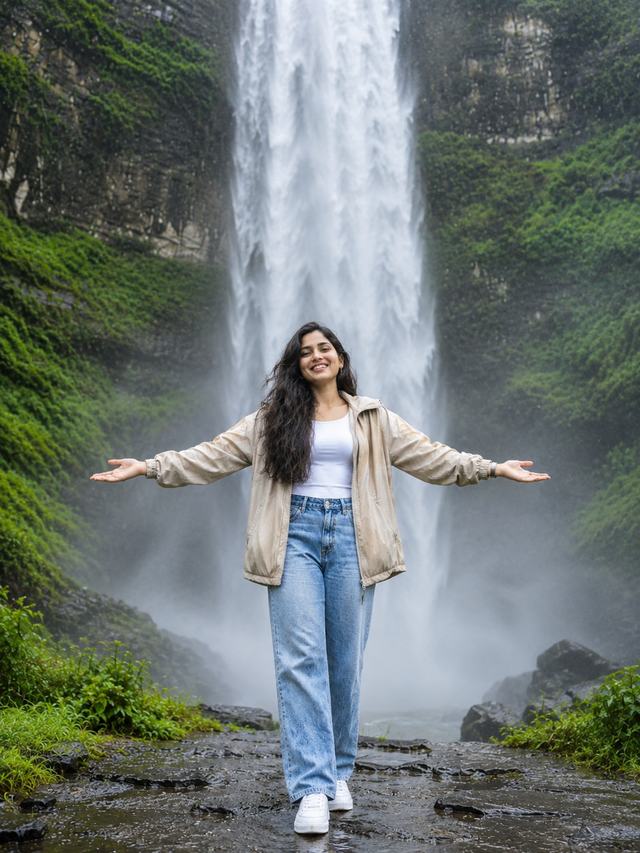
Cinematic Waterfall Travel Portrait – AI Photo Prompt
create a stunning, ultra-realistic travel portrait of a young woman standing in front of a majestic waterfall with her arms open wide.
NBy Gangothri
- Views
- 3
- Copies
- 0
- Made for
- ChatGPT
- Difficulty
- beginner
- – likes
- – saves
- – shares
Create an ultra-photorealistic vertical 9:16 travel portrait of a beautiful young adult South Asian woman standing confidently in front of a massive, breathtaking waterfall. Give her a completely unique, natural-looking AI-generated face with realistic facial proportions, expressive eyes, a gentle smile, and naturally flowing dark hair.

She is wearing a stylish beige oversized jacket over a simple white fitted top, light-blue wide-leg denim jeans, and clean white sneakers. Her arms are stretched gracefully out to both sides, palms facing upward, enjoying the refreshing waterfall atmosphere.

Behind her, a powerful waterfall cascades down from a tall rocky cliff covered with lush green moss, tropical plants, and dense forest vegetation. Add realistic water mist, wet dark rocks, tiny water droplets, and fresh greenery surrounding the scene.

Use soft natural cloudy daylight, cinematic lighting, realistic skin texture, detailed clothing fabric, professional travel photography, DSLR quality, 85mm lens, sharp focus on the woman's face, natural body proportions, beautiful depth of field, balanced composition, realistic colors, HDR, ultra-detailed 8K-style quality.

Make the photograph look like a real professional travel photoshoot. No cartoon effects, no artificial skin smoothing, no extra fingers, no distorted hands, no blurry face, no text, no watermark.
Creator's tips
For the best results, use ChatGPT Image Generation and choose a vertical 9:16 composition. Keep the waterfall large and visible behind the subject. Use natural facial details and realistic skin texture. Avoid excessive background blur because the waterfall and greenery are important parts of this photograph.
Recreate this in 4 steps
- 1Copy the promptTap “Copy prompt”, or open it straight in ChatGPT.
- 2Make it yoursFill any blanks and add one-tap tweaks — your photo, aspect ratio, more cinematic light.
- 3Paste it into ChatGPTFor a personal likeness, upload your photo first, then paste the prompt.
- 4Refine and shareRegenerate a couple of times, keep your favourite, and share the result.
Questions people ask
It was written for ChatGPT, and also works in Gemini and Midjourney. Use the one-tap tweaks to adjust aspect ratio for each tool.
Yes. Upload your photo in the AI tool first, then add the “Keep my face” tweak before copying so the prompt asks it to keep your facial features.
Yes — every prompt on Prompt Mandi is free to copy. Check your AI tool's own terms before using generated images commercially.