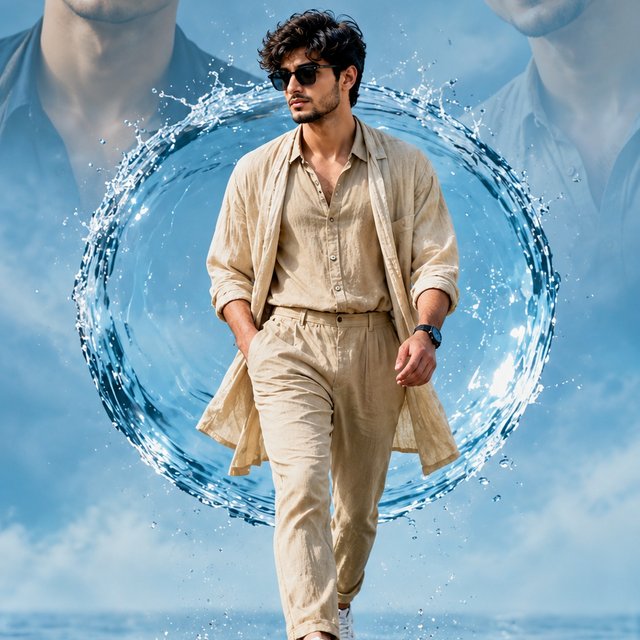
Cinematic Water Splash Male Portrait – ChatGPT AI
Create a cinematic men's fashion portrait featuring a beige linen outfit, black sunglasses, splashing water, and a dramatic blue background.
NBy @nomulagangothri
- Views
- 0
- Copies
- 0
- Made for
- ChatGPT
- Difficulty
- beginner
- – likes
- – saves
- – shares
Create an ultra-realistic 8K-style cinematic fashion poster featuring a stylish young man with a unique original face, thick curly dark hair, and subtle facial hair. He wears a relaxed beige linen shirt with the top buttons open, matching beige trousers, a lightweight long beige overshirt, clean white sneakers, and black sunglasses. Show him confidently walking forward through shallow reflective water, with one hand casually in his pocket and the other relaxed by his side. Create a large circular ring of water splashing behind him, with realistic droplets frozen in motion. Add two oversized, softly faded portraits of the same fictional model in the upper background: one with a serious expression and one smiling while wearing sunglasses. Use a cool blue sky-inspired studio background, soft cinematic daylight, realistic water reflections, detailed linen textures, natural skin texture, accurate anatomy, and crisp facial features. Capture the full-body subject in a vertical 9:16 composition with dramatic depth, balanced framing, sharp focus, professional editorial photography, and high dynamic range. Keep the overall look modern, premium, dynamic, and photorealistic. No text, no logos, no watermark. Use an original fictional face that does not imitate a real person.
Creator's tips
Best used with ChatGPT image generation. Describe the circular water splash, reflective floor, beige linen outfit, and faded background portraits for the full poster effect. Tip: ask for sharp water droplets and realistic reflections. Common mistake: excessive background portraits can distract from the main subject, so keep them softly faded.
Recreate this in 4 steps
- 1Copy the promptTap “Copy prompt”, or open it straight in ChatGPT.
- 2Make it yoursFill any blanks and add one-tap tweaks — your photo, aspect ratio, more cinematic light.
- 3Paste it into ChatGPTFor a personal likeness, upload your photo first, then paste the prompt.
- 4Refine and shareRegenerate a couple of times, keep your favourite, and share the result.
Questions people ask
It was written for ChatGPT, and also works in Gemini and Midjourney. Use the one-tap tweaks to adjust aspect ratio for each tool.
Yes. Upload your photo in the AI tool first, then add the “Keep my face” tweak before copying so the prompt asks it to keep your facial features.
Yes — every prompt on Prompt Mandi is free to copy. Check your AI tool's own terms before using generated images commercially.