ChatGPTDesignbeginnerAug 25, 2026
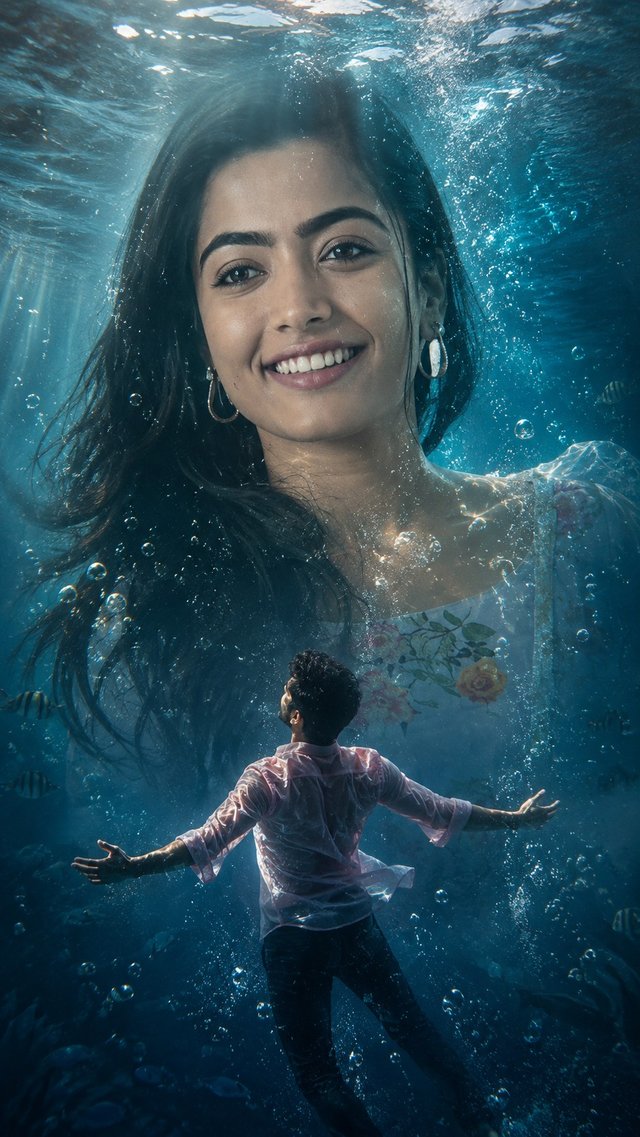
Cinematic Underwater Couple Wallpaper
Create a cinematic underwater love story from your photos 🌊❤️ Ultra-realistic AI wallpaper with fantasy, romance, and 4K cinematic vibes. Save & try the prompt!
GBy @growwithsneha__
- Views
- 86
- Copies
- 2
- Made for
- ChatGPT
- Difficulty
- beginner
- – likes
- – saves
- – shares
The prompt739 chars
Ultra-realistic cinematic underwater fantasy portrait of a giant woman's face, identical to the uploaded image, emerging beneath the ocean surface with calm emotion, piercing blue-grey eyes, soft natural makeup, wet flowing hair, and diamond earrings. Dreamy teal-blue water glows with ripples, bubbles, reflective lighting, and volumetric god rays. Below, a young man wearing a soaked light pink shirt and dark pants floats underwater with open arms, symbolizing love and longing. Photorealistic textures, shallow depth of field, cinematic color grading, atmospheric particles, realistic fabric movement, melancholic romantic mood, surreal fantasy realism, and ethereal ultra-HD 8K poster-style composition. Give the picture in 9:16 ratio
One-tap tweaks
How to use
Recreate this in 4 steps
- 1Copy the promptTap “Copy prompt”, or open it straight in ChatGPT.
- 2Make it yoursFill any blanks and add one-tap tweaks — your photo, aspect ratio, more cinematic light.
- 3Paste it into ChatGPTFor a personal likeness, upload your photo first, then paste the prompt.
- 4Refine and shareRegenerate a couple of times, keep your favourite, and share the result.
FAQ
Questions people ask
It was written for ChatGPT, and also works in Gemini and Midjourney. Use the one-tap tweaks to adjust aspect ratio for each tool.
Yes. Upload your photo in the AI tool first, then add the “Keep my face” tweak before copying so the prompt asks it to keep your facial features.
Yes — every prompt on Prompt Mandi is free to copy. Check your AI tool's own terms before using generated images commercially.
Community
Made with this prompt
Comments (0)
Sign in to leave a comment.