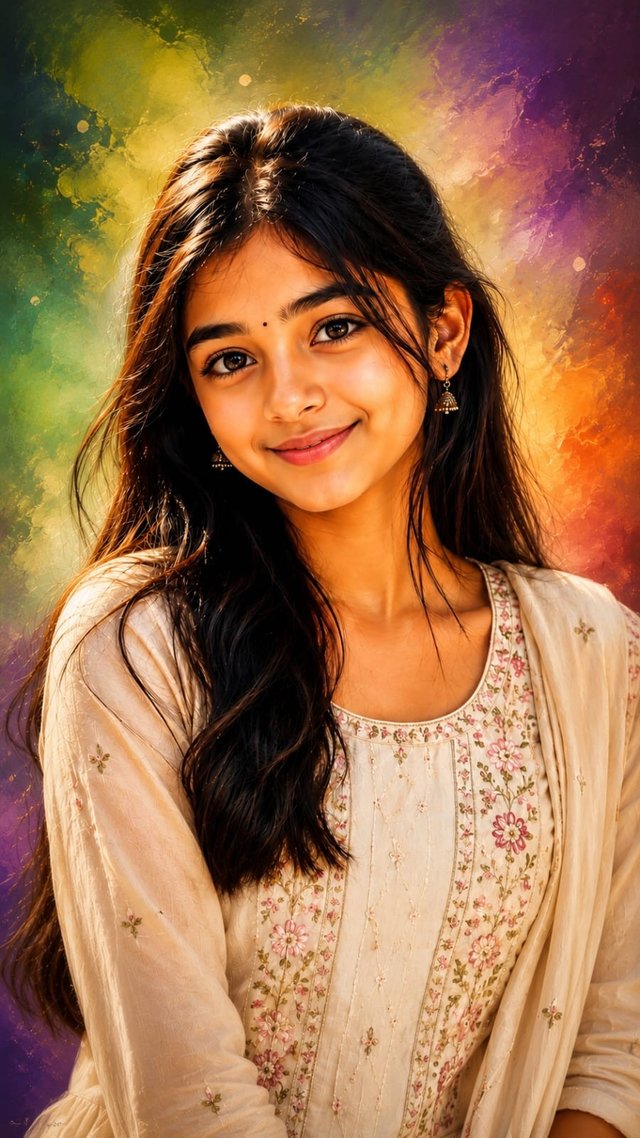
Cinematic Oil Painting Portrait from Your Photo | AI Art Transformation
Turn your photo into a stunning AI oil painting portrait with realistic details, cinematic lighting, and vibrant colors. 🎨✨
GBy @growwithsneha__
- Views
- 35
- Copies
- 0
- Made for
- ChatGPT
- Difficulty
- beginner
- – likes
- – saves
- – shares
Oil Painting Prompt: Generate a highly

detailed digital portrait based on the uploaded photo.

Preserve full likeness and facial structure while enhancing features with smooth, warm-toned skin, symmetrical detailing, and soft glow highlights on the forehead and cheeks.

Apply a realistic yet polished illustration style with glossy skin texture, sharp, expressive eyes, and natural hair detail. Add cinematic soft lighting for depth.

Create a vibrant, dreamy background with softly swirling gradient colours in green, purple and orange tones, slightly blurred to keep focus on the subject. Use studio portrait composition, centred framing, high resolution, refined brush strokes, realistic hair texture, and 8K

ultra-quality artistic digital painting finish.9:16 aspect ratio
Creator's tips
🔥 Creator Tip: For a premium oil-painting portrait, prioritize facial likeness over skin smoothing. Face lock: Use a clear, front-facing reference photo and preserve the exact facial structure, eyes, nose, lips, and hairstyle. Painting style: Combine realistic brush strokes with subtle glossy highlights instead of making the skin look plastic. Background: Blend green, purple, and orange into soft swirling gradients, keeping the face as the main focus. Lighting: Add warm highlights on the forehead and cheeks with soft shadows for depth. Pro move: Keep the eyes and hair sharply detailed, with painterly textures around the edges for an authentic digital oil-painting finish.
Recreate this in 4 steps
- 1Copy the promptTap “Copy prompt”, or open it straight in ChatGPT.
- 2Make it yoursFill any blanks and add one-tap tweaks — your photo, aspect ratio, more cinematic light.
- 3Paste it into ChatGPTFor a personal likeness, upload your photo first, then paste the prompt.
- 4Refine and shareRegenerate a couple of times, keep your favourite, and share the result.
Questions people ask
It was written for ChatGPT, and also works in Gemini and Midjourney. Use the one-tap tweaks to adjust aspect ratio for each tool.
Yes. Upload your photo in the AI tool first, then add the “Keep my face” tweak before copying so the prompt asks it to keep your facial features.
Yes — every prompt on Prompt Mandi is free to copy. Check your AI tool's own terms before using generated images commercially.