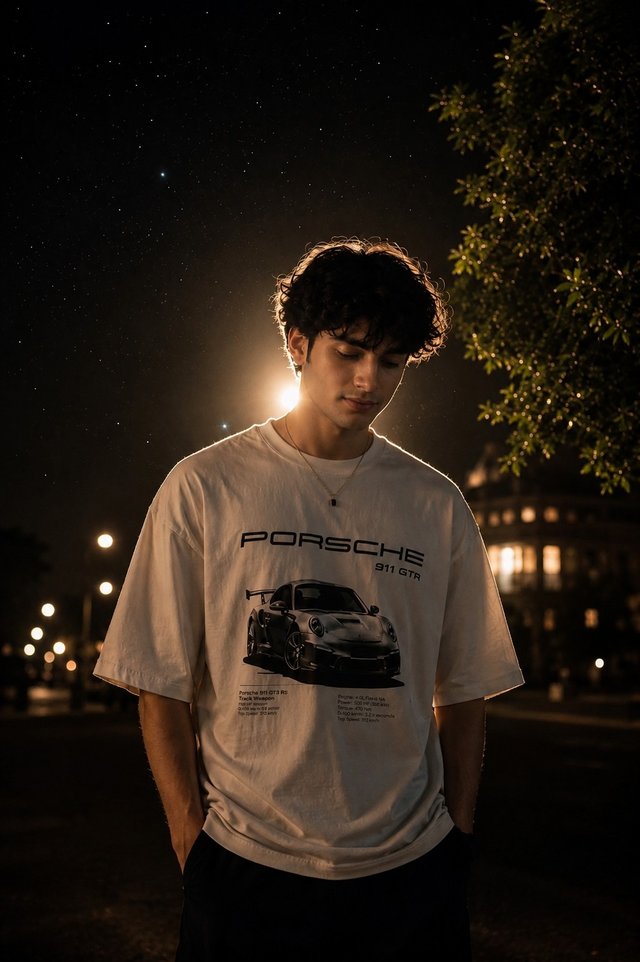
Cinematic Night Boy Portrait | Streetwear AI
A moody cinematic portrait of a stylish young man in a graphic oversized T-shirt beneath a starry night sky.
NBy @nomulagangothri
- Views
- 15
- Copies
- 1
- Made for
- ChatGPT
- Difficulty
- beginner
- – likes
- – saves
- – shares
Create a highly detailed, photorealistic cinematic portrait of a handsome young South Asian man standing outdoors at night. He has naturally curly, slightly messy dark hair and a unique youthful face with realistic skin texture. He wears an oversized cream-white graphic T-shirt featuring a tasteful sports-car-inspired illustration, relaxed dark trousers, and a simple pendant necklace.
Pose him standing naturally with both hands in his trouser pockets, shoulders relaxed, while he looks slightly downward with a calm, thoughtful expression. Place a bright warm streetlight directly behind him to create a beautiful golden halo and rim light around his hair and shoulders. The background should feature a clear star-filled night sky, leafy trees, distant warm building lights, subtle streetlights, and dreamy amber bokeh. Use shallow depth of field, realistic fabric folds, detailed hair strands, natural shadows, cinematic color grading, low-light photography, atmospheric depth, subtle film grain, professional editorial photography, ultra-realistic, high detail, 4K, vertical 9:16 composition.
Creator's tips
🔥 Creator Tip: Make this night portrait look like a professional cinematic fashion shoot. Lighting: Enhance the golden streetlight behind his head to create a clean rim light around his curly hair. AI animation: Add gentle hair movement, subtle blinking, and softly twinkling stars. Camera movement: Use a slow push-in from a full-body shot to a waist-up portrait. Color grading: Combine warm amber highlights with cool midnight-blue shadows for a premium cinematic look. Pro move: Keep his face and T-shirt graphic sharp while the trees and distant lights remain softly blurred.
Recreate this in 4 steps
- 1Copy the promptTap “Copy prompt”, or open it straight in ChatGPT.
- 2Make it yoursFill any blanks and add one-tap tweaks — your photo, aspect ratio, more cinematic light.
- 3Paste it into ChatGPTFor a personal likeness, upload your photo first, then paste the prompt.
- 4Refine and shareRegenerate a couple of times, keep your favourite, and share the result.
Questions people ask
It was written for ChatGPT, and also works in Gemini and Midjourney. Use the one-tap tweaks to adjust aspect ratio for each tool.
Yes. Upload your photo in the AI tool first, then add the “Keep my face” tweak before copying so the prompt asks it to keep your facial features.
Yes — every prompt on Prompt Mandi is free to copy. Check your AI tool's own terms before using generated images commercially.