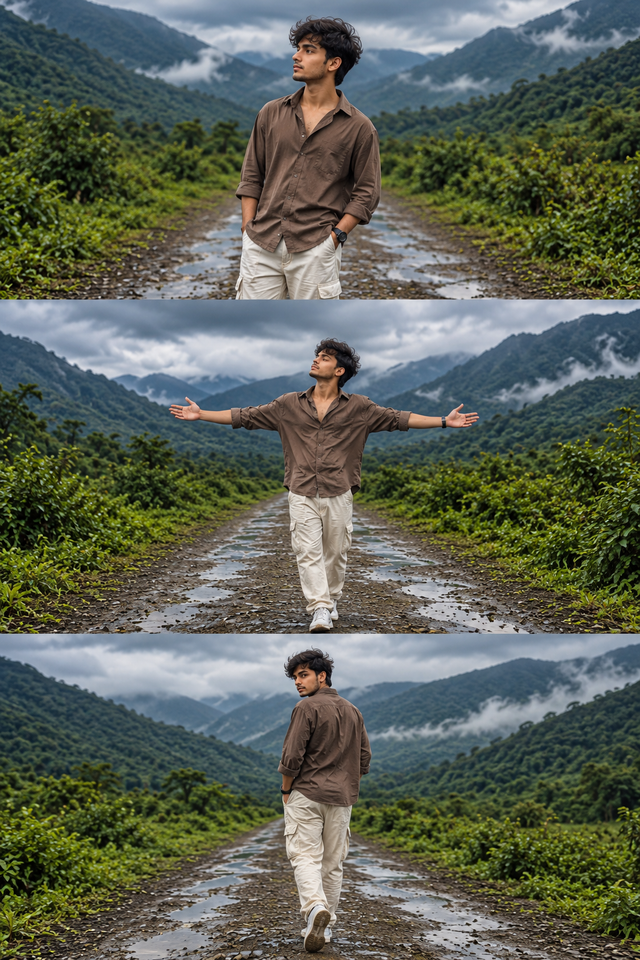
Cinematic Mountain Portrait of a Stylish Man
Create a photorealistic male portrait in a misty green mountain valley, featuring a brown shirt, pants, and three cinematic poses on a rainy countryside road.
NBy @nomulagangothri
- Views
- 0
- Copies
- 0
- Made for
- ChatGPT
- Difficulty
- beginner
- – likes
- – saves
- – shares
Generate an ultra-realistic, high-detail 8K-style fashion photography collage featuring a handsome young South Asian man with a unique original face, naturally tousled black hair, subtle stubble, and a confident, relaxed expression. He wears a loose dark brown button-down shirt with rolled-up sleeves, cream cargo trousers, white sneakers, and a minimal black wristwatch. The setting is a beautiful mountain valley surrounded by lush green hills, dense vegetation, a wet muddy road, small puddles, and dramatic cloudy skies with soft mist in the distance.

Create a vertical three-panel photo collage showing three different poses of the same man: (1) standing casually with one hand in his pocket and looking toward the mountains, (2) standing in the middle of the road with both arms stretched wide, enjoying the fresh mountain air, and (3) walking away along the wet road while looking back over his shoulder. Maintain consistent facial identity, hairstyle, outfit, and body proportions across all panels. Use natural overcast lighting, realistic skin texture, detailed clothing folds, cinematic color grading, lifelike greenery, atmospheric depth, professional travel photography, sharp focus, and balanced composition. Photorealistic quality, high dynamic range, crisp details, vertical 3:4 format. No text, watermark, distorted hands, extra fingers, duplicate limbs, or blurry faces.
Creator's tips
Use ChatGPT image generation and specify each pose separately to create a more consistent collage. Keep the brown shirt and cream trousers identical in every panel. For a moodier result, add light fog and darker clouds while preserving natural skin tones. Avoid excessive sharpening and oversaturated greenery.
Recreate this in 4 steps
- 1Copy the promptTap “Copy prompt”, or open it straight in ChatGPT.
- 2Make it yoursFill any blanks and add one-tap tweaks — your photo, aspect ratio, more cinematic light.
- 3Paste it into ChatGPTFor a personal likeness, upload your photo first, then paste the prompt.
- 4Refine and shareRegenerate a couple of times, keep your favourite, and share the result.
Questions people ask
It was written for ChatGPT, and also works in Gemini and Midjourney. Use the one-tap tweaks to adjust aspect ratio for each tool.
Yes. Upload your photo in the AI tool first, then add the “Keep my face” tweak before copying so the prompt asks it to keep your facial features.
Yes — every prompt on Prompt Mandi is free to copy. Check your AI tool's own terms before using generated images commercially.