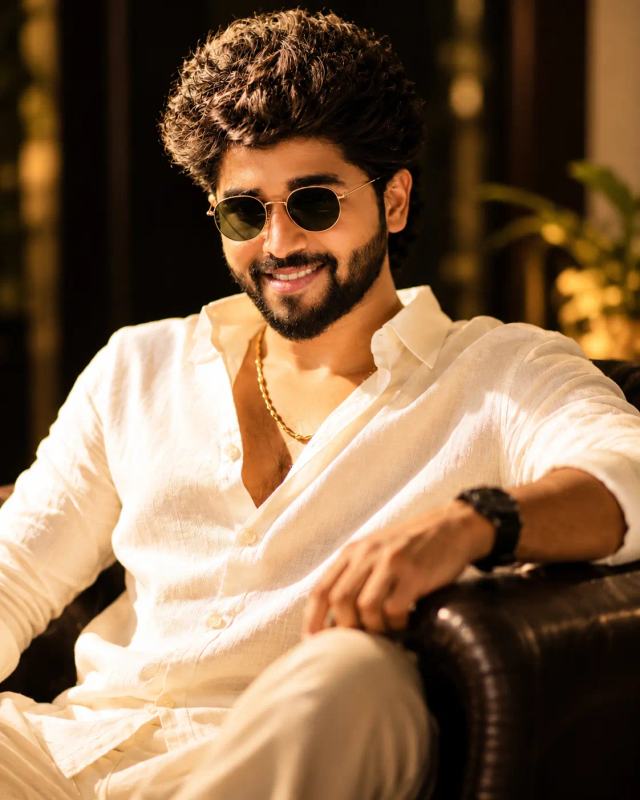
Cinematic Luxury Men's Portrait – ChatGPT AI Prompt
Create a stylish, ultra-realistic men's portrait featuring a cream linen shirt, gold accessories, sunglasses, and warm cinematic lighting.
NBy Gangothri
- Views
- 8
- Copies
- 2
- Made for
- ChatGPT
- Difficulty
- beginner
- – likes
- – saves
- – shares
Create an ultra-realistic, high-resolution cinematic portrait of a handsome young adult man with a unique, original face, thick voluminous curly black hair, a neatly groomed full beard, and a confident natural smile. He is sitting comfortably in a luxurious dark leather armchair, leaning back in a relaxed pose with one arm resting on the chair. He wears a slightly unbuttoned cream-white linen shirt with rolled sleeves, elegant light-colored trousers, a subtle gold chain necklace, stylish gold-framed dark sunglasses, and a premium black wristwatch. His expression is charming, confident, and effortless.

Set the scene inside an elegant, dimly lit luxury lounge with a dark background, warm golden practical lights, and softly blurred decorative elements. Use rich amber and golden cinematic lighting that highlights his face, textured hair, beard, and clothing. Capture realistic skin texture, natural facial proportions, detailed fabric folds, accurate hands, and lifelike reflections on the sunglasses.

Professional DSLR photography, 85mm portrait lens, shallow depth of field, soft background bokeh, warm editorial color grading, balanced highlights and shadows, premium men's fashion photography, photorealistic details, and a sophisticated luxury atmosphere. Keep the seated pose natural and anatomically accurate. Vertical 9:16 composition, high-definition quality, no cartoon effects, no extra fingers, no distorted body parts, no duplicate person, no text, and no watermark.
Creator's tips
Works well in ChatGPT image generation. For a personalized portrait, upload a clear reference photo and request that the person's facial identity be preserved. Keep the warm golden lighting and cream outfit for the luxury look. Avoid adding too many accessories, as they can make the image look artificial.
Recreate this in 4 steps
- 1Copy the promptTap “Copy prompt”, or open it straight in ChatGPT.
- 2Make it yoursFill any blanks and add one-tap tweaks — your photo, aspect ratio, more cinematic light.
- 3Paste it into ChatGPTFor a personal likeness, upload your photo first, then paste the prompt.
- 4Refine and shareRegenerate a couple of times, keep your favourite, and share the result.
Questions people ask
It was written for ChatGPT, and also works in Gemini and Midjourney. Use the one-tap tweaks to adjust aspect ratio for each tool.
Yes. Upload your photo in the AI tool first, then add the “Keep my face” tweak before copying so the prompt asks it to keep your facial features.
Yes — every prompt on Prompt Mandi is free to copy. Check your AI tool's own terms before using generated images commercially.