 ChatGPT
ChatGPTWomen's PromptsbeginnerOct 4, 2026
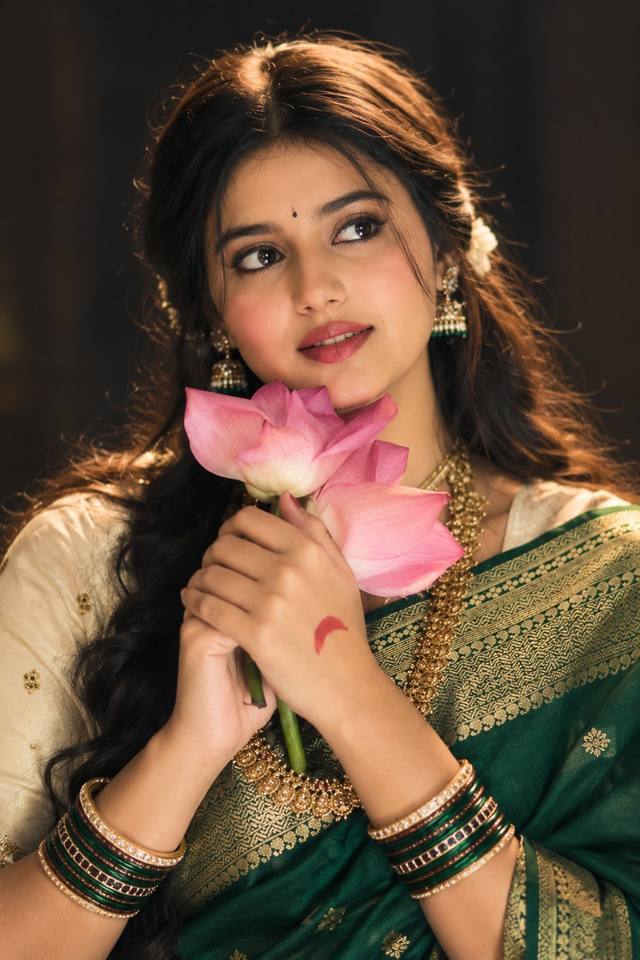
Cinematic Green Saree Lotus Portrait – AI Photo
Create a dreamy, photorealistic Indian saree portrait with a pink lotus, traditional jewelry, warm cinematic lighting, and an elegant timeless mood.
CBy Community Creator
- Views
- 0
- Copies
- 0
- Made for
- ChatGPT
- Difficulty
- beginner
The prompt1265 chars
Create an ultra-realistic cinematic portrait of a beautiful young South Asian woman wearing an elegant deep emerald-green saree with intricate gold borders and a cream-gold blouse. She has long, naturally wavy dark hair styled softly with delicate flowers, traditional gold earrings, a layered gold necklace, a small elegant bindi, and multiple green-and-gold bangles.

She is gently holding fresh pink lotus flowers close to her face and looking slightly to the side with a soft, graceful expression. Use natural realistic facial features, detailed expressive eyes, realistic skin texture, subtle makeup, naturally shaped lips, and finely detailed hair.

Set the scene against a dark, softly blurred background with warm golden cinematic rim lighting around her hair and shoulders. Add soft diffused key lighting on the face, gentle shadows, subtle film grain, shallow depth of field, creamy bokeh, rich but natural colors, realistic fabric texture, detailed jewelry, and authentic Indian styling.

Professional fashion photography, cinematic color grading, 85mm portrait lens, f/1.8, realistic depth of field, high dynamic range, sharp facial details, photorealistic skin, natural proportions, elegant composition, vertical portrait, ultra-detailed 8K HD quality.
One-tap tweaks
How to use
Recreate this in 4 steps
- 1Copy the promptTap “Copy prompt”, or open it straight in ChatGPT.
- 2Make it yoursFill any blanks and add one-tap tweaks — your photo, aspect ratio, more cinematic light.
- 3Paste it into ChatGPTFor a personal likeness, upload your photo first, then paste the prompt.
- 4Refine and shareRegenerate a couple of times, keep your favourite, and share the result.
FAQ
Questions people ask
It was written for ChatGPT, and also works in Gemini and Midjourney. Use the one-tap tweaks to adjust aspect ratio for each tool.
Yes. Upload your photo in the AI tool first, then add the “Keep my face” tweak before copying so the prompt asks it to keep your facial features.
Yes — every prompt on Prompt Mandi is free to copy. Check your AI tool's own terms before using generated images commercially.
Comments (0)
Sign in to leave a comment.