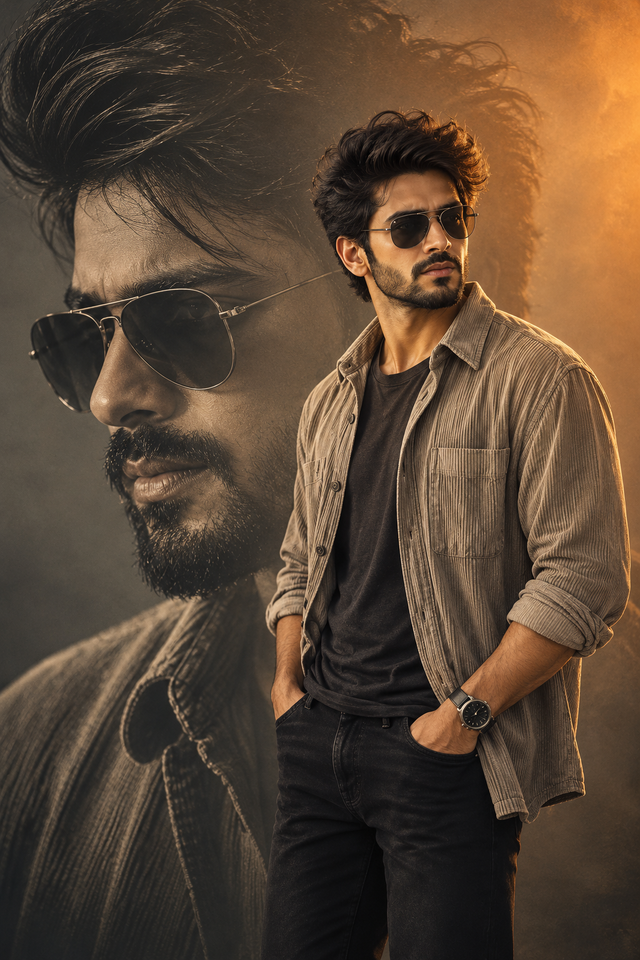
Cinematic Double Exposure Portrait of a Stylish Man
Create a photorealistic cinematic male portrait with a dramatic double-exposure close-up,aviator sunglasses,textured neutral overshirt,and warm golden lighting.
NBy @nomulagangothri
- Views
- 0
- Copies
- 0
- Made for
- ChatGPT
- Difficulty
- beginner
- – likes
- – saves
- – shares
Create an ultra-realistic, high-detail cinematic double-exposure portrait of a stylish young South Asian man with a completely unique face, thick textured black hair, a neatly trimmed beard, and dark aviator sunglasses. He wears a beige textured overshirt with rolled-up sleeves over a charcoal-black T-shirt, paired with dark trousers and a sleek wristwatch. Pose him confidently with both hands in his pockets, looking slightly to the side with a calm, charismatic expression. In the background, blend a large monochrome close-up of the same fictional man's face, emphasizing his sunglasses, hair texture, and beard. Use a smoky charcoal-grey background with warm amber and golden rim lighting, deep shadows, realistic skin pores, natural facial proportions, detailed fabric textures, and professional editorial photography. Create a balanced vertical composition with the close-up on the left and the standing portrait on the right. Photorealistic, cinematic color grading, sharp focus, soft atmospheric haze, premium fashion-poster aesthetic, 8K-style detail, 4K-quality clarity, portrait orientation, no text, no watermark, no logos, no distorted hands, and no duplicated facial features.
Creator's tips
Use ChatGPT image generation for the double-exposure composition. Describe the large background face and foreground pose separately for better control. Keep the lighting warm and directional, and avoid adding text because AI-generated lettering may appear distorted.
Recreate this in 4 steps
- 1Copy the promptTap “Copy prompt”, or open it straight in ChatGPT.
- 2Make it yoursFill any blanks and add one-tap tweaks — your photo, aspect ratio, more cinematic light.
- 3Paste it into ChatGPTFor a personal likeness, upload your photo first, then paste the prompt.
- 4Refine and shareRegenerate a couple of times, keep your favourite, and share the result.
Questions people ask
It was written for ChatGPT, and also works in Gemini and Midjourney. Use the one-tap tweaks to adjust aspect ratio for each tool.
Yes. Upload your photo in the AI tool first, then add the “Keep my face” tweak before copying so the prompt asks it to keep your facial features.
Yes — every prompt on Prompt Mandi is free to copy. Check your AI tool's own terms before using generated images commercially.