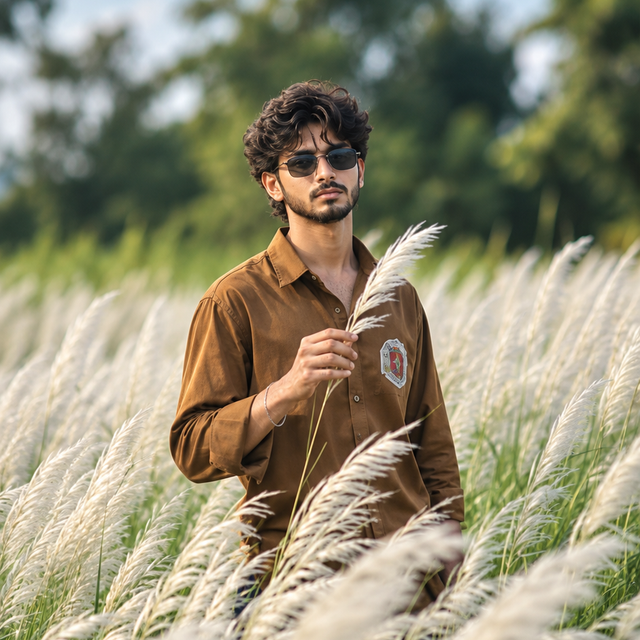
Cinematic Brown Shirt Portrait – ChatGPT AI
Create a photorealistic cinematic portrait of a stylish young man wearing a brown shirt and sunglasses in a beautiful field of tall white grass.
NBy @nomulagangothri
- Views
- 0
- Copies
- 0
- Made for
- ChatGPT
- Difficulty
- beginner
- – likes
- – saves
- – shares
Create an ultra-realistic 8K HD cinematic portrait of a handsome young adult man with a unique, natural face, thick curly black hair, a neatly trimmed beard and mustache, and stylish dark sunglasses. He is standing confidently in a lush outdoor field filled with tall, soft white pampas grass, gently holding a delicate grass plume in one hand. He wears a relaxed-fit brown button-up shirt with rolled-up sleeves, subtle chest detailing, and dark trousers partially hidden by the grass. His expression is calm, confident, and stylish as he looks slightly toward the camera. The background features softly blurred green trees, natural foliage, and an overcast pale-blue sky. Use soft diffused daylight, realistic skin texture, detailed curly hair, natural hands, authentic fabric folds, muted earthy colors, shallow depth of field, creamy bokeh, professional DSLR photography, an 85mm portrait lens, and cinematic color grading. Frame the subject from the waist up with the tall grass in the foreground and a softly blurred natural background. Create a premium editorial fashion photograph with lifelike details, balanced exposure, realistic proportions, crisp focus on the face, and natural depth. Vertical 9:16 composition, photorealistic quality, 8K-style detail, no cartoon effects, no duplicate people, no distorted fingers, no artificial skin, and no watermark.
Creator's tips
Works well with ChatGPT image generation. Use a clear reference photo if you want to guide the facial appearance. Keep the brown shirt, dark sunglasses, white grass, and soft natural lighting consistent. For variations, try a black shirt, golden-hour lighting, or a wider full-body composition.
Recreate this in 4 steps
- 1Copy the promptTap “Copy prompt”, or open it straight in ChatGPT.
- 2Make it yoursFill any blanks and add one-tap tweaks — your photo, aspect ratio, more cinematic light.
- 3Paste it into ChatGPTFor a personal likeness, upload your photo first, then paste the prompt.
- 4Refine and shareRegenerate a couple of times, keep your favourite, and share the result.
Questions people ask
It was written for ChatGPT, and also works in Gemini and Midjourney. Use the one-tap tweaks to adjust aspect ratio for each tool.
Yes. Upload your photo in the AI tool first, then add the “Keep my face” tweak before copying so the prompt asks it to keep your facial features.
Yes — every prompt on Prompt Mandi is free to copy. Check your AI tool's own terms before using generated images commercially.