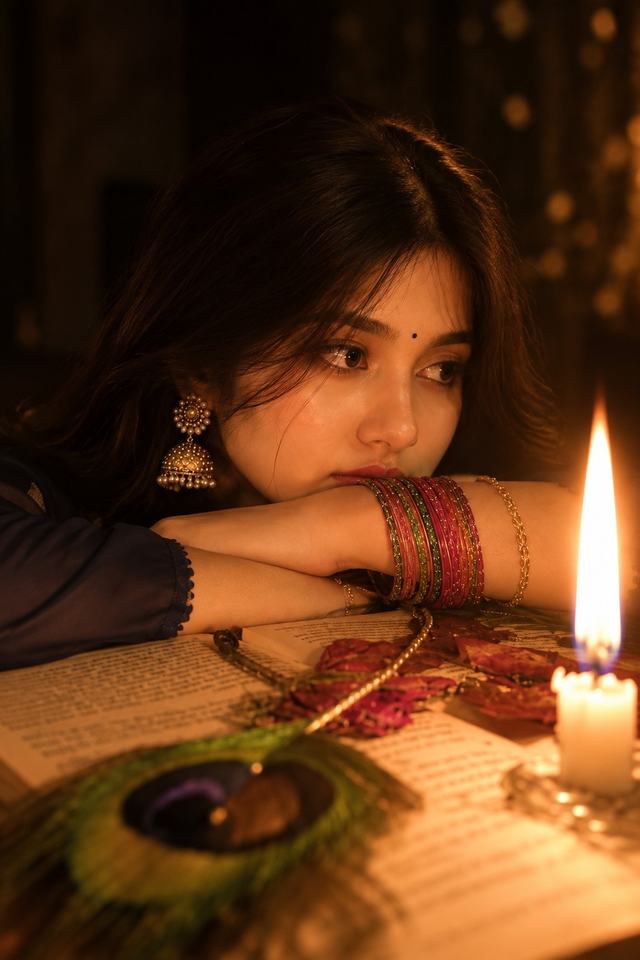
Candlelight Girl Portrait – 8K Cinematic Realistic
Create a dreamy candlelit portrait with warm glowing light, traditional jewelry, colorful bangles, and a cozy festive atmosphere.
NBy Gangothri
- Views
- 24
- Copies
- 4
- Made for
- ChatGPT
- Difficulty
- beginner
- – likes
- – saves
- – shares
Create an ultra-realistic 8K HD cinematic close-up portrait of a young adult South Asian woman in a warm, intimate candlelit setting.

Create a completely different original face and identity from any reference image. Keep her facial features natural, realistic, and consistent.

She has softly styled dark wavy hair framing her face, expressive natural eyes, subtle makeup, a tiny black bindi, and realistic skin texture. She wears elegant traditional gold jhumka earrings and colorful stacked glass bangles in red, green, gold, and pink.

POSE:
She rests her chin gently on her folded arms over an open vintage-looking book placed on a wooden table. Her gaze is directed softly toward the side, creating a thoughtful, dreamy expression.

SETTING:
A cozy dark indoor environment decorated with warm festive details. Place a glowing candle prominently on the right side of the frame. Add a few scattered rose petals, a delicate necklace, and a beautiful peacock feather in the foreground on the table.

LIGHTING:
The candle is the primary light source, creating a warm golden-orange glow across her face, hands, jewelry, and the open book. Add subtle warm bokeh lights in the background, gentle shadows, realistic candle glow, and soft atmospheric illumination.

PHOTOGRAPHY:
High-end cinematic portrait photography, ultra-photorealistic, 8K HD, realistic skin pores, detailed eyes, individual hair strands, realistic jewelry reflections, accurate hands and fingers, natural facial proportions, shallow depth of field, creamy foreground and background blur, professional portrait lens, HDR, subtle film grain.

COLOR GRADING:
Warm amber, deep brown, golden orange, muted red and green accents, rich shadows, cozy festive tones.

COMPOSITION:
Vertical 9:16 portrait, close-up framing, woman's face as the primary focus, candle visible on the right, open book and peacock feather softly visible in the foreground.

Create a completely different face and identity from the reference image. Do not copy the identity of the original person.

Make the overall result look like a real professional photograph rather than an AI-generated image.

No text, no watermark, no logo, no cartoon effect, no plastic skin, no distorted face, no extra fingers, no malformed hands, no duplicate objects.
Creator's tips
🔥 Creator Tip: Turn this candlelit portrait into a cinematic, emotional AI Reel. Hook: Start with an extreme close-up of the flickering candle, then slowly reveal her face. AI animation: Add natural blinking, subtle hair movement, and gentle candlelight flickering across her face. Camera movement: Use a slow push-in toward her eyes while keeping the peacock feather and book softly blurred. Sound design: Combine soft flute music, candle crackling, and subtle ambient sounds for a dreamy atmosphere. Pro move: Preserve realistic skin pores and facial details; animate only the lighting and small movements to avoid the artificial AI look.
Recreate this in 4 steps
- 1Copy the promptTap “Copy prompt”, or open it straight in ChatGPT.
- 2Make it yoursFill any blanks and add one-tap tweaks — your photo, aspect ratio, more cinematic light.
- 3Paste it into ChatGPTFor a personal likeness, upload your photo first, then paste the prompt.
- 4Refine and shareRegenerate a couple of times, keep your favourite, and share the result.
Questions people ask
It was written for ChatGPT, and also works in Gemini and Midjourney. Use the one-tap tweaks to adjust aspect ratio for each tool.
Yes. Upload your photo in the AI tool first, then add the “Keep my face” tweak before copying so the prompt asks it to keep your facial features.
Yes — every prompt on Prompt Mandi is free to copy. Check your AI tool's own terms before using generated images commercially.