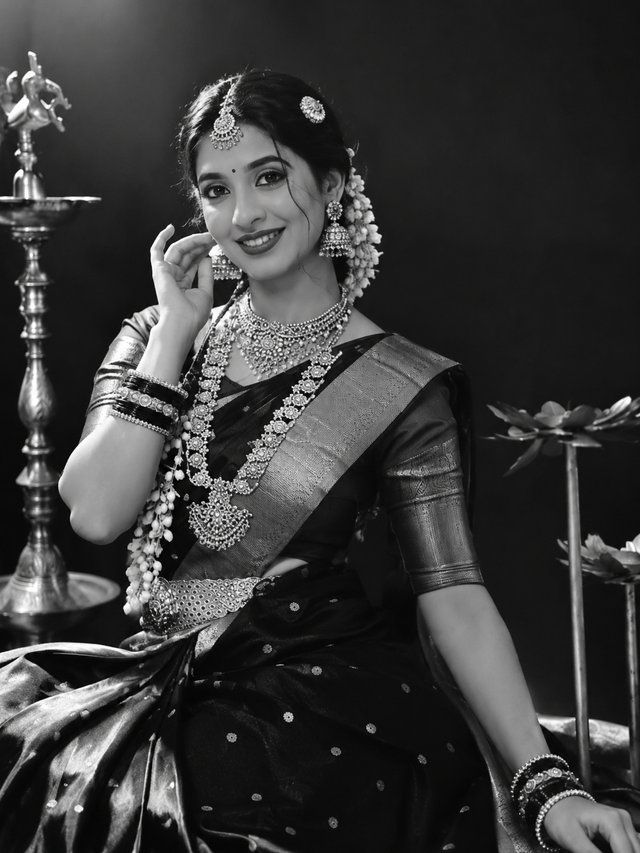
Black and White Traditional Indian Saree Portrait
Create a stunning black and white traditional Indian woman portrait featuring an elegant saree, beautiful temple jewellery, jasmine flowers, and a classic vintage photography atmosphere.
NBy @nomulagangothri
- Views
- 0
- Copies
- 0
- Made for
- Veo
- Difficulty
- beginner
- – likes
- – saves
- – shares
A striking black-and-white studio portrait of a smiling Indian woman dressed in an elegant traditional silk saree, wearing an ornate temple-style jewelry set with layered necklaces, long earrings, bangles, waist belt, and a decorative maang tikka. Her hair is neatly tied in a traditional bun adorned with jasmine flowers. She poses gracefully with one hand near her face, looking directly at the camera with a warm, confident smile. Dramatic low-key studio lighting, soft rim light on her hair and shoulders, deep black background, highly detailed facial features, expressive eyes, realistic skin texture, rich saree fabric texture, classic South Indian bridal styling, elegant seated pose, vintage fine-art photography, strong contrast, monochrome grayscale, soft shadows, professional portrait composition, ultra-realistic, cinematic atmosphere.

Negative prompt
Color image, blurry face, distorted hands, extra fingers, malformed jewelry, asymmetrical eyes, duplicate accessories, plastic skin, overly smooth face, modern clothing, messy background, harsh overexposure, low resolution, cartoon, illustration, unrealistic anatomy, cropped head, cut-off jewelry,text,watermark.
Creator's tips
Works beautifully with veo Image Generation. Use detailed descriptions of traditional jewellery, jasmine flowers, saree fabric, and dramatic lighting. For a vintage look, keep the background dark and use strong black-and-white contrast. Avoid excessive skin smoothing to preserve realistic facial details.
Recreate this in 4 steps
- 1Copy the promptTap “Copy prompt”, or open it straight in ChatGPT.
- 2Make it yoursFill any blanks and add one-tap tweaks — your photo, aspect ratio, more cinematic light.
- 3Paste it into VeoFor a personal likeness, upload your photo first, then paste the prompt.
- 4Refine and shareRegenerate a couple of times, keep your favourite, and share the result.
Questions people ask
It was written for Veo, and also works in ChatGPT and Gemini. Use the one-tap tweaks to adjust aspect ratio for each tool.
Yes. Upload your photo in the AI tool first, then add the “Keep my face” tweak before copying so the prompt asks it to keep your facial features.
Yes — every prompt on Prompt Mandi is free to copy. Check your AI tool's own terms before using generated images commercially.