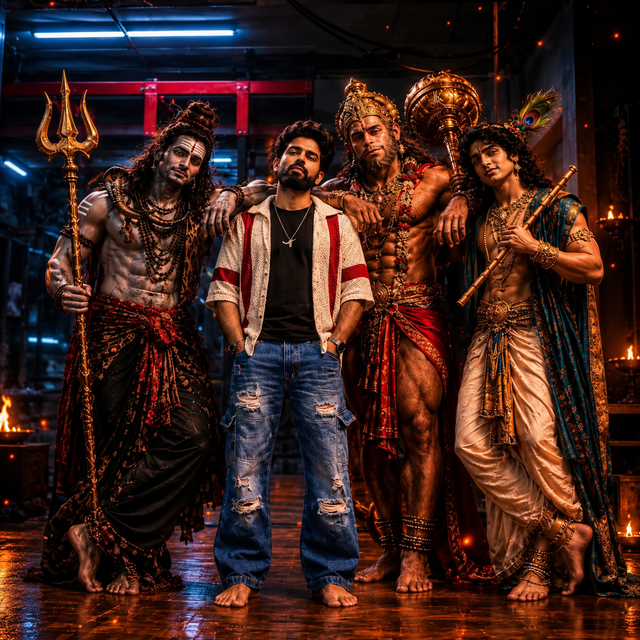
AI Mythology Group Portrait with Cinematic Lighting
Create a dramatic, photorealistic AI group portrait featuring a modern man surrounded by powerful Indian mythology-inspired characters, traditional costumes, ornate accessories, and cinematic lighting.
NBy @nomulagangothri
- Views
- 1
- Copies
- 0
- Made for
- ChatGPT
- Difficulty
- beginner
- – likes
- – saves
- – shares
Generate an ultra-realistic 8K HD square cinematic group portrait in a 1:1 aspect ratio. In the center stands a confident adult South Asian man with a unique original face, natural black hair, a well-groomed beard, a black T-shirt, an open cream jacket with red borders, distressed blue jeans, and a silver chain. Surround him with four powerful mythological-inspired Indian fantasy characters wearing elaborate traditional costumes, antique gold jewelry, rudraksha beads, detailed crowns, and flowing garments. One character holds a tall golden trident, another carries an ornate golden mace, and another holds a traditional wooden flute with a peacock feather accessory. Give every character a distinct face, realistic anatomy, expressive eyes, and detailed skin texture. Set the scene inside a dark cinematic studio with industrial beams, dramatic blue overhead lights, warm amber highlights, floating sparks, subtle atmospheric smoke, and glossy reflective flooring. Use professional movie-poster composition, realistic shadows, sharp fabric and jewelry details, natural proportions, high dynamic range, and cinematic color grading. Keep all five characters fully visible and well balanced within the square frame. Photorealistic, premium quality, no text, no watermark, no duplicated faces, no extra limbs, and no distorted hands.
Creator's tips
Use ChatGPT image generation for the cinematic square composition. Describe each character's outfit and accessories separately to improve detail. Check the faces, hands, and traditional props before publishing. For a different look, try warmer golden lighting or a blue-and-orange movie-poster style.
Recreate this in 4 steps
- 1Copy the promptTap “Copy prompt”, or open it straight in ChatGPT.
- 2Make it yoursFill any blanks and add one-tap tweaks — your photo, aspect ratio, more cinematic light.
- 3Paste it into ChatGPTFor a personal likeness, upload your photo first, then paste the prompt.
- 4Refine and shareRegenerate a couple of times, keep your favourite, and share the result.
Questions people ask
It was written for ChatGPT, and also works in Gemini and Midjourney. Use the one-tap tweaks to adjust aspect ratio for each tool.
Yes. Upload your photo in the AI tool first, then add the “Keep my face” tweak before copying so the prompt asks it to keep your facial features.
Yes — every prompt on Prompt Mandi is free to copy. Check your AI tool's own terms before using generated images commercially.