OpenAI WebMCP: The Model That Could Change the Web
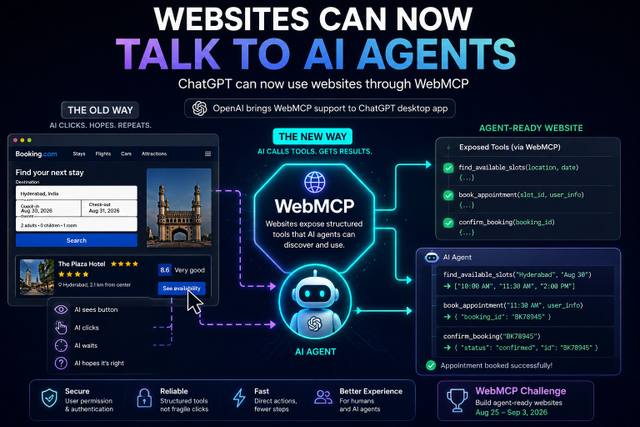
WebMCP lets websites expose structured tools that AI agents can call directly, turning websites from pages humans click into interfaces agents can operate.
By singamankitha
Source: https://openai.com/webmcp-challenge/?utm_source=chatgpt.com
Text Section
Websites Are Learning How to Talk Directly to AI Agents
For decades, websites were designed around one assumption:
A human is going to use them.
You open a website.
You look at the page.
You find a button.
You fill out a form.
You click something.
You wait.
Then you repeat the process.
But AI agents don't necessarily need to interact with websites the same way humans do.
An AI agent doesn't fundamentally care where the blue button is.
It cares about the action.
If you want an appointment, the important operation isn't:
"Find the blue Book Now button."
It's:
book_appointment()
If you want to search available flights, the important operation isn't:
"Find the search box and click it."
It's:
search_flights()
That is the idea behind WebMCP.
WebMCP is an experimental open standard designed to let websites expose structured tools that AI agents can use directly.
OpenAI is now bringing support for WebMCP-style site tools into the ChatGPT desktop app's built-in browser, allowing ChatGPT and Codex to discover and use these tools when compatible websites provide them.
And this could change how websites are built.
1. What Is WebMCP?
WebMCP stands for Web Model Context Protocol.
It is an experimental open standard that gives websites a way to expose specific capabilities as tools for AI agents.
Instead of forcing an agent to figure out how a website works by looking at the screen, the website can explicitly tell the agent:
Here are the actions you can perform.
For example:
find_available_slots()
book_appointment()
cancel_booking()
search_products()
add_to_cart()
check_order_status()
The agent can then call the appropriate tool.
The basic idea becomes:
User
↓
AI Agent
↓
Website exposes structured tools
↓
Agent calls the right tool
↓
Website performs the action
↓
Result returns to agent
This is fundamentally different from traditional browser automation.
2. The Old Way: AI Looks at the Website
Imagine an AI agent needs to book a doctor's appointment.
A traditional browser agent might have to:
Open website
↓
Find appointment page
↓
Read page
↓
Find date selector
↓
Click date
↓
Find available slots
↓
Click time
↓
Fill patient information
↓
Click Book
↓
Confirm
The agent is essentially trying to behave like a human.
That can work.
But it can also be fragile.
A website changes its layout.
A button moves.
A popup appears.
The page loads differently.
The agent misunderstands an element.
The automation breaks.
This is one of the major challenges with browser-based agents.
3. The New Way: Website Exposes the Action
With WebMCP, the website can expose the underlying functionality directly.
Instead of the AI having to figure out:
"Where is the booking button?"
the website could expose:
find_available_slots()
Then:
book_appointment()
The workflow becomes:
AI Agent
↓
find_available_slots()
↓
Available times
↓
book_appointment()
↓
Confirmation
That's much closer to how software APIs work.
The AI isn't guessing what the website wants.
The website is explicitly exposing the actions an agent can use.
OpenAI describes WebMCP as a way for websites to define exactly how agents can use an app so tasks can be completed faster, more accurately, and more reliably.
4. Why This Is a Big Deal
This could change the fundamental role of a website.
Today, most websites are designed as:
Human interface
Tomorrow, they could increasingly become:
Human interface + Agent interface
That means one website could have two ways of interacting with it.
Human
Uses:
Buttons
Menus
Forms
Pages
AI Agent
Uses:
Structured tools
Actions
Parameters
Results
The same underlying website can support both.
That's important because humans and AI agents don't necessarily need the same interface.
Humans need visual interfaces.
Agents need structured actions.
WebMCP attempts to bridge those two worlds.
5. Think of a Website as an API
Here's an easy way to understand it.
An API exposes functionality to software.
For example:
GET /products
POST /orders
GET /appointments
WebMCP brings a similar concept directly into the web experience for agents.
Instead of only exposing pages, a website can expose agent-facing tools.
For example:
search_products(query)
get_product_details(product_id)
add_to_cart(product_id)
checkout()
The AI agent doesn't have to understand every visual detail of the page.
It can interact with the site's capabilities directly.
This could make agent-based workflows much more reliable.
6. A Booking Website Example
Imagine a hotel website.
A human might navigate:
Homepage
↓
Hotels
↓
Location
↓
Dates
↓
Guests
↓
Search
↓
Room
↓
Book
An AI agent could potentially interact with tools like:
search_hotels(location, dates, guests)
↓
get_available_rooms(hotel_id)
↓
reserve_room(room_id)
↓
confirm_booking()
The user could simply say:
"Find me a hotel in Hyderabad for this weekend under ₹5,000 and book the best-rated option."
The AI could translate the request into a sequence of structured actions.
The important point is that the website itself can expose those capabilities.
7. This Is More Than Browser Automation
This distinction is important.
Browser automation tries to imitate what a human does.
WebMCP is designed to let the website expose what an agent can do.
Compare the two.
Browser automation
See → Find → Click → Type → Wait → Repeat
WebMCP-style interaction
Discover tools → Call tool → Receive result → Call next tool
The second approach can be more deterministic because the agent isn't relying entirely on visual interpretation.
It knows:
This tool exists.
This is what it does.
These are the inputs it accepts.
This is the result it returns.
That's a much cleaner interface for agentic workflows.
8. What Does OpenAI Actually Support?
OpenAI says support for WebMCP is being added to the ChatGPT desktop app's built-in browser and ChatGPT Sites.
When a compatible website exposes the appropriate tools, ChatGPT or Codex can discover and use them.
OpenAI calls its implementation Site tools.
These tools allow a website to provide useful actions directly to an AI agent alongside the normal human-facing interface.
The important detail is that the agent and user can work with the same live page and signed-in session.
That means the AI doesn't necessarily need to operate in some completely separate backend environment.
It can work with the website itself.
9. Why the Signed-In Session Matters
Imagine you're using an e-commerce website.
You are already logged in.
You have:
Your account
Your saved addresses
Your preferences
Your shopping cart
Your order history
If an AI agent can operate within the same authorized session, it could potentially perform actions using the permissions you already have.
For example:
User
"Show me my recent orders."
↓
Agent
calls:
get_order_history()
↓
Website
returns the user's orders.
Or:
User
"Reorder the same product."
↓
Agent
calls:
get_previous_order()
↓
Agent
calls:
reorder_product()
↓
Website
processes the request.
This is much more powerful than simply asking an AI to tell you how to use a website.
10. But This Also Creates a Huge Security Problem
This is where we need to slow down.
Giving AI agents direct access to website actions is powerful.
It's also risky.
Imagine a website exposes:
transfer_money()
delete_account()
purchase_product()
send_message()
change_password()
The AI agent now has access to actions that can have real consequences.
That's why agentic websites need strong permission systems.
A good architecture should distinguish between:
Read actions
and
Write actions
and especially:
High-risk actions
For example:
Low risk
search_products()
Medium risk
add_to_cart()
Higher risk
purchase_product()
Very high risk
transfer_money()
Different actions should require different levels of authorization.
11. Human Approval Becomes Important
A future website might work like this:
AI wants to perform action
↓
Website checks permission
↓
Risk evaluation
↓
Human approval if required
↓
Action executes
This is similar to how many agent systems already think about tool permissions.
The AI shouldn't automatically be allowed to perform every action simply because the website exposes the tool.
The website can expose the capability.
The user still needs control over whether the agent is allowed to use it.
12. WebMCP Could Change Website Design
Here's where things get really interesting for developers.
For years, web developers have asked:
"How do humans use this website?"
With agentic interfaces, they increasingly need to ask:
"How will humans and AI agents use this website together?"
That changes design thinking.
A website might need:
Human UI
For people who want to browse visually.
Agent tools
For AI systems that want to perform structured actions.
Permissions
To control what agents can do.
Authentication
To ensure the agent acts on behalf of the correct user.
Tool descriptions
So agents understand what each capability does.
Validation
To prevent incorrect actions.
This creates a new category:
Agent-ready websites.
13. Agent-Ready Doesn't Mean "No UI"
This is another important distinction.
WebMCP doesn't mean websites should stop having interfaces.
Humans still need interfaces.
Instead, the website can support both.
Think:
Human
→ visual UI
AI Agent
→ structured tools
Both interact with:
The same website
That's actually more powerful than replacing the UI entirely.
The website becomes accessible to both humans and agents.
14. What Developers Can Build
The possibilities are huge.
E-commerce
search_products()
compare_products()
add_to_cart()
checkout()
Travel
search_flights()
search_hotels()
reserve_room()
cancel_booking()
Restaurants
find_available_tables()
book_table()
modify_reservation()
Healthcare
find_available_slots()
book_appointment()
reschedule_appointment()
Education
search_courses()
enroll_course()
get_assignments()
Finance
get_transactions()
create_payment()
transfer_money()
with much stronger authentication and approval requirements.
The key idea is:
The website exposes the action.
The AI decides when and how to use it based on the user's request and permissions.
15. WebMCP and MCP Are Related, But Don't Confuse Them
The name can be confusing.
MCP, or Model Context Protocol, is a broader protocol ecosystem for connecting AI models and agents with external tools and data.
WebMCP is specifically focused on the web.
The goal is to let web applications expose tools that agents can discover and use.
So think:
MCP
→ broader tool/context connection
WebMCP
→ web applications exposing capabilities to agents
They're related concepts, but they're not identical.
16. Chrome Is Working on WebMCP Too
This isn't only an OpenAI initiative.
Google Chrome has published WebMCP developer documentation and describes WebMCP as a way to create consistent agent experiences for websites.
Chrome's documentation explains that WebMCP tools can support different kinds of actions, including form input, site navigation, and state management.
That matters.
Because if multiple major companies start supporting the same concept, the idea has a better chance of becoming an important web standard.
But remember:
It is still experimental.
We are not at the point where every website automatically supports agent tools.
17. The WebMCP Challenge
OpenAI is also pushing developers to experiment with the idea.
The WebMCP Challenge launched on August 25, 2026.
OpenAI describes it as a 10-day challenge focused on building websites and applications that become meaningfully better when people and AI agents can use them together.
The top 10 submissions each receive:
$3,000 cash from OpenAI
One year of ChatGPT Pro
A Codex Micro keyboard
OpenAI swag
Additional prizes from Shopify, Google Chrome, Netlify, Cloudflare, Vercel and Render.
Registration and submissions opened on August 25.
The official OpenAI page lists the submission deadline as September 3 at 1 PM PT, with winners planned for September 23, although the winner date can change depending on submission volume.
So this isn't just a theoretical discussion.
Developers are being actively encouraged to build around the concept.
18. What Could Developers Build?
OpenAI's challenge examples give us a glimpse of what agent-native websites could look like.
One example is 3D modeling.
Instead of manually manipulating every object, you could work with an AI agent that helps create and modify a 3D scene.
Another example is collaborative writing.
The AI can work inside a shared document and leave comments.
There are also examples involving:
Crossword creation
Travel planning
Data exploration
The common idea is:
The human and the AI work inside the same web experience.
That's a different philosophy from simply adding a chatbot to a website.
19. The Website of the Future May Be Different
Imagine a website today.
You see:
Home
Products
About
Pricing
Contact
Login
A future agent-ready website might additionally expose:
search()
compare()
purchase()
book()
cancel()
track()
The visual website remains for humans.
The structured tools become the interface for agents.
So the website effectively has:
A human interface
and
an agent interface
at the same time.
20. Why This Could Be Huge for AI Agents
AI agents are only as useful as the tools they can access.
A powerful AI model without tools is limited.
Give it tools, and it becomes much more capable.
For example:
AI + Search
→ Find information
AI + Code execution
→ Perform computation
AI + APIs
→ Interact with software
AI + WebMCP
→ Potentially interact directly with agent-ready websites
That could turn websites into a huge ecosystem of tools.
Instead of building a custom integration for every service, websites themselves could expose agent-friendly actions.
21. The Economic Impact
This could also change how businesses think about websites.
Today a company builds a website primarily to attract humans.
In an agent-driven internet, companies may also need to make their services discoverable and usable by AI agents.
Imagine someone tells an AI:
"Find me the cheapest flight that matches these requirements."
The AI doesn't need to visit 20 websites manually.
It could potentially interact with agent-ready travel websites and compare structured results.
Or:
"Find me a laptop under ₹80,000 with 32GB RAM and order the best option."
The AI could potentially search multiple agent-ready stores and interact with their product and checkout tools.
The web becomes less about:
Where is the information?
and more about:
What actions can this service perform?
22. Search Could Change Too
Search engines traditionally answer:
"Where can I find information about X?"
Agents could increasingly ask:
"Which service can perform X?"
That's a different model.
For example:
Instead of searching:
"How do I book a hotel?"
the AI could find services that expose:
search_hotels()
reserve_room()
The web becomes increasingly action-oriented.
That could eventually influence SEO, website architecture, APIs, and digital marketing.
23. SEO May Become Agent Optimization
This is a fascinating possibility.
Traditional SEO focuses on:
Keywords
Content
Links
Search rankings
But if AI agents become major users of the web, businesses may also care about:
Tool discoverability
Tool descriptions
Structured actions
Permissions
Reliability
Agent usability
You could eventually see something like:
AEO — Agent Experience Optimization
or other forms of agent-focused web optimization.
The goal wouldn't only be:
"Can Google find my website?"
It would also become:
"Can AI agents understand and use my website?"
24. What This Means for Developers
If you're a developer, this is worth paying attention to now.
Don't just build:
A website humans can click.
Start thinking about:
What actions could an AI agent perform here?
For an online store:
search
compare
cart
checkout
For a SaaS product:
create_project
generate_report
invite_user
export_data
For a booking service:
search_availability
reserve
modify
cancel
The website becomes a collection of capabilities that both humans and agents can access.
25. But Don't Expose Everything
This is critical.
Just because an action can be automated doesn't mean it should be.
Developers should carefully decide which tools are exposed.
A good agent tool should have:
Clear purpose
Strict input validation
Defined permissions
Predictable outputs
Authentication
Authorization
Rate limits
Audit logs
Human confirmation for risky operations
Agent-ready doesn't mean:
"Give the AI unrestricted access to my backend."
That would be a terrible idea.
26. The Security Challenge
Imagine an AI agent receives a malicious instruction from a website.
Or a webpage contains prompt injection.
Or an agent misunderstands the user's request.
Or a tool is poorly designed.
Now the AI could potentially execute an unwanted action.
That's why WebMCP and agentic web infrastructure will need strong security practices.
The system has to answer:
Who authorized this action?
What exactly is the agent allowed to do?
What information can it access?
Can it make purchases?
Can it change account settings?
Does this action require confirmation?
These aren't minor implementation details.
They're fundamental to making agentic websites safe.
27. The Real Shift
The biggest shift isn't:
"ChatGPT can browse websites."
AI agents can already browse.
The bigger shift is:
Websites can explicitly tell AI agents what they can do.
That's a very different relationship.
Old model:
AI → sees website → interprets page → clicks
New model:
AI → discovers tools → calls action → receives structured result
That could make agent interactions faster, more reliable, and easier to build.
28. The Future Internet Could Be Agent-Readable and Agent-Actionable
Imagine every major service exposing structured capabilities.
Amazon:
search_products()
Google Maps:
find_route()
Airlines:
search_flights()
Hotels:
search_rooms()
Restaurants:
find_tables()
Banks:
get_transactions()
SaaS platforms:
create_report()
The AI agent becomes a universal interface layer.
You don't necessarily need to learn how every website works.
You tell the AI what you want.
The agent finds the appropriate service.
Then it calls the appropriate tools.
That's the long-term vision.
29. What This Means for Normal Users
For users, the biggest benefit could be simplicity.
Instead of learning dozens of websites, users could simply tell an AI:
"Find me the best option."
"Book this."
"Compare these."
"Cancel my subscription."
"Track my order."
"Schedule an appointment."
The AI handles the interaction.
But users will still need visibility and control.
For important actions, you should know:
What is the AI doing?
Which website is it using?
What information is being shared?
What action will happen?
How much will it cost?
Can I approve or reject it?
Convenience should not mean losing control.
30. The Biggest Question
If WebMCP succeeds, the web could evolve from:
A collection of pages humans navigate
into:
A collection of services both humans and AI agents can operate.
That's a massive change.
The browser might become less important as a place where humans manually click through pages.
Instead, it could become the environment where humans and AI agents collaborate.
You say:
"Book me a table tomorrow at 8 PM."
The agent doesn't need to explain:
"First, click Restaurants."
It simply finds the relevant service and uses its booking capability.
31. The Future Website
The website of the future may have three layers:
Layer 1 — Human Interface
What people see.
Pages
Buttons
Forms
Images
Layer 2 — Agent Interface
What AI agents use.
Tools
Actions
Schemas
Structured results
Layer 3 — Permission & Safety
What controls everything.
Authentication
Authorization
Approvals
Validation
Audit logs
That combination could become the foundation of the agentic web.
32. What Happens Next?
WebMCP is still experimental.
So there are several things to watch.
Will browsers adopt it?
Chrome is already publishing WebMCP documentation and experimentation around the standard.
Will websites implement it?
Without website adoption, agent tools remain limited.
Will AI companies support it?
OpenAI is already integrating WebMCP-style site tools into its desktop experience.
Will developers build useful applications?
The WebMCP Challenge is specifically designed to encourage that experimentation.
Will security standards mature?
This may be one of the biggest challenges.
Will users trust agents?
Technology can exist without becoming mainstream if users don't trust it.
33. The Bigger Picture
The AI industry has been moving through several stages.
AI generates content
↓
AI uses tools
↓
AI uses computers
↓
AI uses websites
↓
Websites expose tools to AI
That last step is important.
The relationship between AI and the web is becoming more two-way.
Previously:
AI learns how to use the web.
Now:
The web can be designed to be used by AI.
That's the real story behind WebMCP.
34. Final Takeaway
Don't think of WebMCP as:
"A better way for ChatGPT to click websites."
That's too small.
Think of it as:
"A way for websites to become native tools for AI agents."
That changes the architecture of the internet.
Instead of:
Human → Website → Click
we could increasingly see:
Human → AI Agent → Website Tool → Action → Result
And for developers, this creates a completely new question:
If an AI agent visited your website tomorrow, what could it actually do?
Because the websites of the future may not just need to be human-friendly.
They may need to be agent-ready.
Key Takeaways
1. WebMCP is an experimental open standard.
It lets websites expose structured tools that AI agents can use directly.
2. OpenAI is adding support through Site tools.
ChatGPT's desktop app built-in browser can discover and use compatible site tools.
3. Agents don't have to rely entirely on clicking.
Instead, websites can expose explicit actions such as booking, searching, or modifying data.
4. This can make agent interactions more reliable.
The agent can work with defined tools instead of guessing from a visual interface.
5. Security becomes critical.
Not every website action should automatically be available to an AI agent.
6. Chrome is also experimenting with WebMCP.
This gives the concept broader industry significance.
7. OpenAI launched a WebMCP Challenge.
The challenge opened August 25, with submissions due September 3 at 1 PM PT and 10 winning projects receiving OpenAI prizes plus additional partner prizes.
8. The bigger idea is the agentic web.
Websites could evolve from pages humans navigate into services AI agents can directly operate.