Microsoft MAI-Code AI Runs Locally on Your PC
Microsoft's MAI-Code-1.1-Flash can run locally with zero inference charges, but Microsoft recommends more than 120 GB of RAM for best performance.
Source: https://microsoft.ai/news/mai-code-1-1-flash-br-better-faster-at-a-quarter-of-the-cost/
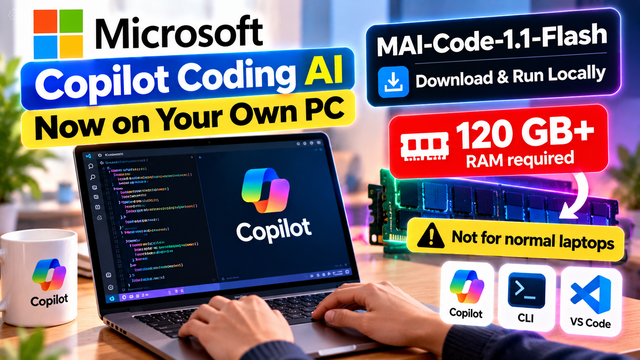
Microsoft Brings Copilot Coding AI to Your Own PC — But There Is a Catch
Imagine running an AI coding model directly on your own computer instead of sending every coding request to a cloud service. You could ask an AI to explain code, help debug a project or assist with development tasks while using your own hardware to perform the model's inference.
Microsoft is moving toward this idea with MAI-Code-1.1-Flash, a coding-focused AI model that can be downloaded and run locally.
The announcement is exciting for developers because Microsoft says local model calls carry zero inference charges. But there is an important catch: Microsoft recommends devices with more than 120 GB of RAM for the best performance.
That is far beyond the memory available in many ordinary student and office laptops, which often have 8 GB or 16 GB of RAM.
The announcement therefore raises two questions: how useful is local AI coding, and who can realistically benefit from it?
Let's break down the technology, costs, hardware requirements and implications for Indian developers.
1. What is MAI-Code-1.1-Flash?
MAI-Code-1.1-Flash is Microsoft's coding-focused AI model, developed to support software engineering tasks through GitHub Copilot.
It is designed to help developers with activities such as writing code, understanding existing projects, working through technical problems and completing iterative coding tasks.
Unlike a general-purpose chatbot, a coding model is evaluated on how well it helps solve programming problems. Its practical usefulness depends not only on whether it can explain code, but also on whether it can produce working changes and use development tools correctly.
Microsoft says the 1.1 release improves on its earlier MAI-Code model through better coding performance, faster output and greater token efficiency. The company reports that output tokens stream 25% faster and tasks use 25% fewer tokens than the earlier model.
These are Microsoft's reported results, not independent guarantees that every developer will see the same improvements.
The important new development is that Microsoft has also made a version available for local execution, allowing supported hardware to perform the model's inference.
2. What does running an AI model locally mean?
Many AI coding assistants use cloud infrastructure. When you submit a request, the service sends it to remote servers, runs the model and returns a response.
With local inference, the model runs on your own device or local computing hardware.
A simplified comparison looks like this:
Cloud AI coding
Your request is processed by a remote service.
Usage may be subject to subscription limits, credits or usage-based charges.
Performance depends partly on network conditions and the cloud service.
Local AI coding
Your computer performs the model's inference.
Local model calls do not incur inference charges according to Microsoft's announcement.
Performance depends heavily on your hardware, memory, software and workload.
Local execution can be useful for developers who run AI coding tasks frequently or want to explore workflows that keep more processing on their own machines.
However, local inference does not automatically mean that every part of the development workflow is offline. GitHub Copilot integration, account authentication, extensions, repositories and other services may still require connectivity. The exact behavior depends on the workflow.
Similarly, running a model locally does not automatically make every connected tool or file private. Developers should understand the permissions and network access of the complete application.
3. The big catch: more than 120 GB of RAM
The headline hardware requirement is the most important detail for ordinary users.
Microsoft recommends devices with more than 120 GB of RAM for the best performance with the local model.
Compare that with common laptop configurations:
8 GB RAM: common in entry-level and older laptops.
16 GB RAM: common in student and everyday development laptops.
32 GB RAM: useful for heavier development workloads.
64 GB RAM: available in more powerful workstations.
More than 120 GB RAM: generally a workstation-class configuration or a supported system with substantial unified memory.
This comparison is illustrative; available configurations vary by device.
Why does a coding model need so much memory?
The model must keep its weights available while running. It also needs memory for the operating system, development tools, the active context, intermediate computations and the agent's working process.
A coding agent may read many files, inspect command output and work through a long conversation. These activities can increase memory use.
The model's total parameter count alone does not tell you exactly how much RAM is needed. Quantization, context length, runtime implementation and hardware architecture all affect the actual requirement.
Microsoft has optimized MAI-Code-1.1-Flash for local use, but the model is still large enough that hardware selection matters.
The practical lesson: do not assume that a 16 GB laptop can run this model well simply because the model is available to download.
4. How Microsoft reduces the memory requirement
Microsoft describes using quantization to reduce the model's footprint.
Quantization represents model values using lower precision than the original full-precision format. This can reduce the amount of memory needed to store and run a model.
Microsoft reports an approximately 53 GB model footprint for its local configuration, alongside a peak memory figure of 75.5 GB at a 256K-token context in its published technical evaluation.
These figures help explain why the recommended system memory is higher than the model footprint alone.
The model needs more than space for its weights. The runtime, context and other active processes also consume memory. A large context window can increase the memory needed for a coding session.
Microsoft also uses speculative decoding to improve responsiveness. In this approach, a draft process proposes tokens that the main model checks. Under suitable conditions, this can improve generation speed.
These optimizations make local execution more practical than it would otherwise be, but they do not eliminate the need for substantial hardware.
5. How does the model work with GitHub Copilot?
Microsoft says experimental access to local MAI-Code-1.1-Flash is planned through the GitHub Copilot app, GitHub Copilot CLI and Visual Studio Code.
These tools support different development workflows.
GitHub Copilot app: Provides an interface for AI-assisted development and supported agent workflows.
GitHub Copilot CLI: Brings coding assistance into a command-line environment, which can be useful when working with repositories, scripts and terminal-based tasks.
Visual Studio Code: Lets developers work with code, inspect changes and use AI assistance inside a popular code editor.
The idea is to let Copilot route eligible coding tasks to a local model when the local configuration is available and suitable.
That does not mean every request will always be handled locally. More demanding tasks may still use cloud models, depending on the configuration and routing behavior.
It also does not mean that all GitHub Copilot functionality becomes free. Microsoft specifically refers to zero inference charges for local model calls. Subscription terms, account requirements and other service costs should be checked separately.
6. Does zero inference cost mean free Copilot?
Not exactly.
This distinction is important because the phrase "free local AI" can easily be misunderstood.
When Microsoft says local model calls have zero inference charges, it means those calls do not incur a model-inference charge from the cloud provider because the inference is performed on your hardware.
But using local AI still has costs.
You need suitable hardware, electricity, storage, software setup and time to maintain the environment. A powerful workstation may cost much more than a typical laptop.
Depending on the Copilot integration, you may also need an eligible account or subscription to access the relevant features.
Therefore, zero inference charges do not necessarily mean that the entire Copilot experience is free or that every user can access the local model without restrictions.
For a developer who already owns suitable hardware, local inference could be attractive. For someone buying a workstation solely to avoid cloud usage charges, the economics require careful calculation.
7. Could this help Indian students and developers?
India has a large community of engineering students, independent developers, software professionals and startup teams. Many use AI assistants to learn programming, debug projects and accelerate development.
Local coding models could be useful for people who run many coding tasks, experiment with AI development tools or need more control over their computing environment.
However, the hardware requirement creates a barrier.
A student using a typical 8 GB or 16 GB laptop is unlikely to have the recommended configuration. Purchasing a high-memory workstation just to run this model may not be a sensible financial decision.
There are several practical alternatives.
Students can continue using cloud-based coding assistants within the limits of their existing plans. They can explore smaller local models that better match their hardware. They can also use conventional programming tools, testing frameworks and documentation to build coding skills without needing a large local model.
Developers who already have workstation-class hardware can evaluate MAI-Code-1.1-Flash with representative tasks before deciding whether it belongs in their regular workflow.
The best tool is not necessarily the largest or newest model. It is the one that performs the required task reliably within the available budget and hardware.
8. What about privacy and offline development?
Local inference can provide more control over where model computation takes place. This may be useful for teams handling sensitive source code or working under specific data-handling requirements.
But local execution should not be treated as an automatic privacy guarantee.
A development environment may still use network services for authentication, extensions, package installation, repository access or cloud-based tasks. The agent may also have permission to read local files or execute commands.
Before using a local coding agent on a sensitive project, developers should review the software's network behavior, tool permissions and data-handling documentation.
It is also wise to use sandboxing or other appropriate controls when an AI agent can run commands or modify files. A model operating on your computer can potentially affect your local environment if given excessive permissions.
Local inference changes where the model runs; it does not remove the need for safe development practices.
9. How to decide whether local AI coding is worth it
Before buying hardware, evaluate the decision from three angles.
First, check your existing hardware. Find out how much memory your system has and whether the local runtime supports your processor and graphics hardware. Do not rely only on the model's advertised download size.
Second, estimate how often you will use it. A developer making a few AI requests per day may not benefit enough to justify a workstation purchase. Someone running frequent coding tasks may have a stronger reason to investigate.
Third, test real tasks. Measure whether the model can complete your actual coding work, including tests, tool calls and review. Fast token generation is not useful if the resulting code requires extensive correction.
You should also compare the total cost of local hardware with the cost of cloud usage over a realistic period.
For example, a startup should calculate the hardware purchase, power consumption, maintenance and developer time—not simply compare zero local inference charges with a cloud price.
10. What should developers watch next?
The next important step is practical availability and reproducibility.
Microsoft's announcement describes local model availability and planned experimental integration into Copilot clients. Developers should check the current official documentation for the supported operating systems, installation process, hardware configurations, account requirements and model terms.
They should also look for detailed compatibility guidance and reproducible performance measurements.
Benchmarks are useful, but real coding workflows can behave differently. A model may perform well on a standardized test yet struggle with a particular repository, framework or tool sequence.
A careful trial should include code generation, debugging, repository navigation, test execution and review of the resulting changes.
That will reveal more about usefulness than a headline score alone.
Final takeaway
Microsoft's MAI-Code-1.1-Flash local release is an important step toward coding AI that can run on a developer's own hardware. It offers the possibility of zero inference charges for local model calls and integration with the GitHub Copilot development environment.
But the recommended requirement of more than 120 GB of RAM makes this a specialized option rather than an easy upgrade for every laptop.
For Indian students and developers, there is no need to rush out and buy expensive hardware. Check your existing setup, compare local and cloud alternatives, and evaluate the model against real tasks before spending money.
The big story is not simply that Microsoft has put coding AI on a PC. It is that powerful local AI is becoming more practical—but the hardware needed to run it well still matters.
Official source: Microsoft AI — MAI-Code-1.1-Flash: Better, faster, at a quarter of the cost.