Microsoft Copilot: The Future of One AI
Microsoft is reshaping Copilot into one unified AI experience while retiring several existing features.
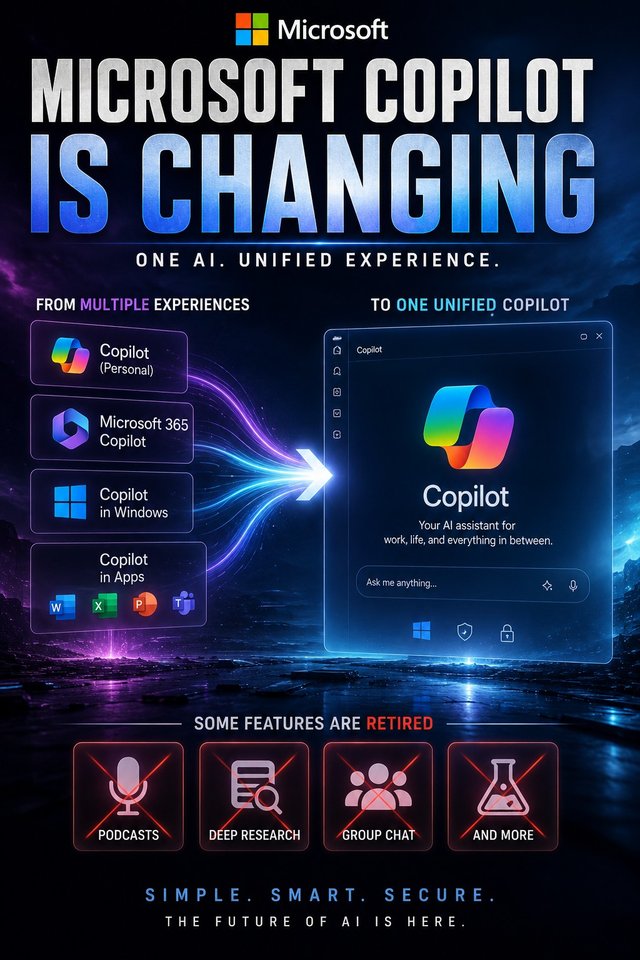
Microsoft Copilot Is Changing: One App, Fewer Features
Microsoft is making a major change to Copilot.
Instead of continuing to maintain separate experiences for consumer Copilot and Microsoft 365 Copilot, the company is moving toward a simpler, unified Copilot experience that can handle personal, work, and school accounts through the same overall application.
At the same time, Microsoft is retiring several Copilot features.
For users, that means something important:
Copilot is becoming more unified—but some things are disappearing along the way.
Microsoft's own support documentation confirms that the updated Copilot experience is rolling out with changes to navigation, functionality, feature availability, and sign-in. It also explicitly lists features including Podcasts, Deep Research, and Group Chat among those being retired.
The move is bigger than a simple app redesign.
It shows Microsoft trying to turn Copilot from a collection of separate AI experiences into a much more centralized AI platform.
From multiple Copilots to one Copilot
For a long time, Microsoft's AI strategy could be confusing.
There was consumer Copilot.
There was Microsoft 365 Copilot.
There were Copilot experiences inside Windows.
There were Copilot features inside Word, Excel, PowerPoint, Teams, Edge, and other Microsoft products.
And there were specialized AI experiences and features appearing across the ecosystem.
For businesses, this made sense because Microsoft could integrate AI directly into existing workplace products.
For ordinary users, however, it could feel fragmented.
Which Copilot should you use?
Where should you go?
Which features are available?
Which account should you sign in with?
What happens if you have both a personal Microsoft account and a work account?
Microsoft's new direction attempts to simplify that.
The company is moving toward one primary Copilot experience, while still keeping personal and work/school data separated.
That's an important distinction.
One app does not mean one giant pool of everyone's data.
Your account type and permissions still determine what Copilot can access.
What is actually changing?
Microsoft says users will see changes to the Copilot app's appearance, navigation, functionality, feature availability, and sign-in experience.
For people using personal accounts, the transition can involve moving to the updated Copilot app, with chats and content coming along during the migration.
Microsoft also says that when personal Copilot and Microsoft 365 Copilot are used with the same personal account, chats and content can be merged into the updated experience while data remains separated between different account types.
For users with work or school accounts, the experience is more controlled by their organization's Microsoft 365 environment.
That matters because Microsoft isn't simply creating a consumer chatbot and putting a corporate logo on it.
The company is trying to build a common AI interface that can understand which account and environment you're using.
Some features are being retired
This is the part likely to get the most attention.
Microsoft has confirmed that several Copilot features are being retired as part of the transition.
Among them are:
Podcasts
Deep Research
Group Chat
Mico
Other features that Microsoft says are being phased out as the experience changes
Microsoft's support documentation specifically says Podcasts will no longer be available after August 18, 2026, and Deep Research is being retired in the consumer Copilot app starting August 18.
Microsoft also has a dedicated FAQ explaining the retirement of Copilot features, including Group Chat, Mico, and Copilot Labs.
So the headline "Microsoft is changing Copilot" is accurate.
But "Microsoft is killing Copilot" would be completely wrong.
The opposite is happening.
Microsoft is investing in a more centralized Copilot.
It's just removing some features along the way.
Why would Microsoft remove features?
This is where the strategy gets interesting.
AI companies are still figuring out which features people actually use.
It's easy to launch an impressive AI capability.
It's much harder to make that capability useful enough that millions of people repeatedly come back to it.
A feature can look incredible during a product demonstration and still fail to become an important part of someone's daily workflow.
That creates a difficult decision.
Should Microsoft keep every experimental feature forever?
Or should it remove features that don't fit the direction of the product?
Microsoft appears to be choosing consolidation.
Instead of endlessly adding separate Copilot experiences, the company is trying to create a cleaner core product.
That can make the platform easier to understand.
The "super app" strategy
Microsoft's broader Copilot direction has increasingly been described as a move toward a more comprehensive AI experience.
The idea is relatively simple.
Instead of having one AI for chatting, another interface for work, another feature for research, another experience for agents, and another tool for productivity, Microsoft wants Copilot to become a central entry point.
You open Copilot.
You choose your account.
You ask for something.
Copilot determines what capabilities and data are available.
The experience becomes less about which individual AI feature you are using and more about Copilot as the interface to Microsoft's AI ecosystem.
That is a powerful strategy if Microsoft can execute it well.
But Microsoft has one major advantage
Microsoft isn't starting from zero.
It already controls one of the largest software ecosystems in the world.
Windows.
Microsoft 365.
Word.
Excel.
PowerPoint.
Outlook.
Teams.
OneDrive.
Edge.
Azure.
GitHub.
That gives Copilot something many standalone AI assistants don't have:
deep integration into existing workflows.
Imagine asking an AI assistant to help prepare for a meeting.
If the assistant can appropriately access your calendar, relevant emails, documents, previous conversations, and presentation files, it can potentially provide much more useful assistance than a chatbot that only sees the text you type into it.
That is the long-term opportunity for Microsoft.
Copilot doesn't have to win simply by being the smartest chatbot.
It can win by becoming deeply embedded in the software people already use.
This is where the ChatGPT comparison gets interesting
Microsoft isn't operating in a vacuum.
ChatGPT has become one of the biggest general-purpose AI products in the world.
Google has Gemini.
Anthropic has Claude.
Perplexity is building AI search.
And countless other companies are developing specialized AI assistants.
So Microsoft has a difficult strategic problem.
How do you make Copilot stand out?
One answer is integration.
ChatGPT can be a powerful general-purpose AI assistant.
Claude can be extremely useful for reasoning and coding.
Gemini can leverage Google's ecosystem.
Microsoft's advantage is the workplace.
Millions of people already use Microsoft products every day.
If Copilot becomes the AI layer connecting those products, Microsoft doesn't necessarily need users to abandon everything else.
It needs them to use Copilot where they already work.
One app doesn't mean one account
There is another detail users should understand.
Microsoft's unified experience does not mean personal and corporate information suddenly becomes mixed together.
Microsoft says account types remain separated.
Personal accounts and work or school accounts operate within their respective environments, with organizational security and compliance controls remaining relevant for work accounts.
That is essential for enterprise customers.
Imagine accidentally asking Copilot a work-related question while it is connected to your personal environment—or vice versa.
That would create obvious privacy and security concerns.
Microsoft therefore has to make the experience simple without making the underlying data boundaries confusing.
That's a difficult product-design problem.
Why the retirement of Deep Research matters
Deep Research is one of the more interesting features being retired from consumer Copilot.
Microsoft's documentation confirms that Deep Research is being retired from the consumer Copilot app starting August 18, 2026.
That doesn't necessarily mean Microsoft is abandoning the idea of AI-powered research.
Instead, it could indicate that Microsoft wants research capabilities to live differently inside its broader Copilot strategy.
This is an important distinction.
When a technology company retires a feature, it doesn't always mean the underlying capability is considered useless.
Sometimes the company believes the capability should become part of another product experience.
AI products are still evolving rapidly enough that today's standalone feature can become tomorrow's built-in capability.
Podcasts are another example
Microsoft is also retiring Podcasts from Copilot.
The company says that after August 18, users will no longer be able to create or access Podcasts in Copilot.
Again, this is interesting because AI-generated podcasts became a popular demonstration of what generative AI could do.
Give the system some information.
Let AI turn it into a conversational audio experience.
It sounds futuristic.
But the question isn't whether the technology is impressive.
The question is whether people actually need it often enough to justify maintaining a dedicated product feature.
That's the brutal reality of consumer software.
Cool isn't the same as useful.
Microsoft is learning what users actually want
This may be the biggest lesson from the change.
AI companies are entering a phase where launching features isn't enough.
They have to decide which features deserve to survive.
Users don't want 50 AI buttons.
They want AI that reliably solves problems.
That means AI companies may increasingly consolidate their products.
Instead of:
Feature A + Feature B + Feature C + Feature D
the future could be:
One AI assistant that does all four.
That's the logic behind Microsoft's unified Copilot strategy.
The risk of putting everything into one Copilot
There is a downside.
When everything becomes one application, the product can become complicated.
Think about your smartphone.
One app that does messaging, payments, shopping, social media, video, banking, documents, and productivity sounds convenient.
Until the interface becomes overwhelming.
AI assistants face the same problem.
If Copilot eventually tries to handle:
Chat
Search
Research
Documents
Email
Calendar
Coding
Images
Voice
Agents
Workflows
Personal tasks
Business tasks
then Microsoft has to make the experience extremely easy to navigate.
Otherwise, "one Copilot" could simply become "one giant confusing Copilot."
The enterprise opportunity is enormous
For businesses, however, consolidation could be a major advantage.
Companies don't want employees using dozens of disconnected AI systems.
They want security.
They want centralized management.
They want identity controls.
They want compliance.
They want predictable billing.
They want access to corporate data without losing control over it.
Microsoft already has an enormous enterprise footprint.
That gives Copilot a major opportunity.
If Microsoft can make one Copilot work across personal and professional contexts while maintaining strict data boundaries, it could become an extremely important enterprise AI interface.
The AI assistant is becoming an operating layer
This is the bigger trend.
AI assistants are slowly moving beyond the chatbot model.
A chatbot waits for you to type something.
An AI assistant can potentially understand your context.
An agent can potentially perform actions.
And a broader AI platform can potentially connect those actions to the applications you already use.
That's where Microsoft appears to be heading.
Copilot becomes less like a website you visit occasionally and more like an AI layer sitting across Microsoft's software ecosystem.
The long-term goal isn't necessarily for you to think:
"I need to open Microsoft Word."
It could become:
"I need to get this work done."
And Copilot figures out which Microsoft tools and capabilities are needed.
That's a much bigger vision.
What this means for ordinary users
For users, the immediate impact is relatively simple.
Your Copilot experience may look different.
Some features may disappear.
Your account experience may change.
Some users will move into the updated Copilot application.
And if you relied heavily on features such as Podcasts, Deep Research, or Group Chat, you should pay attention to Microsoft's retirement information.
But the overall direction is not a reduction in Microsoft's AI ambitions.
It's a consolidation of them.
Microsoft wants fewer disconnected Copilots and a stronger central Copilot experience.
The bigger Microsoft vs ChatGPT battle
This is where the story becomes much more interesting.
Microsoft and OpenAI have had a close relationship for years, but the AI market has become far more competitive.
Microsoft can't simply rely on having access to advanced AI technology.
It needs its own products to become indispensable.
That's why Copilot's user experience matters.
That's why integration matters.
That's why Microsoft 365 matters.
And that's why combining personal and professional Copilot experiences could be strategically important.
Microsoft isn't just competing with ChatGPT on chatbot quality.
It is competing on distribution and integration.
ChatGPT asks:
"What can AI do for you?"
Microsoft can ask:
"What can AI do across everything you already use?"
Those are different strategies.
The future may have fewer AI apps
Ironically, the AI explosion has created thousands of AI products.
There is an AI for writing.
An AI for coding.
An AI for research.
An AI for images.
An AI for meetings.
An AI for presentations.
An AI for search.
An AI for automation.
But users may eventually move in the opposite direction.
Instead of using more AI apps, they may use fewer powerful AI platforms.
That's exactly what Microsoft is attempting with Copilot.
And other companies are likely to pursue similar strategies.
The winning AI product may not be the one with the most features.
It may be the one that makes all those capabilities feel like one simple experience.
So, is Microsoft making Copilot better?
The honest answer is:
Potentially—but there is a trade-off.
Microsoft is simplifying the experience by bringing more Copilot functionality under one umbrella.
That's good for users who find Microsoft's AI ecosystem confusing.
But feature retirements will disappoint people who relied on specific tools.
And consolidation always comes with the risk that useful specialized experiences disappear before users are ready to let them go.
Still, Microsoft's direction is clear.
The company wants Copilot to become the central AI experience across its ecosystem.
The bigger AI battle
The next stage of AI competition won't simply be about who has the best model.
It will also be about who can build the best AI ecosystem.
Who has the best data?
Who has the best distribution?
Who has the best applications?
Who has the best agents?
Who can integrate AI into everyday workflows?
And perhaps most importantly:
Who can make all of that feel simple?
Microsoft is betting that the answer can be Copilot.
The company is consolidating its AI experiences, retiring some features, and building toward a more unified assistant for personal and professional use.
That means Copilot is not disappearing.
It's becoming something bigger.
The real question is whether users will prefer Microsoft's vision of one Copilot for everything over having several specialized AI tools.
Because the AI battle is no longer just about the smartest model.
It's becoming a battle over the AI assistant you use every day.