Meta Muse AI Agent Adds iPad Support and Integrations
Meta Muse adds native iPad support and integrations with Canva, Dropbox, Figma, GitHub and business apps to help coordinate everyday workflows.
Source: https://www.theverge.com/tech/1006813/muse-ai-agent-ios-app-ipad-support
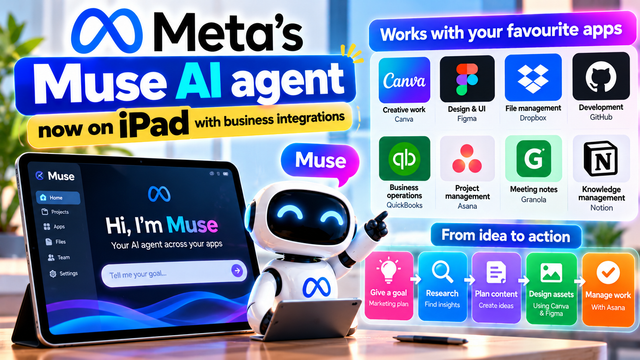
Meta Muse AI Agent Expands to iPad and Connects With Business Apps
Meta is expanding its Muse AI agent beyond basic conversations. The company has added native iPad support and expanded connections to popular productivity, creative and business applications. The update could make Muse more useful for people who want AI assistance with several connected tasks rather than just answers to individual questions.
The reported integrations include Canva, Figma, Dropbox, GitHub, QuickBooks and Asana, alongside connectors for Granola and Notion. Other integrations reported in the update include Zoom and Klaviyo.
The direction is clear: Meta wants Muse to help users work toward a goal by coordinating tasks across the applications they already use.
For content creators, freelancers, entrepreneurs and small businesses, this raises an interesting question: could one AI agent help organize a workflow that normally requires several separate tools?
The answer depends on the task, the available integrations and how reliably the agent performs. Here's what the update means and how people might use it.
1. What is Meta Muse?
Muse is Meta's personal AI agent. Unlike a conventional chatbot that mainly responds to questions, an AI agent is designed to help carry out tasks toward a goal.
A user might describe an objective, such as planning a marketing campaign or organizing a project. The agent can help break that objective into steps and work with connected applications to support the process.
Meta introduced Muse in September 2026 and has been expanding its capabilities across devices and software. Its small-business offering focuses on helping users with activities such as finding customers, planning marketing content, preparing client pitches and developing product pages.
Meta says users remain in control: actions such as publishing, sending or spending require approval. This distinction is important because an AI agent that can interact with business software needs clear boundaries around what it can do.
The latest update extends this approach to iPad users and more connected applications.
2. Muse now supports the iPad
The new update brings native iPad support to the Muse app. This means the experience is adapted for Apple's tablet rather than simply relying on an enlarged phone interface.
The iPad's larger display can be useful for reviewing plans, reading documents, examining visual content and managing several parts of a project.
For example, a freelancer might use an iPad to review a proposed campaign, check design assets and organize the next steps. A small-business owner could use the larger screen to inspect a project plan or review information before approving an action.
Native iPad support is a usability improvement, not proof that Muse has become more intelligent by itself. Its practical value depends on how well the interface supports the tasks users want to complete.
The update also reflects a broader industry trend: AI agents are increasingly being developed for multiple devices instead of remaining confined to a single chat window.
3. Which apps can Muse connect to?
The reported integrations cover several types of work.
Creative tools: Canva and Figma can support visual design, graphics and interface-related workflows.
File management: Dropbox provides a way to work with stored files, subject to the access and permissions granted.
Software development: GitHub is relevant to repositories, code and development workflows.
Business operations: QuickBooks supports accounting-related work, while Asana helps teams organize projects and tasks.
Knowledge and meeting notes: Granola and Notion can support the organization of notes, information and project knowledge.
Additional business tools: Zoom and Klaviyo are also among the integrations reported in the update.
The purpose of these connections is to reduce the need to move manually between apps for every step. Instead, a user can give Muse a goal and ask it to help coordinate work using connected services.
However, the presence of an integration does not mean that every feature inside the connected app is available to Muse. Access can depend on the connector, account permissions, product availability and the task being attempted.
4. How connected AI agents could change content creation
Consider a creator who wants to publish a series of posts about a new AI tool.
Without an AI agent, the creator might research the topic, write a content plan, prepare designs, organize the publishing schedule and track progress in separate applications.
A connected agent could help coordinate parts of that process.
First, the creator provides a clear goal, such as preparing a week of educational content. Muse could help develop a plan and organize the required tasks. Canva or Figma could support the visual-design stage, while a project-management tool such as Asana could help track progress.
Files and notes could be organized using the relevant connected services.
The creator would still need to check facts, review the designs, confirm that the content meets platform requirements and approve actions before publication.
This is not the same as pressing one button and receiving a guaranteed, finished campaign. The benefit is the potential to coordinate multiple steps more conveniently.
For creators who regularly publish tutorials, technology updates or educational content, even reducing repetitive organization could be useful.
5. A practical example for a small business
Imagine a small clothing business in India that wants to promote a new collection.
The owner could give Muse a goal: prepare a campaign plan for the new collection.
A possible workflow might include:
Plan the campaign: Identify the target audience, product highlights and promotional goals.
Prepare content ideas: Develop post topics, product descriptions and campaign messages.
Create visual assets: Use a connected design tool to help prepare graphics or layouts.
Organize tasks: Track responsibilities and deadlines in a project-management application.
Manage business information: Use approved connected tools to organize relevant files or accounting tasks.
Review everything: Check prices, product details, designs and dates before anything is published or sent.
This example illustrates how an agent could help coordinate work. It does not guarantee that Muse will complete every step independently or that every proposed workflow is available to every account.
Human review remains essential, particularly when the workflow involves prices, customer information, financial records or public-facing content.
6. Why this matters for Indian freelancers and startups
Many small businesses and independent creators have limited time and resources. They may handle marketing, customer communication, content production and project organization themselves.
Connected AI agents could help reduce the overhead of managing these different responsibilities.
For example, a freelance designer might benefit from a more organized project workflow. A small marketing agency could explore using AI to help prepare campaign plans and coordinate tasks. A startup could use an agent to support research and documentation before team members review the results.
Students could also learn how different applications fit into a complete workflow, particularly when working on projects, portfolios or startup ideas.
However, an agent is not a replacement for professional judgment. A business still needs people who understand its customers, verify its information and make responsible decisions.
The real opportunity is to use AI to reduce repetitive work so people can spend more time on creative thinking, customer service and higher-value tasks.
7. What the update means for developers
GitHub's inclusion among the reported integrations is particularly interesting to software developers.
Development work involves more than writing code. Teams also manage issues, documentation, files, reviews and project tasks. Connecting an AI agent to relevant tools could help coordinate some of these activities.
For example, a developer might ask an agent to help organize a feature request into a checklist, summarize project notes or prepare a plan for reviewing a code change.
These are examples of potential assistance, not a claim that Muse can safely make every code change or deploy software without supervision.
Developers should review generated code, inspect repository permissions and follow their team's security practices. Access to a development tool should be limited to what the task actually requires.
An AI agent may save time on organization, but the responsibility for code quality, testing and production decisions remains with the people maintaining the software.
8. What about privacy and permissions?
Connecting an AI agent to several applications can make workflows more convenient, but it also raises important security questions.
A connected service may contain confidential files, financial information, customer details, internal notes or source code. Users should understand which information an agent can access and which actions it can perform.
Before connecting an application, consider these precautions:
Review the permissions requested by the connector.
Connect only accounts and data sources needed for the task.
Avoid providing access to sensitive information unnecessarily.
Check the output before sharing, publishing or sending it.
Review financial actions carefully and verify amounts and recipients.
Follow your company's policies for customer data and confidential documents.
Remove permissions that are no longer needed.
Meta says Muse is designed to keep users in control of actions such as publishing, sending and spending. Even so, users should confirm the approval process for the particular action and integration they intend to use.
A useful rule is to give an AI agent the minimum access it needs, then expand that access only when necessary.
9. What connected agents still cannot guarantee
The phrase "AI agent" can make a product sound more autonomous than it is in practice.
Connecting multiple applications does not automatically mean the system can perform every task from beginning to end. Some actions may be unsupported, some connectors may have limited permissions, and an agent may misunderstand an instruction or produce an incorrect result.
A marketing plan can contain inaccurate claims. A design may use the wrong product information. A project plan may overlook a deadline. A financial workflow may require additional checks.
For these reasons, it is better to treat Muse as a tool for assistance and coordination rather than a completely independent employee.
Start with a small, low-risk task. Observe the result, correct errors and gradually determine which workflows are reliable enough for regular use.
Businesses should also consider whether the time saved is worth the setup, review and maintenance involved.
10. How to test Muse with a real workflow
If Muse is available to you, start with a specific goal instead of a vague instruction such as "run my business."
For example, try a clearly defined content-planning task:
"Help me plan five educational social media posts about AI tools. Suggest a topic and hook for each post, organize the tasks by priority and prepare a checklist for the designs. Do not publish anything or send messages. Show me the proposed steps for review."
This kind of instruction defines the goal and places limits on what the agent should do.
Next, review the plan. Check whether the suggested topics are relevant, whether the tasks are realistic and whether the connected apps are actually needed.
If you decide to use connected services, authorize only the access required and review each consequential action before approving it.
After completing the test, compare the time taken with your normal process. This will help you decide whether the agent provides practical value instead of relying on promotional claims alone.
Final takeaway
Meta's Muse update brings native iPad support and more connections to the applications people use for creative work, file management, development and business operations.
The bigger idea is that AI assistants are moving from answering individual questions toward helping coordinate multi-step workflows. For Indian creators, freelancers, students and small businesses, this could make certain repetitive tasks easier to organize.
But integrations are not the same as unlimited autonomy. Access varies, tasks may need human input, and important actions require careful review.
The most useful way to approach Muse is to choose a real task, test the workflow, verify the output and keep control of sensitive information and important decisions.
Sources: The Verge — Muse launches on the iPad | Meta — The Future Is for Everyone: Muse for Small Business