Google Gemini Agent: AI That Works Across Business Apps
Google Gemini Agent aims to automate multi-step business tasks across connected apps. Explore its integrations, subagents, enterprise preview, and AI workflow benefits.
Source: https://blog.google/innovation-and-ai/infrastructure-and-cloud/google-cloud/gemini-at-work/
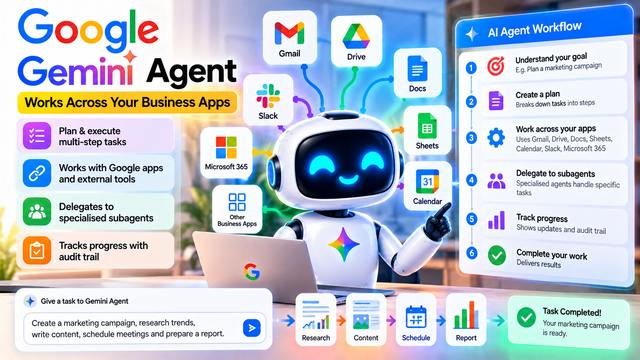
Google Gemini Agent: How AI Is Moving Beyond Chatbots to Complete Business Tasks
Introduction
Artificial intelligence is changing how people search for information, write content, analyse data, and manage their daily work. Tools such as AI chatbots can answer questions, summarise documents, and generate ideas in seconds. However, many business tasks require more than a single answer. They involve multiple steps, different applications, and coordination between several activities.
Google Cloud announced Gemini Agent on October 8, 2026, introducing an enterprise-focused approach to AI that aims to help users carry out complex work across business applications.
According to the announcement and reporting from TechCrunch, Gemini Agent is designed to plan multi-step tasks, work with connected applications, delegate specialised work to subagents, and track progress through an audit trail. The reported integrations include Google's productivity applications and external business systems.
This development reflects the broader movement toward agentic AI: AI systems designed not only to respond to instructions but also to plan and execute sequences of actions toward a goal.
An important qualification is that the announced feature is in private preview for enterprise customers. It should not be confused with a feature that is already available to every personal Gemini user.
What Is Google Gemini Agent?
Gemini Agent is an AI agent designed to assist with complex work involving multiple steps and business applications.
A conventional chatbot usually responds to a question or performs a specific task within a conversation. An AI agent can go further by breaking down a larger objective, deciding which actions are needed, using connected tools, and tracking progress toward the intended outcome.
Imagine asking an AI assistant to help organise a marketing campaign for a new product. The assignment could involve researching competitors, preparing a campaign brief, drafting promotional content, organising a calendar, and creating a performance report.
Instead of requiring the user to request each output separately, an agent-oriented system aims to coordinate the different steps as part of a larger workflow.
The distinction is important: the user describes the desired result, while the agent attempts to organise the work needed to achieve it. The user still needs to review the results, provide appropriate permissions, and approve sensitive actions where necessary.
How Does Gemini Agent Work Across Business Applications?
One of the key ideas behind the announcement is connecting AI-driven workflows with the applications that people already use at work.
1. Gmail
Email is central to many business processes. Employees receive requests, share updates, communicate with customers, and coordinate projects through their inboxes.
An agent connected to an authorised email workflow could help organise relevant information, identify action items, or prepare a draft response as part of a larger task.
For example, a marketing employee might ask an agent to review relevant campaign discussions and prepare a summary of the team's decisions. The practical result would depend on the available integrations and permissions.
2. Google Drive
Businesses store reports, presentations, spreadsheets, research documents, and project files in cloud storage.
An AI agent that can work with authorised Drive content could use relevant documents as context for a task. This could help employees collect information from several files without manually opening each one.
Access permissions remain essential. An agent should only use information that it is authorised to access for the requested task.
3. Google Docs
Documents are used to prepare reports, proposals, briefs, and internal guidelines.
Within a supported workflow, an AI agent could help turn collected research into a structured document or prepare an initial draft based on approved source material.
Human review is still important for checking factual accuracy, tone, confidential information, and business requirements before a document is shared externally.
4. Google Sheets
Spreadsheets support budgeting, campaign tracking, sales reporting, and data analysis.
A multi-step workflow might involve collecting authorised data, analysing trends, preparing a summary, and using the results in a report.
Developers and business users must still validate calculations, source data, and any consequential changes made to spreadsheets.
5. Google Calendar
Calendar tools help teams coordinate meetings, deadlines, and project schedules.
An agent working with an authorised calendar integration could help identify scheduling requirements or coordinate steps that depend on meeting availability.
Actual scheduling actions can affect other people, so permissions, confirmations, and clear approval rules are important.
6. External business applications
The reported announcement also describes connections with external systems, including Slack and Microsoft 365.
This matters because many organisations use products from several providers rather than relying on a single software ecosystem. An agent that can coordinate supported tools could reduce the need for employees to repeatedly move information between applications.
However, integration does not automatically mean that every feature of every external application is supported. Available actions depend on the product, configuration, access permissions, and deployment.
Multi-Step Planning: Turning a Goal Into a Workflow
One of the most important features of agentic AI is the ability to break down a complex objective into smaller tasks.
Consider a business that wants to launch a promotional campaign for a new product.
The workflow could look like this:
Step 1: Understand the goal. The user provides the product details, target audience, deadline, and desired outcome.
Step 2: Create a plan. The agent identifies the work needed, such as gathering research, preparing content, organising deliverables, and compiling a report.
Step 3: Gather information. Using authorised sources, the agent collects relevant material to support the campaign.
Step 4: Prepare deliverables. It helps produce drafts, summaries, spreadsheet analyses, and other requested materials.
Step 5: Coordinate work. Supported integrations can help organise related activities across applications.
Step 6: Review progress. The agent tracks the task status and identifies incomplete steps or problems that require attention.
Step 7: Deliver the results. The user reviews the completed work, checks accuracy, and approves any outstanding actions.
This workflow is an illustrative example of how a multi-step agent could be used, not a claim that every action is automatically available in the current private preview.
What Are Specialised Subagents?
The announcement also highlights delegation to specialised subagents.
A subagent is a separate AI-driven worker or component assigned a more specific task within a larger workflow. Instead of expecting one agent to handle every part of a complex assignment in the same way, a system can organise work into specialised responsibilities.
For example, a marketing workflow might assign separate tasks to components responsible for research, content preparation, and reporting.
The main agent can coordinate these tasks and bring their results together. This resembles a project manager assigning different responsibilities to team members.
The approach can help organise complicated work, but it also introduces challenges. Results from different subagents must be consistent, duplicate work should be avoided, and errors in one component must not silently affect the entire project.
Good task boundaries, validation, and clear permissions are therefore essential.
Why Progress Tracking and Audit Trails Matter
When an AI system performs multiple actions, users need to understand what it has done and what remains unfinished.
An audit trail records information about actions and their execution. Depending on implementation, it can help authorised users investigate which steps were attempted, what happened, and where a workflow encountered a problem.
Progress tracking is particularly important for business tasks involving several applications. Without visibility, an employee might struggle to determine whether a document was created, a meeting was scheduled, or a report remains incomplete.
Auditability can also support troubleshooting and accountability. Organisations should nevertheless examine exactly what information is recorded, how long records are retained, who can access them, and whether the logs are sufficient for their compliance requirements.
An audit trail is useful, but it does not guarantee that every action is correct or that the system cannot make mistakes.
How Is an AI Agent Different From a Traditional Chatbot?
The difference becomes clearer when the same request is given to two systems.
A traditional chatbot might respond to the request, "Help me plan a product launch," by generating a checklist and suggesting marketing ideas.
An agentic system aims to go beyond that response. Within its authorised capabilities, it may plan a sequence of tasks, work with connected applications, prepare deliverables, track progress, and coordinate specialised components.
The chatbot primarily provides an answer. The agent attempts to make progress toward the larger objective.
However, these categories are not absolute. Modern chatbots can use tools, and some agents still require user approval for important actions. The key distinction is the degree of planning, execution, tool use, and coordination supported by the system.
What Could Gemini Agent Mean for Indian Businesses?
Indian startups and established companies manage large amounts of information across email, documents, spreadsheets, project management tools, and collaboration platforms.
An agent that can coordinate authorised work across these systems could potentially reduce repetitive administrative tasks and help employees spend more time on planning, customer relationships, and decision-making.
For example, a startup could explore agent-assisted preparation of campaign materials, weekly reporting, or project updates. A sales team could investigate workflows that combine authorised customer information with reporting and follow-up preparation.
Businesses should start with clearly defined, low-risk tasks and measure the actual time saved, accuracy, cost, and reliability. They should also establish rules for sensitive information, external communications, financial actions, and human approval.
The benefits will depend on the organisation's existing systems, available integrations, subscription arrangements, and deployment requirements.
Opportunities for Students and AI Creators
For students studying computer science, AI, or software development, agentic AI offers several useful learning areas.
These include task planning, APIs, tool calling, workflow orchestration, permissions, error handling, evaluation, and audit logging. Understanding these components helps explain how an AI system moves from generating text to carrying out structured work.
Creators can also make educational demonstrations using a hypothetical marketing campaign. A short video could compare a chatbot that provides a checklist with an agent workflow that plans research, prepares content, organises tasks, and generates a report.
Such demonstrations should be labelled as examples unless they use verified product footage.
For people building AI-powered products, the larger opportunity is to understand how different tools can be connected safely and how to verify that an automated workflow achieves its intended outcome.
Availability and Important Limitations
According to the supplied reports, Gemini Agent was introduced in private preview for enterprise customers. This means access is limited rather than generally available to everyone using Gemini.
Interested businesses should consult Google's official announcement and product documentation for eligibility, supported integrations, regional availability, and deployment requirements.
There are also practical limitations to consider. Agents may misunderstand instructions, encounter unavailable tools, produce inaccurate content, or fail when a task depends on missing information. Connected applications introduce additional security and privacy considerations.
Organisations should implement least-privilege access, test workflows before deployment, validate outputs, monitor execution, and require human approval for high-impact actions.
The ability to plan and execute a task should not be confused with a guarantee of perfect autonomous performance.
Conclusion
Google Gemini Agent illustrates the growing shift from conversational AI toward systems designed to carry out multi-step business workflows.
By combining planning, connected applications, specialised subagents, progress tracking, and audit trails, the announced capability aims to help enterprise users coordinate work across their software tools.
For Indian businesses, the potential value lies in reducing repetitive work while maintaining control over important decisions. For students and developers, it offers a useful example of the engineering principles behind agentic AI. For creators, it provides an accessible way to explain the difference between an AI that answers a question and an AI system designed to help complete a task.
The most important measure of success will be practical performance: whether these agents save time, produce dependable results, protect sensitive information, and make their actions understandable to the people who use them.
Sources: Google Cloud's Gemini at Work announcement and TechCrunch's October 8, 2026 report on Gemini Agent.