AI Agents Are Changing How We Design cinematical User Interfaces
AI agents need interfaces for live progress, tool calls, approvals and human control.
By @admin
Source: https://bengalurutechweek.com/2026/events?utm_source=chatgpt.com
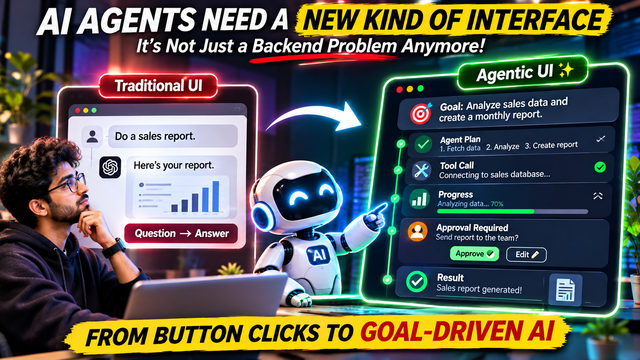
AI Agents Are Changing How We Design User Interfaces: The Rise of Agentic UI
For decades, software interfaces have followed a relatively simple pattern.
A user opens an application, clicks a button, enters some information and receives a result.
Click a button to upload a file. Select an option to make a payment. Submit a form to create an account.
The interface tells the software what to do, and the software performs the requested action.
But artificial intelligence is changing this relationship.
Modern AI agents are increasingly capable of understanding goals, creating plans, using external tools, interacting with applications and completing multiple steps without requiring a human to guide every individual action.
This creates a new challenge for software developers.
If an AI agent can perform ten actions in the background, how does the user know what it is doing?
What happens when it makes a mistake? How does a user approve an important action? Can someone stop the agent halfway through a task? And how can users understand whether the work has actually been completed?
These questions are becoming increasingly important as developers build more autonomous AI applications.
On September 6, 2026, a Bengaluru developer community event organised by ReactPlay Bengaluru focused specifically on this emerging area.
The event was called AgentUI: The Frontend Layer for the Agentic Era.
It brought attention to agent-powered interfaces, real-time AI state, tool-calling experiences and human-in-the-loop design.
The event reflects a broader change happening across software development: developers are beginning to rethink what an interface should look like when AI is no longer simply answering questions but actually performing work.
This emerging approach is commonly called Agentic UI.
Let's understand why it matters.
1. The problem with traditional chatbot interfaces
Most people are familiar with chatbot interfaces.
You type a question, the AI processes it and generates a response.
For example, you might ask:
"Find the best laptops under ₹70,000."
The chatbot gives you a list of recommendations.
You then decide what to do next.
This interaction is relatively simple because the AI is primarily providing information.
But imagine a more advanced request:
"Find a laptop under ₹70,000, compare five options, check their specifications, find the best offer and prepare a purchase recommendation."
This task involves multiple operations.
The AI needs to understand the request, search for products, compare specifications, examine prices and organise its findings.
If it has access to the necessary tools, it might complete most of this workflow without requiring the user to issue a separate instruction for every step.
Now imagine the interface only displays a small chatbot window.
The user sends the request and sees a loading animation.
They have no idea whether the AI is searching, comparing products, accessing external services or experiencing an error.
This is where traditional chatbot interfaces become insufficient.
An AI agent needs more than a place to display its final response.
It needs an interface that communicates its progress, actions, decisions and requirements.
2. What exactly is Agentic UI?
Agentic UI refers to interface experiences designed around AI agents that can perform multi-step tasks.
Instead of treating AI as a system that only generates text, the interface treats it as an active participant in a workflow.
The user provides a goal.
The agent creates a plan, performs actions using available tools, updates its progress and returns a result.
The interface allows the user to understand and control this process.
Consider a simple comparison.
Traditional UI:
Button → Action → Result.
Agentic UI:
User goal → Agent plan → Tool calls → Progress updates → Approval → Result.
This changes the responsibilities of the frontend.
A traditional interface primarily displays information and provides controls.
An agentic interface must also communicate what the AI is doing, what it intends to do next, what information it needs and whether human approval is required.
It becomes a control centre for human-AI collaboration.
Importantly, Agentic UI is an emerging design approach, not one single programming framework or official universal standard.
3. The six important elements of an agentic interface
A useful agentic interface needs several important components.
Let's examine them.
A. Goal and planning interface
The first step is understanding what the user wants.
Instead of forcing users to manually navigate multiple pages, the application allows them to describe an outcome.
For example:
"Analyse my company's sales data and prepare a monthly performance report."
The agent should translate this request into a structured plan.
The interface might display:
1. Connect to sales database.
2. Retrieve monthly sales records.
3. Compare revenue with the previous month.
4. Identify top-performing products.
5. Generate charts.
6. Prepare a report.
This makes the agent's intended workflow visible before it starts executing.
The user can also correct the plan if something is missing.
B. Tool-call visibility
AI agents become useful when they can interact with external tools.
These tools could include databases, APIs, browsers, spreadsheets, email systems and other applications.
But users should not have to guess what the agent is accessing.
For example, a tool-call interface could display:
- Searching company database.
- Reading financial records.
- Running Python calculations.
- Creating an Excel spreadsheet.
- Generating a PDF report.
The application does not necessarily need to expose every technical detail.
It should communicate the meaningful actions in a way that users can understand.
This improves transparency and makes it easier to identify unexpected behaviour.
C. Real-time progress tracking
An agent might take several minutes to complete a complicated task.
During that time, users need to understand whether the system is working.
A good interface could display:
<escape>✓</escape> Research completed.
<escape>✓</escape> Data retrieved.
<escape>⏳</escape> Financial analysis running.
<escape>○</escape> Report generation pending.
This is more useful than displaying a generic loading animation.
It also helps users understand where a task is taking longer than expected.
D. Human approval
Not every action should happen automatically.
Imagine an AI agent preparing an email to a client.
Writing the email may be safe to automate, but sending it could require approval.
Similarly, an agent might prepare a payment, modify a database or delete a file.
These actions can have real consequences.
The interface should provide an approval step before executing sensitive operations.
For example:
AI wants to send an email.
Recipient: Client account.
Subject: Monthly financial report.
<escape>[</escape>Review email<escape>]</escape>
<escape>[</escape>Approve and send<escape>]</escape>
This is known as human-in-the-loop interaction.
The AI performs the preparation, while the human retains control over important decisions.
E. Error handling and recovery
AI agents can make mistakes.
A website might be unavailable. An API might return an error. A database query might fail.
A useful interface should explain what happened and provide a recovery option.
For example:
"Unable to retrieve the latest sales data because the database connection failed."
The interface could offer:
- Retry the connection.
- Change the data source.
- Continue using previously retrieved data.
- Cancel the task.
Users should also be able to stop an agent while it is working.
A system that can perform actions but cannot explain or recover from failures is difficult to trust.
F. Final result and activity history
Once the agent finishes, users need a clear summary.
The interface should communicate:
- What the agent completed.
- What information it used.
- What files or records it changed.
- Which actions required approval.
- Which tasks failed or remain incomplete.
An activity history is particularly important when agents interact with business systems.
It provides a record that users can examine if something goes wrong.
4. What happened at the Bengaluru AgentUI event?
The September 6 event organised by ReactPlay Bengaluru was part of Bengaluru Tech Week 2026.
Its focus was the frontend layer of agentic applications.
The event included discussions and sessions around several important topics.
One session explored how design systems can help agents build better user interfaces.
Another examined common UI patterns that AI agent applications are beginning to reinvent.
A further session discussed the state of agentic UI, including A2UI, AG-UI and MCP Apps.
These technologies and approaches address different parts of the problem.
The broader discussion was about how frontend developers should approach applications where AI agents interact with tools and perform tasks.
The event also included a panel discussing an important question:
AI has made building applications easier, but why is shipping reliable products still difficult?
This is a meaningful question for the developer community.
Creating an AI agent demonstration is relatively easy compared with building a reliable production application.
A real product needs permissions, error handling, monitoring, secure tool access and an interface that users can understand.
That is why the frontend is becoming an important part of agent development rather than simply the final layer added after the backend is complete.
5. Technologies shaping the agentic UI ecosystem
Several technologies are contributing to this emerging ecosystem.
AG-UI
AG-UI is an open protocol designed to connect AI agents with frontend applications.
It provides a structured way for applications to communicate agent events and state.
For example, the frontend can receive information about an agent's progress, messages and tool activity.
This helps developers build more interactive experiences than a basic request-and-response chatbot.
A2UI
A2UI is an approach to generating user interfaces through structured descriptions that applications can render.
Instead of only returning plain text, an AI system can describe interactive components such as forms, cards and other interface elements.
The application can then display those components using its own rendering system.
MCP Apps
MCP Apps extend Model Context Protocol integrations with interactive user interfaces.
Instead of a tool returning only text, an application can provide a richer interface for a user to interact with.
For example, a connected tool could display an interactive data view rather than simply returning a long text response.
These technologies are related to the wider movement towards AI-native applications, but they are not interchangeable. Each addresses a different part of the interaction between agents, tools and interfaces.
6. How developers can build an agentic UI
For developers, the interesting part is that building an agentic interface does not necessarily require creating an entirely new frontend framework.
Existing web technologies can be used.
For example, a React application could provide the frontend, while a backend manages agent execution and tool access.
A simplified architecture could look like this:
Frontend:
- React or Next.js.
- Agent progress components.
- Tool-call activity cards.
- Approval dialogs.
- Task history.
Backend:
- Python or Node.js.
- Agent orchestration.
- API integrations.
- Authentication and permissions.
- Database and task state.
Agent layer:
- OpenAI Agents SDK.
- LangGraph.
- Other agent orchestration frameworks.
Communication:
- Server-Sent Events or WebSockets.
- Structured agent events.
- Persistent task state.
The backend should control the actual execution of tools and enforce permissions.
The frontend should receive only the information it needs to display the agent's progress and request user input.
This separation is important for security.
An application should never expose private model API keys or unrestricted backend credentials to the browser.
A practical example
Imagine building an AI research assistant.
A user enters:
"Research five competitors and prepare a comparison report."
The application could display the following workflow:
Step 1 — Understanding the request
The agent identifies the five competitors and the information required.
Step 2 — Research
The agent searches approved sources and retrieves relevant information.
Step 3 — Analysis
It compares pricing, features and market positioning.
Step 4 — Human review
The interface asks the user to confirm the selected competitors and important assumptions.
Step 5 — Report generation
The agent creates a comparison document.
Step 6 — Completion
The interface displays the report, research sources and activity history.
This is a practical example of an AI-native interface.
The user does not need to understand every backend operation. They need enough visibility to trust and control the workflow.
7. Why this creates a new opportunity for Indian developers and startups
India has a large developer ecosystem, and many startups are experimenting with AI-powered products.
A lot of these products currently use a familiar design:
A dashboard, a chatbot window and a few buttons.
But as AI agents become capable of performing more complicated tasks, this design may not be sufficient.
Developers could build specialised interfaces for:
- AI-powered CRM systems.
- Automated marketing platforms.
- Financial research assistants.
- AI coding environments.
- Business workflow automation.
- Customer support agents.
- AI-powered analytics dashboards.
Consider an AI-powered CRM.
A traditional CRM requires employees to navigate pages, update records and manually perform repetitive operations.
An agentic CRM could allow an employee to request:
"Find all leads who have not responded in seven days, prepare follow-up messages and show me the list."
The AI could identify the leads, draft messages and present them for approval.
The interface would show the selected contacts, message previews and approval controls.
The employee remains in control, but the repetitive work becomes easier.
This is where the combination of frontend engineering, backend development and AI agent architecture could become valuable.
8. The biggest challenge: trust and control
There is one problem developers cannot ignore.
The more actions an AI agent can perform, the more important it becomes to control what it is allowed to do.
An agent with access to a database, email account and payment system could potentially cause serious problems if it makes an incorrect decision.
A good interface alone cannot solve this.
Applications also need backend permission checks, audit logs, secure authentication and carefully defined tool access.
Developers should distinguish between actions that can happen automatically and actions that require human approval.
For example:
- Reading approved documents may be allowed automatically.
- Preparing a draft email may be allowed automatically.
- Sending an external email may require approval.
- Deleting important records should require stronger safeguards.
Users should also have clear ways to pause, cancel, correct and undo actions where possible.
The goal is not to expose every internal technical detail.
The goal is to give users meaningful control without forcing them to supervise every small operation.
Conclusion: The next interface may not look like a traditional application
For years, developers focused on building interfaces around pages, buttons, forms and dashboards.
With AI agents, the design challenge is changing.
Users are increasingly asking software to complete goals rather than simply perform individual actions.
That means applications need to show what an agent plans to do, what it is currently doing, which tools it is using, where it needs approval and what it has completed.
The Bengaluru AgentUI event is one example of developers beginning to explore this new design space.
Technologies such as AG-UI, A2UI and MCP Apps are also contributing to the wider ecosystem.
The important takeaway is that building an AI agent is only part of building a successful AI product.
Developers must also create an interface that makes the agent understandable, controllable and reliable.
Traditional software waits for users to click buttons. Agentic software works towards users' goals. The interface must evolve to connect the two.
And that could become one of the most interesting frontend engineering challenges of the AI era.
---
Sources and further reading
1. ReactPlay Bengaluru — AgentUI event, September 6, 2026: https://luma.com/gyva03z6
2. Bengaluru Tech Week — Official 2026 events: https://bengalurutechweek.com/2026/events
3. Agent Surface — Agentic UI documentation: https://agentsurface.dev/docs/agentic-ui
4. Google Cloud — Agentic AI design patterns and human-in-the-loop architecture: https://docs.cloud.google.com/architecture/choose-design-pattern-agentic-ai-system
5. Nielsen Norman Group — AI Agents as Users: https://www.nngroup.com/articles/ai-agents-as-users/